Generation 9 HOME LAB Bill of Materials
Last Updated 07/22/2026
Below are my current BOMs, along with an Archive section containing my previous physical home lab builds.
My current Gen 9 BOMs are based on Windows 11, with VMware Workstation 25H2-26H1 for BOM1 and Nested ESX for BOM2. Both support VCF 9.x, but only BOM2 will support VCF 9.1. The primary purpose of these BOMs is to give the reader a few options.
It should be noted that BOM1 only supports VCF 9.0.
BOM2 is currently under development. Plans are to deploy it with nested VCF 9.1.
Have questions? Check out the FAQs about the Gen 9 BOM.
Gen 9 – VMware Workstation BOMs
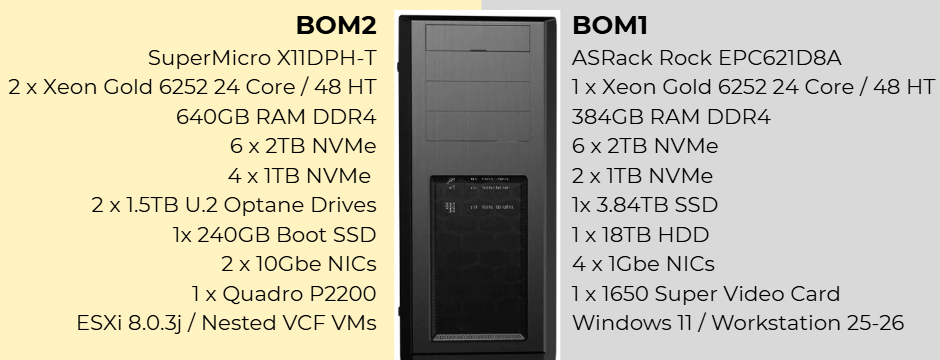
Gen 9 BOM2 Nested ESX – (Not Final Under Development)
- OS: Nested ESXi 8.0.3j
- VMware: VCF 9.1
- Mobo: SuperMicro X11DPH-T << Currently reviewing this Mobo posts coming soon.
- CPU: 2 x Xeon Gold 6252
- Cooler: 2 x Noctua NH-D9 DX-3647 4U
- RAM: 640GB
- Disk:
- 240GB SATA Boot Disk
- Optane Disks:
- Disk Cables: 2 x Mini SAS to 4 SATA Cable, 36 Pin SFF 8087
- Quad M.2 NVME Card: NVME SSD to PCIe 4.0/3.0 x16 Expansion Card
- NVMe: 4 x 1TB NVMe
Gen 9 BOM1 Workstation – (Not currently in use, runs VCF Simple install, this does not include VCF Automation)
- OS: Windows 11 Pro for Workstation
- VMware: VMware Workstation 25
- Mobo: ASRack Rock EPC621D8A
- CPU: Xeon Gold ES 6252 (ES means Engineering Samples)
- Cooler: Noctua NH-D9 DX-3647 4U
- RAM: 384GB
- NVMe: 2 x 1TB NVMe (Win 11 Boot Disk and Workstation VMs)
- SSD: 1 x 3.84TB Intel D3-4510 (Workstations VMs)
- HDD: 1 x Seagate IronWolf Pro 18TB (VM Backups)
- 10Gbe NIC: ASUS XG-C100C 10G Network Adapter
Common items to both BOMs:
- Case: Phanteks Enthoo Pro series PH-ES614PC_BK Black Steel
- Power Supply: MAG A1000GL
- DISK:
- NVMe Adapter: 3 x Supermicro PCI-E Add-On Card for up to two NVMe SSDs
- NVMe: 6 x Sabrent 2TB ROCKET NVMe PCIe (Workstation VMs)
- SATA Cable: SATA 6G Data Cable
- BluRay Drive: LG Blu-ray Disc Rewriter
- UPS: APC Back-UPS PRO BN1500M2
Other Devices
Storage (NAS, Backups, and File Shares):
- Asustor Lockerstor 10
- 2 x 10GBe Onboard
- 2 x 2.5Gbe Onboard
- SATA Drives: 5 x 3TB, 4 x 8TB, & 1 x 10TB
- 2 x Crucial P1 1TB 3D NAND NVMe PCIe Internal SSD
- Asustor Drivestor 2 Pro AS3302T
- 1 x 2.5Gbs OnBoard
- 2 x Intel D3-S4510 3.84TB
- Asustor Flashstor 6 FS6706T
- 2 x 2.5Gbs OnBoard
- 2 x SABRENT 512GB Rocket NVMe
Network (Currently Unused):
- Core VM Switches:
- 2 x Cisco 3560 (WS-C3560CG-8TC-S 8 Gigabit Ports, 2 Uplink)
- 2 x Cisco 2960 (WS-C2960G-8TC-L)
- 10Gb Network: (DAC Cables and SFP+ can be included)
- 2 x MikoTik 10Gb CN309
- 2 x DAC 1M used for 10Gbe Uplink between MikroTik Switches
- Several FLYPROFiber 10GBase-T SFP+ to RJ45 used on the MikoTik Switches
- 2 per host: HP 684517-001 Twinax SFP 10Gb 0.5m DAC Cable (Ebay)
Battery Backup UPS:
- 1 x APC NS1250
- 2 x APC Back-UPS PRO BN1500M2
ARCHIVE: Gen 8 Workstation Posts
VMware Workstation Generation 8 : Nested vSphere 8 Home Lab (2023-2025 Archived)
- VMware Workstation Gen 8: Environment Revitalization
- VMware Workstation 17 Nested Home Lab Part 9: Performance Testing
- VMware Workstation 17 Nested Home Lab Part 8b: More on Networking
- VMware Workstation 17 Nested Home Lab Part 8: Setting up vSAN ESA
- VMware Workstation 17 Nested Home Lab Part 7: Setting up vSphere Environment
- VMware Workstation 17 Nested Home Lab Part 6: Installation of ESXi 8 Hosts
- VMware Workstation 17 Nested Home Lab Part5: Install VCSA
- VMware Workstation 17 Nested Home Lab Part 4A/B: Install Windows 2022
- VMware Workstation 17 Nested Home Lab Part 3: Workstation Networking
- VMware Workstation 17 Nested Home Lab Part 2: Window 11/Workstation 17 Install
- VMware Workstation 17 Nested Home Lab Part 1: Goals, Requirements, and planning
- VMware Workstation 17 Nested vSAN ESA Overview
ARCHIVE: Previous Home Lab Information
Home Lab Gen 8: (01/2023 – 12/2024)
- Home Lab Generation 8 Parts List (Part 2)
- First Look GEN8 ESXi/vSAN ESA 8 Home Lab (Part 1)
- Troubleshooting Items:
Home Lab Gen 7: (09/2020-02/2023)
- Home Lab Generation 7: Archive Page
- Home Lab Generation 7: Updating from Gen 5 to Gen 7
- Home Lab Generation 7: Upgrading vSAN 7 Hybrid capacity step by step
- Home Lab Generation 7: Part 1 – Change Rational for software and hardware changes
- Home Lab Generation 7: Updating the Dell HBA330 firmware with No Dell Server
- Home Lab Generation 7: Part 2 – New Hardware and Software Updates
- Home Lab Generation 7: Upgrading and Replacing a vSAN 7 Cache Disk
- Home Lab Generation 7: Migration to ALL Flash vSAN
Home Lab Gen 5: (01/2020 – 09/2020)
- Home Lab GEN V: VIDEO The Quest for More Cores! – First Look
- Home Lab GEN V: BLOG The Quest for More Cores! Design Considerations
- Home Lab GEN V Build: Part 1 – VIDEO Build Components Overview
- Home Lab GEN V Build: Part 2 – VIDEO Case Selection
- Home Lab Gen V Build: Part 3 – VIDEO Motherboard Overview
- Home Lab Gen V Build: Part 4 – VIDEO First Install Steps
- Home Lab Gen V Build: Part 5 – VIDEO Motherboard Install
- Home Lab Gen V Build: Part 6 – VIDEO Final Steps
- Home Lab Gen V Build: Part 7 – VIDEO: Wrap up, Outcomes, and Design Changes
Home Lab Gen 4: (10/2016 – 2019)
- Home Lab Gen IV – Part I: To InfiniBand and beyond!
- Home Lab Gen IV – Part II: Design Considerations
- Home Lab Gen IV – Part III: Best ESXi White box Mobo yet?
- Home Lab Gen IV – Part IV: Overcoming installation challenges
- Home Lab Gen IV – Part V Installing Mellanox HCAs with ESXi 6.5
- Gigabyte Firmware / BIOS update for MergePoint Embedded Management Software and Motherboard

