vmware
10Gbe NAS Home Lab Part 3: asustor DRIVESTOR 2 PRO and LOCKERSTOR10 Unboxing
In part 3 of this series asustor joins the 10Gbe NAS Home Lab build! In this video I take a first look and unbox the asustor DRIVESTOR 2 PRO and LOCKERSTOR10. I also go over some of their features.
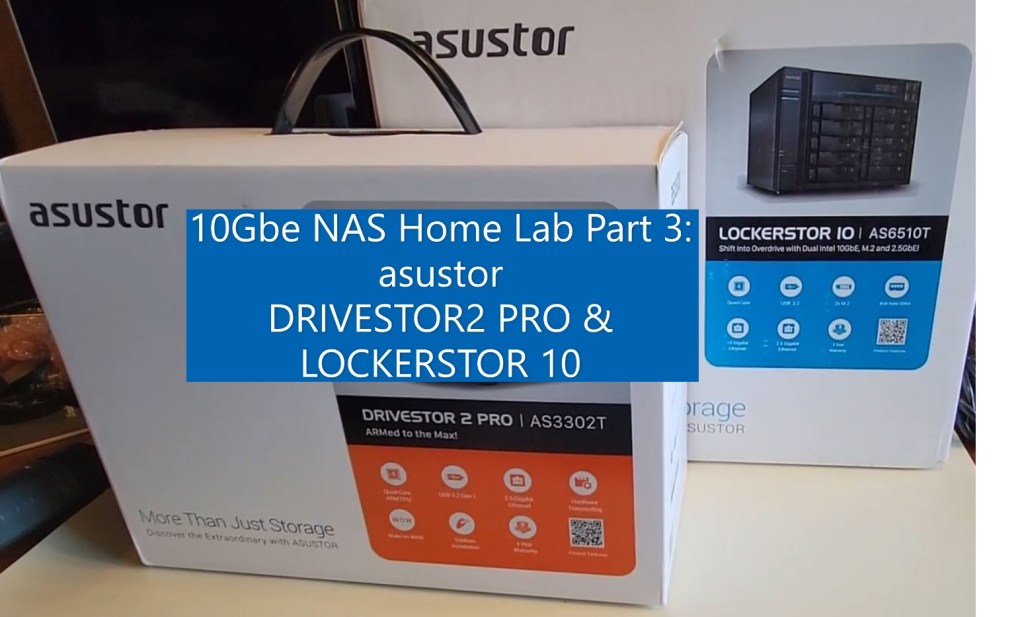
** Products Seen in this Video **
DRIVESTOR 2 PRO
asustor – https://www.asustor.com/en/product?p_id=72
Amazon – https://www.amazon.com/Asustor-Drivestor-Pro-AS3302T-Attached/dp/B08ZD7R72P
LOCKERSTOR10
asustor – https://www.asustor.com/product?p_id=64
Amazon – https://www.amazon.com/Asustor-Lockerstor-Enterprise-Attached-Quad-Core/dp/B07Y2BJWLT/
10Gbe NAS Home Lab Part 2: Dissecting the Synology DiskStation DS1621+
In part 2 of this series I dissect the Synology DiskStation DS1621+. This is a pretty long video – best to watch it at 2x speed :) Note: This was a loaner unit and I do not recommend others doing this as it may void the warranty. I made this video to simply show others what the insides look like. Reach out if you have questions.
** PART Seen in this Video **
1x Synology 6 bay NAS DiskStation DS1621+ https://www.amazon.com/Synology-Bay-DiskStation-DS1621-Diskless/dp/B08HYQJJ62
2x Synology M.2 2280 NVMe SSD SNV3400 800GB https://www.amazon.com/Synology-2280-NVMe-SNV3400-800GB/dp/B08WLJYY76/
10Gbe NAS Home Lab Part 1: Parts Overview and Synology DS1621+
In this new video series I’ll be testing serval NAS products with in my NAS test lab.
My plan is to setup a new 10GBe network with 2 x Windows 10 PCs w/10gbe NICs, Laptops, Cell Phones, VMware ESXi and various other devices to see how they perform with the different NAS devices. Additionally, I’ll be going over the NAS devices and their software options too. A big part of my Home Network is the use of PLEX. Seeing how these devices handle PLEX and their other built in apps should make for some interesting content.
It all starts with this blog and in this initial video I go over some of the parts I’ve assembled for my NAS development lab. As the series progresses I plan to enhance the lab and how the devices interact with it.
** Advisement **
- 07/30/21: I am just starting to work with these components and set them up. Everything tells me they should work together. However, I have not tested them together.
- Any products that I blog/vblog about may or may not work – YOU ultimately assume all risk
** PARTS Seen in this Video **
- 1x Synology 6 bay NAS DiskStation DS1621+ https://www.amazon.com/Synology-Bay-DiskStation-DS1621-Diskless/dp/B08HYQJJ62
- 2x Synology M.2 2280 NVMe SSD SNV3400 800GB https://www.amazon.com/Synology-2280-NVMe-SNV3400-800GB/dp/B08WLJYY76/
- 1x Synology 10Gb Ethernet Adapter 2 SFP+ Ports (E10G21-F2), Black https://www.amazon.com/Synology-Ethernet-Adapter-Ports-E10G21-F2/dp/B08WLJQYL2
- 10x Cable Matters 5-Pack Snagless Short Cat6A (SSTP, SFTP) Shielded Ethernet Cable in Black 7 ft https://www.amazon.com/gp/product/B00HEM5FEI
- 2x ASUS XG-C100C 10G Network Adapter Pci-E X4 Card with Single RJ-45 Port https://www.amazon.com/gp/product/B072N84DG6/
- 1x MikroTik 9-Port Desktop Switch, 1 Gigabit Ethernet Port, 8 SFP+ 10Gbps Ports (CRS309-1G-8S+IN) https://www.amazon.com/gp/product/B07NFXN4SS/
- 8x FLYPROFiber 10GBase-T SFP+ to RJ45 for MikroTik https://www.amazon.com/gp/product/B08FXBFZP8/
- 10x HP 684517-001 TWINAX SFP+ 10GBE 0.5M DAC Cable Assy 611980001 4N6H4-01 https://www.ebay.com/itm/264745339079?ssPageName=STRK%3AMEBIDX%3AIT&_trksid=p2060353.m2749.l2649
Quick overview of the Rosewill RSV-SATA-Cage-34 Part II
A few of you reached out and asked that I create a video that shows the SATA cage installed. The point of this video is to show what a Rosewell SATA cage looks like when installed Antec Sonata III 500, its over all noise levels, and its activity lights.
Quick overview of the Rosewill RSV-SATA-Cage-34
In this vblog I go over the Rosewill RSV-SATA-Cage-34 and some of its features. I plan to use it in a host where I have a RAID group for file storage.
How to disable the Windows 10 Weather App
During a recent windows update I noticed weather information appear in the lower right hand corner. It showed it was 78f and Sunny! Clicking on it displayed a bunch of news stories and they all seem to link to MSN sites. Not exactly what I need in a office based OS. In this very short and straight to the point blog I’ll show how to hide this information from displaying.

To disable this function, simply right click on the taskbar > News and Interests > choose Turn off.

Once you select ‘Turn off’ the next time you look at the ‘News and interests’ you’ll notice the optional items have gone to gray.

There might be a home user base out there that would love this ‘New and Interests’, but its just not for me.
If you like my ‘no-nonsense’ videos and blogs that get straight to the point… then post a comment or let me know… Else, I’ll start posting really boring content!
GA Release #VMware vESXi 7.0 Update 2 | ISO Build 17630552 | Announcement, information, and links
VMware announced the GA Release of the following:
- VMware ESXi 7.0 Update 2
See the base table for all the technical enablement links.
| Product Overview | |
| ESXi 7.0 Update 2 | ISO Build 17630552 | |
| What’s New | |
|
|
| Upgrade Considerations | |
Product Support Notices
Impact on ESXi upgrade due to expired ESXi VIB Certificate (76555)
Refer to the Interoperability Matrix for more product support notices. |
|
| Technical Enablement | |
| Release Notes | Click Here | What’s New | Patches Contained in this Release | Product Support Notices | Resolved Issues | Known Issues |
| docs.vmware.com/vSphere | Installation and Setup | Upgrade | vSphere Virtual Machine Administration | vSphere Host Profiles | vSphere Networking
vSphere Storage | vSphere Security | vSphere Resource Management | vSphere Availability | Monitoring & Performance |
| More Documentation | vSphere Security Configuration Guide 7 |
| Compatibility Information | Configuration Maximums | Interoperability Matrix | Upgrade Paths | ports.vmware.com/vSphere7 |
| Download | Click Here |
| Blogs | Multiple Machine Learning Workloads Using GPUs: New Features in vSphere 7 Update 2 |
| Videos | Quicker ESXi Host Upgrades with Suspend to Memory (4 min video)
Introduction to vSphere Native Key Provider video (9 min video) |
| HOLs | HOL-2111-03-SDC – VMware vSphere – Security Getting Started
Explore the new security features of vSphere, including the Trusted Platform Module (TPM) 2.0 for ESXi, the Virtual TPM 2.0 for virtual machines (VM), and support for Microsoft Virtualization Based Security (VBS) HOL-2111-05-SDC – VMware vSphere Automation and Development – API and SDK The vSphere Automation API and SDK are developer-friendly and have simplified interfaces. |

GA Release #VMware vCenter Server 7.0 Update 2 | ISO Build 17694817 | Announcement, information, and links
VMware announced the GA Release of the following:
- VMware vCenter Server 7.0 Update 2
See the base table for all the technical enablement links.
| Product Overview | |
| vCenter Server 7.0 Update 2 | ISO Build 17694817 | |
| What’s New | |
| New in vSphere 7 Update 2 is that vMotion is able to fully benefit from high-speed bandwidth NICs for even faster live-migrations. Manual tuning is no longer required as it was in previous vSphere versions, to achieve the same.
The evolution of vMotion
|
|
| Upgrade Considerations | |
Product Support Notices
Refer to our Interoperability Matrix for more product support notices. |
|
| Technical Enablement | |
| Release Notes | Click Here | What’s New | Patches Contained in this Release | Product Support Notices | Resolved Issues | Known Issues |
| docs.vmware.com/vSphere | vCenter Server Installation and Setup | vCenter Server Upgrade | vSphere Authentication | Managing Host and Cluster Lifecycle
vCenter Server Configuration | vCenter Server and Host Management |
| More Documentation | vSphere with Tanzu | vSphere Bitfusion |
| Compatibility Information | Configuration Maximums | Interoperability Matrix | Upgrade Paths | ports.vmware.com/vSphere7 |
| Download | Click Here |
| Blogs | Announcing: vSphere 7 Update 2 Release
Faster vMotion Makes Balancing Workloads Invisible vSphere With Tanzu – NSX Advanced Load Balancer Essentials The AI-Ready Enterprise Platform: Unleashing AI for Every Enterprise |
| Videos | What’s New (35 mins)
Learn About the vMotion Improvements in vSphere 7 (8 min video) |
| HOLs | HOL-2104-01-SDC – Introduction to vSphere Performance
This lab showcases what is new in vSphere 7.0 with regards to performance. HOL-2113-01-SDC – vSphere with Tanzu vSphere 7 with Tanzu is the new generation of vSphere for modern applications and it is available standalone on vSphere or as part of VMware Cloud Foundation HOL-2147-01-ISM Accelerate Machine Learning in vSphere Using GPUs In this lab, you will learn how you can accelerate Machine Learning Workloads on vSphere using GPUs. VMware vSphere combines GPU power with the management benefits of vSphere |


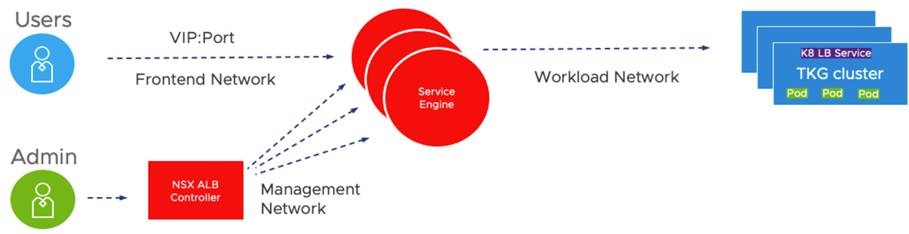
GA Release #VMware #NSX-T Data Center 3.1.1Build 17483185 | Announcement, information, and links
VMware Announced the GA Releases of VMware NSX-T Data Center 3.1.1
See the base table for all the technical enablement links.
| Product Overview | |
| VMware NSX-T Data Center 3.1.1 | Build 17483185 | |
| What’s New | |
NSX-T Data Center 3.1.1 provides a variety of new features to offer new functionalities for virtualized networking and security for private, public, and multi-clouds. Highlights include new features and enhancements in the following focus areas.
L3 NetworkingOSPFv2 Support on Tier-0 Gateways NSX-T Data Center now supports OSPF version 2 as a dynamic routing protocol between Tier-0 gateways and physical routers. OSPF can be enabled only on external interfaces and can all be in the same OSPF area (standard area or NSSA), even across multiple Edge Nodes. This simplifies migration from the existing NSX for vSphere deployment already using OSPF to NSX-T Data Center. NSX Data Center for vSphere to NSX-T Data Center MigrationSupport of Universal Objects Migration for a Single Site You can migrate your NSX Data Center for vSphere environment deployed with a single NSX Manager in Primary mode (not secondary). As this is a single NSX deployment, the objects (local and universal) are migrated to local objects on a local NSX-T. This feature does not support cross-vCenter environments with Primary and Secondary NSX Managers. Migration of NSX-V Environment with vRealize Automation – Phase 2 The Migration Coordinator interacts with vRealize Automation (vRA) to migrate environments where vRealize Automation provides automation capabilities. This release adds additional topologies and use cases to those already supported in NSX-T 3.1.0. Modular Migration for Hosts and Distributed Firewall The NSX-T Migration Coordinator adds a new mode to migrate only the distributed firewall configuration and the hosts, leaving the logical topology(L3 topology, services) for you to complete. You can benefit from the in-place migration offered by the Migration Coordinator (hosts moved from NSX-V to NSX-T while going through maintenance mode, firewall states and memberships maintained, layer 2 extended between NSX for vSphere and NSX-T during migration) that lets you (or a third party automation) deploy the Tier-0/Tier-1 gateways and relative services, hence giving greater flexibility in terms of topologies. This feature is available from UI and API. Modular Migration for Distributed Firewall available from UI The NSX-T user interface now exposes the Modular Migration of firewall rules. This feature was introduced in 3.1.0 (API only) and allows the migration of firewall configurations, memberships and state from an NSX Data Center for vSphere environment to an NSX-T Data Center environment. This feature simplifies lift-and-shift migration where you vMotion VMs between an environment with hosts with NSX for vSphere and another environment with hosts with NSX-T by migrating firewall rules and keeping states and memberships (hence maintaining security between VMs in the old environment and the new one). Fully Validated Scenario for Lift and Shift Leveraging vMotion, Distributed Firewall Migration and L2 Extension with Bridging This feature supports the complete scenario for migration between two parallel environments (lift and shift) leveraging NSX-T bridge to extend L2 between NSX for vSphere and NSX-T, the Modular Distributed Firewall. Identity FirewallNSX Policy API support for Identity Firewall configuration – Setup of Active Directory, for use in Identity Firewall rules, can now be configured through NSX Policy API (https://<nsx-mgr>/policy/api/v1/infra/firewall-identity-stores), equivalent to existing NSX Manager API (https://<nsx-mgr>/api/v1/directory/domains). Advanced Load Balancer Integration Support Policy API for Avi Configuration The NSX Policy API can be used to manage the NSX Advanced Load Balancer configurations of virtual services and their dependent objects. The unique object types are exposed via the https://<nsx-mgr>/policy/api/v1/infra/alb-<objecttype> endpoints. Service Insertion Phase 2 This feature supports the Transparent LB in NSX-T advanced load balancer (Avi). Avi sends the load balanced traffic to the servers with the client’s IP as the source IP. This feature leverages service insertion to redirect the return traffic back to the service engine to provide transparent load balancing without requiring any server-side modification. Edge Platform and ServicesDHCPv4 Relay on Service Interface Tier-0 and Tier-1 Gateways support DHCPv4 Relay on Service Interfaces, enabling a 3rd party DHCP server to be located on a physical network AAA and Platform SecurityGuest Users – Local User accounts: NSX customers integrate their existing corporate identity store to onboard users for normal operations of NSX-T. However, there is an essential need for a limited set of local users — to aid identity and access management in many scenarios. Scenarios such as (1) the ability to bootstrap and operate NSX during early stages of deployment before identity sources are configured in non-administrative mode or (2) when there is failure of communication/access to corporate identity repository. In such cases, local users are effective in bringing NSX-T to normal operational status. Additionally, in certain scenarios such as (3) being able to manage NSX in a specific compliant-state catering to industry or federal regulations, use of local guest users are beneficial. To enable these use-cases and ease-of-operations, two guest local-users have been introduced in 3.1.1, in addition to existing admin and audit local users. With this feature, the NSX admin has extended privileges to manage the lifecycle of the users (e.g., Password rotation, etc.) including the ability to customize and assign appropriate RBAC permissions. Please note that the local user capability is available on both NSX-T Local Managers (LM) and Global Managers (GM) but is unavailable on edge nodes in 3.1.1 via API and UI. The guest users are disabled by default and have to be explicitly activated for consumption and can be disabled at any time. NSX CloudNSX Marketplace Appliance in Azure: Starting with NSX-T 3.1.1, you have the option to deploy the NSX management plane and control plane fully in Public Cloud (Azure only, for NSX-T 3.1.1. AWS will be supported in a future release). The NSX management/control plane components and NSX Cloud Public Cloud Gateway (PCG) are packaged as VHDs and made available in the Azure Marketplace. For a greenfield deployment in the public cloud, you also have the option to use a ‘one-click’ terraform script to perform the complete installation of NSX in Azure. NSX Cloud Service Manager HA: In the event that you deploy NSX management/control plane in the public cloud, NSX Cloud Service Manager (CSM) also has HA. PCG is already deployed in Active-Standby mode thereby enabling HA. NSX-Cloud for Horizon Cloud VDI enhancements: Starting with NSX-T 3.1.1, when using NSX Cloud to protect Horizon VDIs in Azure, you can install the NSX agent as part of the Horizon Agent installation in the VDIs. This feature also addresses one of the challenges with having multiple components ( VDIs, PCG, etc.) and their respective OS versions. Any version of the PCG can work with any version of the agent on the VM. In the event that there is an incompatibility, the incompatibility is displayed in the NSX Cloud Service Manager (CSM), leveraging the existing framework. OperationsUI-based Upgrade Readiness Tool for migration from NVDS to VDS with NSX-T Data Center To migrate Transport Nodes from NVDS to VDS with NSX-T, you can use the Upgrade Readiness Tool present in the Getting Started wizard in the NSX Manager user interface. Use the tool to get recommended VDS with NSX configurations, create or edit the recommended VDS with NSX, and then automatically migrate the switch from NVDS to VDS with NSX while upgrading the ESX hosts to vSphere Hypervisor (ESXi) 7.0 U2. LicensingEnable VDS in all vSphere Editions for NSX-T Data Center Users: Starting with NSX-T 3.1.1, you can utilize VDS in all versions of vSphere. You are entitled to use an equivalent number of CPU licenses to use VDS. This feature ensures that you can instantiate VDS. Container Networking and Security This release supports a maximum scale of 50 Clusters (ESXi clusters) per vCenter enabled with vLCM, on clusters enabled for vSphere with Tanzu as documented at configmax.vmware.com |
|
| Upgrade Considerations | |
| API Deprecations and Behavior Changes
Retention Period of Unassigned Tags: In NSX-T 3.0.x, NSX Tags with 0 Virtual Machines assigned are automatically deleted by the system after five days. In NSX-T 3.1.0, the system task has been modified to run on a daily basis, cleaning up unassigned tags that are older than one day. There is no manual way to force delete unassigned tags. Duplicate certificate extensions not allowed: Starting with NSX-T 3.1.1, NSX-T will reject x509 certificates with duplicate extensions (or fields) following RFC guidelines and industry best practices for secure certificate management. Please note this will not impact certificates that are already in use prior to upgrading to 3.1.1. Otherwise, checks will be enforced when NSX administrators attempt to replace existing certificates or install new certificates after NSX-T 3.1.1 has been deployed. |
|
| Enablement Links | |
| Release Notes | Click Here | What’s New | Compatibility & System Requirements | API Deprecations & Behavior Changes |
| docs.vmware.com/NSX-T | Click Here | Installation Guide | Administration Guide | Upgrade Guide | Migration Coordinator Guide |
| Upgrading Docs | Data Center Upgrade Checklist | Preparing to Upgrade | Upgrading | Upgrading Cloud Components | Post-Upgrade Tasks
Troubleshooting Upgrade Failures | Upgrading Federation Deployment |
| NSX Container Guides | For Kubernetes and Cloud Foundry – Installation & Administration Guide | For OpenShift – Installation & Administration Guide |
| API Guides | REST API Reference Guide | CLI Reference Guide | Global Manager REST API |
| Download | Click Here |
| Blogs | NSX-T Data Center Migration Coordinator – Modular Migration |
| Compatibility & Requirements | Interoperability | Upgrade Paths | ports.vmware.com/NSX-T |
Possible Security issues with #solarwinds #loggly and #Trojan #BrowserAssistant PS
Lately, I haven’t had much involvement with malware, trojans, and virus’. However, most recently Norton Family started to alert me to a few websites I didn’t recognize on one of my personal PC’s. Norton reported these three sites: loggly.com | pads289.net | sun346.net Something I also noticed was all three sites were posting at the same date/time, and the Pads/Sun sites had the same ID number in their URL (see pic below). This behavior just seemed odd. I didn’t initially recognize any of these sites, but a quick search revealed loggly.com was a solarwinds product. My mind started to wander, could this be related to their recent security issues? Just to be clear, this post isn’t about any current issues with solarwinds, VMware, or others. These issues were located on my personal network. I’m posting this information as I know many of us are working from home, have kids doing online school, and the last thing we need is a pesky virus slowing things down.
I use Norton Family on all of my personal PC and the first thing I did was block the sites on the affected PC and the via Internet firewall.
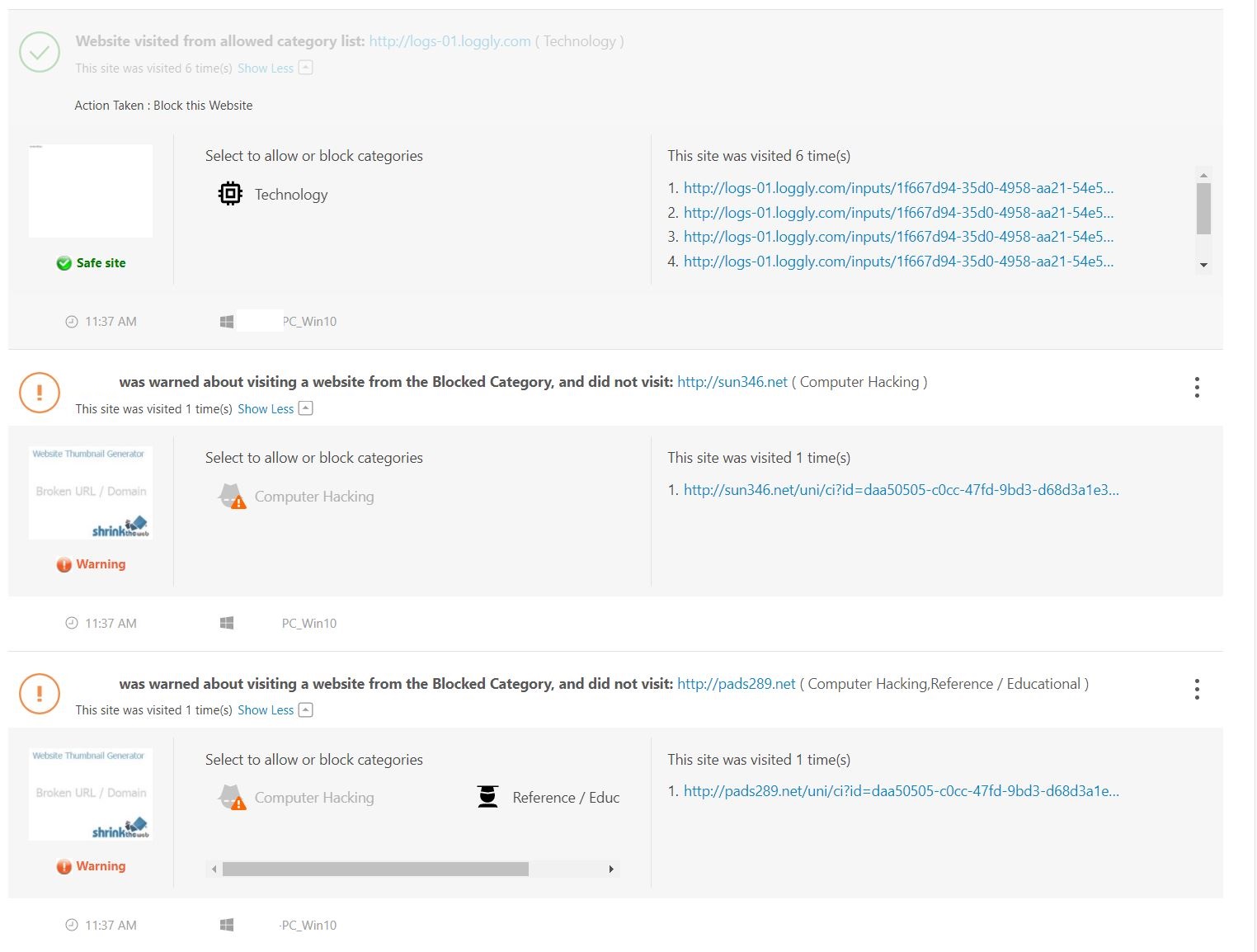
Next, I started searching the Inet to see what I could find out on these three sites. Multiple security sites of these URLs turned up no warnings, no black lists, whois seemed normal, just pretty much nothing alarming. In fact, I was even running Sophos UTM Home Firewall, and it never alerted on this either. If I went directly to these sites it resulted in a blank page. Additionally, the PC seemed to run normal, no popups, or redirection of sites. Really it had no issues at all except it just kept going to these odd sites.
That’s when I found urlscan.io. I pointed it at one of the sites and I noticed there were several update.txt files.
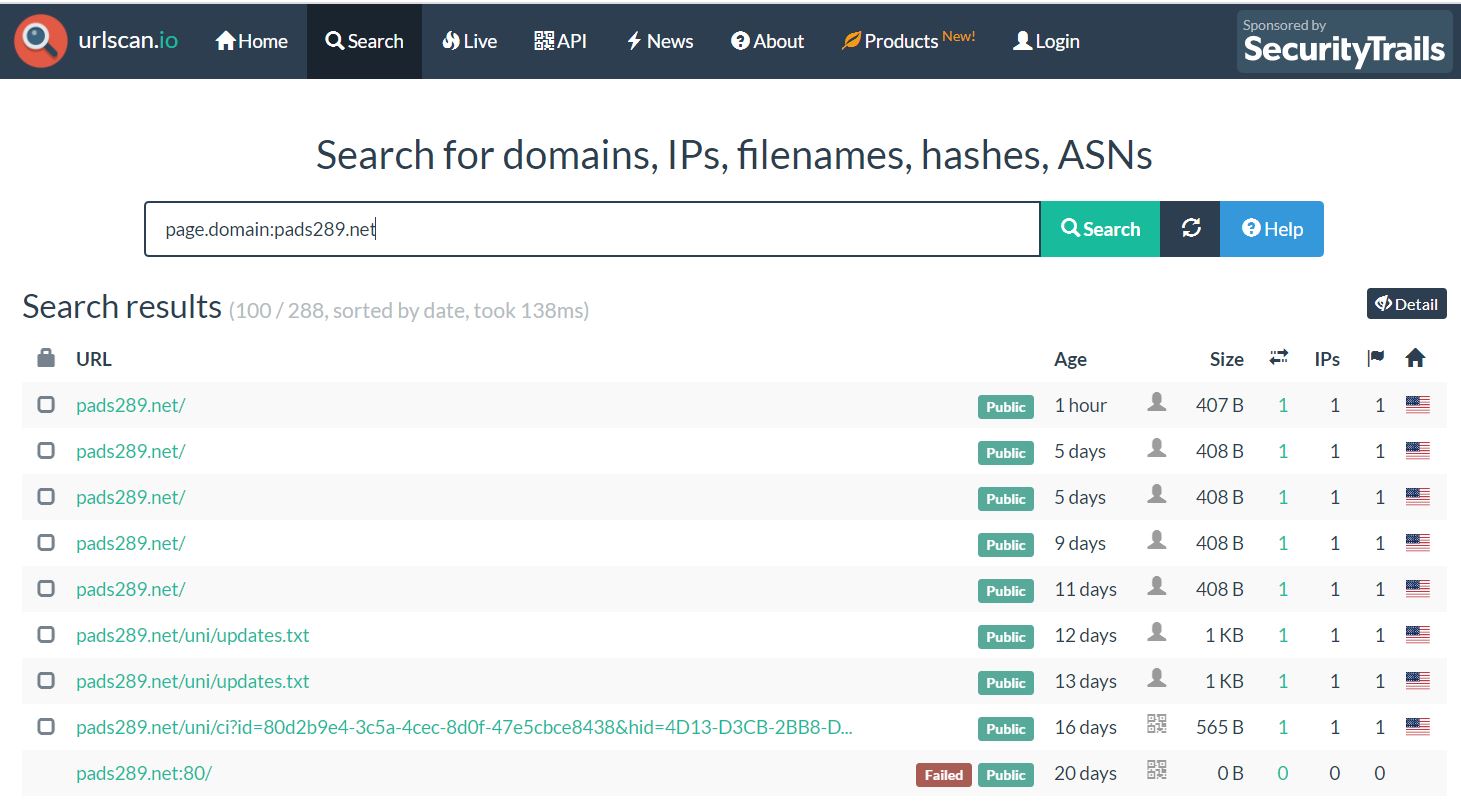
When I clicked on the update.txt it brought me to this screen where I could view the text file via the screenshot.

One thing I noticed about the text file was ‘Realistic Media Inc.’ and ‘Browser Assistant’, and MSI installable. These things seemed like a programs that could be installed on a PC.

Looking at the installed programs on the affected PC and I found a match.

A quick search, and sure enough lots of hits on this Trojan.
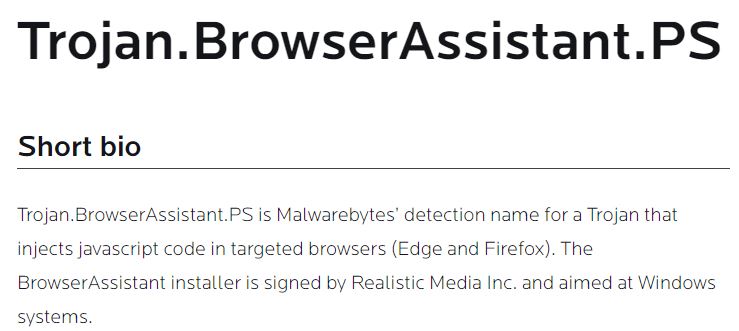
Next I ran Microsoft Safety Scanner, it removed some of it, and then I uninstalled the ‘Browser Assistant’ program.

Lastly, I sent an email into AWS and Solarwinds asking them to look into this issue.
Within 24 hours Amazon Responded with: “The security concern that you have reported is specific to a customer application and / or how an AWS customer has chosen to use an AWS product or service. To be clear, the security concern you have reported cannot be resolved by AWS but must be addressed by the customer, who may not be aware of or be following our recommended security best practices. We have passed your security concern on to the specific customer for their awareness and potential mitigation.”
Within 24 hours Solarwinds responded with: They are working with me to see if there are any issues with this.
Summary:
This pattern for Trojans or Mal/ad-ware probably isn’t new to security folks but either way I hope this blog helps you to better understand odd behavior on your personal network.
Thanks for reading and please do reach out if you have any questions.
Reference Links / Tools:
If you like my ‘no-nonsense’ videos and blogs that get straight to the point… then post a comment or let me know… Else, I’ll start posting really boring content!
 vmexplorer