vmware
GA Release #VMware #vSphere + #vSAN 7.0 Update 1c/P02 | Announcement, information, and links
Announcing GA Releases of the following
- VMware vSphere 7.0 Update 1c/P02 (Including Tanzu)
- VMware vSAN™ 7.0 Update 1c/P02
Note: The included ESXi patch pertains to the Low severity Security Advisory for VMSA-2020-0029 & CVE-2020-3999
See the base table for all the technical enablement links.
| Release Overview | ||||
| vCenter Server 7.0 Update 1c | ISO Build 1732751
ESXi 7.0 Update 1c | ISO Build 17325551 |
||||
| What’s New vCenter | ||||
|
||||
| What’s New vSphere With Tanzu | ||||
Supervisor Cluster
· Newly created Supervisor Clusters uses this new topology automatically. · Existing Supervisor Clusters are migrated to this new topology during an upgrade
Tanzu Kubernetes Grid Service for vSphere
Missing new default VM Classes introduced in vSphere 7.0 U1
The selected value must fit the purpose of your system. For example, a system with 1TB of memory must use the minimum of 69 GB for system storage. To set the boot option at install time, for example systemMediaSize=small, refer to Enter Boot Options to Start an Installation or Upgrade Script. For more information, see VMware knowledge base article 81166. |
||||
| VMSA-2020-0029 Information for ESXi | ||||
| VMSA-2020-0029 | Low | |||
| CVSSv3 Range | 3.3 | |||
| Issue date: | 12/17/2020 | |||
| CVE numbers: | CVE-2020-3999 | |||
| Synopsis: | VMware ESXi, Workstation, Fusion and Cloud Foundation updates address a denial of service vulnerability (CVE-2020-3999) | |||
| ESXi 7 Patch Info | VMware Patch Release ESXi 7.0 ESXi70U1c-17325551 | |||
| This section derives from our full VMware Security Advisory VMSA-2020-0029 covering ESXi only. It is accurate at the time of creation and it is recommended you reference the full VMSA for expanded or updated information. | ||||
| What’s New vSAN | ||||
vSAN 7.0 Update 1c/P02 includes the following summarized fixes as documented within the Resolved Sections for vCenter & ESXi
|
||||
| Technical Enablement | |
| Release Notes vCenter | Click Here | What’s New | Patches Contained in this Release | Product Support Notices | Resolved Issues | Known Issues |
| Release Notes ESXi | Click Here | What’s New | Patches Contained in this Release | Product Support Notices | Resolved Issues | Known Issues |
| Release Notes vSAN 7.0 U1 | Click Here | What’s New | VMware vSAN Community | Upgrades for This Release | Limitations | Known Issues |
| Release Notes Tanzu | Click Here | What’s New | Learn About vSphere with Tanzu | Known Issues |
| docs.vmware.com/vSphere | vCenter Server Upgrade | ESXi Upgrade | Upgrading vSAN Cluster | Tanzu Configuration & Management |
| Download | Click Here |
| Compatibility Information | ports.vmware.com/vSphere 7 + vSAN | Configuration Maximums vSphere 7 | Compatibility Matrix | Interoperability |
| VMSA Reference | VMSA-2020-0029 | VMware Patch Release ESXi 7.0 ESXi70U1c-17325551 |
GA Release VMware NSX Data Center for vSphere 6.4.9 | Announcement, information, and links
Announcing GA Releases of the following
- VMware NSX Data Center for vSphere 6.4.9 (See the base table for all the technical enablement links.)
| Release Overview |
| VMware NSX Data Center for vSphere 6.4.9 | Build 17267008
NSX for vSphere 6.4 End Of General Support Was Extended to 01/16/2022 |
| What’s New |
NSX Data Center for vSphere 6.4.9 adds usability enhancements and addresses a number of specific customer bugs.
|
| Minimum Supported Versions & Depreciated Notes |
| VMware declares minimum supported versions, this content has been simplified, please view the full details in the Versions, System Requirements, and Installation section.
For vSphere 6.5: Recommended: 6.5 Update 3 Build Number 14020092. VMware Product Interoperability Matrix | NSX-V 6.4.9 & vSphere 6.5 For vSphere 6.7: Recommended: 6.7 Update 2 For vSphere 7, Update 1 is now supported Note vSphere 6.0 has reached End of General Support and is not supported with NSX 6.4.7 onwards. Guest Introspection for Windows It is recommended that you upgrade VMware Tools to 10.3.10 before upgrading NSX for vSphere. End of Life and End of Support Warnings For information about NSX and other VMware products that must be upgraded soon, please consult the VMware Lifecycle Product Matrix.
General Behavior Changes If you have more than one vSphere Distributed Switch, and if VXLAN is configured on one of them, you must connect any Distributed Logical Router interfaces to port groups on that vSphere Distributed Switch. Starting in NSX 6.4.1, this configuration is enforced in the UI and API. In earlier releases, you were not prevented from creating an invalid configuration. If you upgrade to NSX 6.4.1 or later and have incorrectly connected DLR interfaces, you will need to take action to resolve this. See the Upgrade Notes for details. In NSX 6.4.7, the following functionality is deprecated in vSphere Client 7.0:
For the complete list of NSX installation prerequisites, see the System Requirements for NSX section in the NSX Installation Guide. For installation instructions, see the NSX Installation Guide or the NSX Cross-vCenter Installation Guide. Also refer to the complete Deprecated and Discontinued Functionality for all depreciated features, API Removals and Behavior Changes |
| General Upgrade Considerations |
For more information, notes and considerations for upgrading please see the Upgrade Notes & FIPS Compliance section.
POST https://<nsmanager>/api/2.0/si/service/<service-id>/servicedeploymentspec/versioneddeploymentspec |
| Upgrade Consideration for NSX Components |
Support for VM Hardware version 11 for NSX components
NSX Manager Upgrade
Controller Upgrade
When the controllers are deleted, this also deletes any associated DRS anti-affinity rules. You must create new anti-affinity rules in vCenter to prevent the new controller VMs from residing on the same host. See Upgrade the NSX Controller Cluster for more information on controller upgrades. Host Cluster Upgrade
NSX Edge Upgrade
PUT /api/4.0/edges/{edgeId} or PUT /api/4.0/edges/{edgeId}/interfaces/{index}. See the NSX API Guide for more information.
To avoid such upgrade failures, perform the following steps before you upgrade an ESG: The following resource reservations are used by the NSX Manager if you have not explicitly set values at the time of install or upgrade.
<applicationProfile> <name>https-profile</name> <insertXForwardedFor>false</insertXForwardedFor> <sslPassthrough>false</sslPassthrough> <template>HTTPS</template> <serverSslEnabled>true</serverSslEnabled> <clientSsl> <ciphers>AES128-SHA:AES256-SHA:ECDHE-ECDSA-AES256-SHA</ciphers> <clientAuth>ignore</clientAuth> <serviceCertificate>certificate-4</serviceCertificate> </clientSsl> <serverSsl> <ciphers>AES128-SHA:AES256-SHA:ECDHE-ECDSA-AES256-SHA</ciphers> <serviceCertificate>certificate-4</serviceCertificate> </serverSsl> … </applicationProfile>
{ “expected” : null, “extension” : “ssl-version=10”, “send” : null, “maxRetries” : 2, “name” : “sm_vrops”, “url” : “/suite-api/api/deployment/node/status”, “timeout” : 5, “type” : “https”, “receive” : null, “interval” : 60, “method” : “GET” }
|
| Technical Enablement | |
| Release Notes | Click Here | What’s New | Versions, System Requirements, and Installation | Deprecated and Discontinued Functionality
Upgrade Notes | FIPS Compliance | Resolved Issues | Known Issues |
| docs.vmware.com/nsx-v | Installation | Cross-vCenter Installation | Administration | Upgrade | Troubleshooting | Logging & System Events
API Guide | vSphere CLI Guide | vSphere Configuration Maximums |
| Networking Documentation | Transport Zones | Logical Switches | Configuring Hardware Gateway | L2 Bridges | Routing | Logical Firewall
Firewall Scenarios | Identity Firewall Overview | Working with Active Directory Domains | Using SpoofGuard Virtual Private Networks (VPN) | Logical Load Balancer | Other Edge Services |
| Compatibility Information | Interoperability Matrix | Configuration Maximums | ports.vmware.com/NSX-V |
| Download | Click Here |
| VMware HOLs | HOL-2103-01-NET – VMware NSX for vSphere Advanced Topics |
Using vRealize Log Insight to troubleshoot #ESXi 7 Error – Host hardware voltage System board 18 VBAT
This blog post demonstrates how I used vRLI to solve what seemed like a complex issue and it helped to simplify the outcome. I use vRLI all the time to parse log files from my devices (hosts, VM’s, etc.), pinpoint data, and resolve issues. In this case a simple CMOS battery was the issue but its the power of vRLI that allowed me to pinpoint the problem.
Recently I was doing some updates on my Home Lab Gen 7 and I noticed this error kept popping up – ‘Host hardware voltage’. At first I thought it might be time for a new power supply, this error message seems pretty serious.

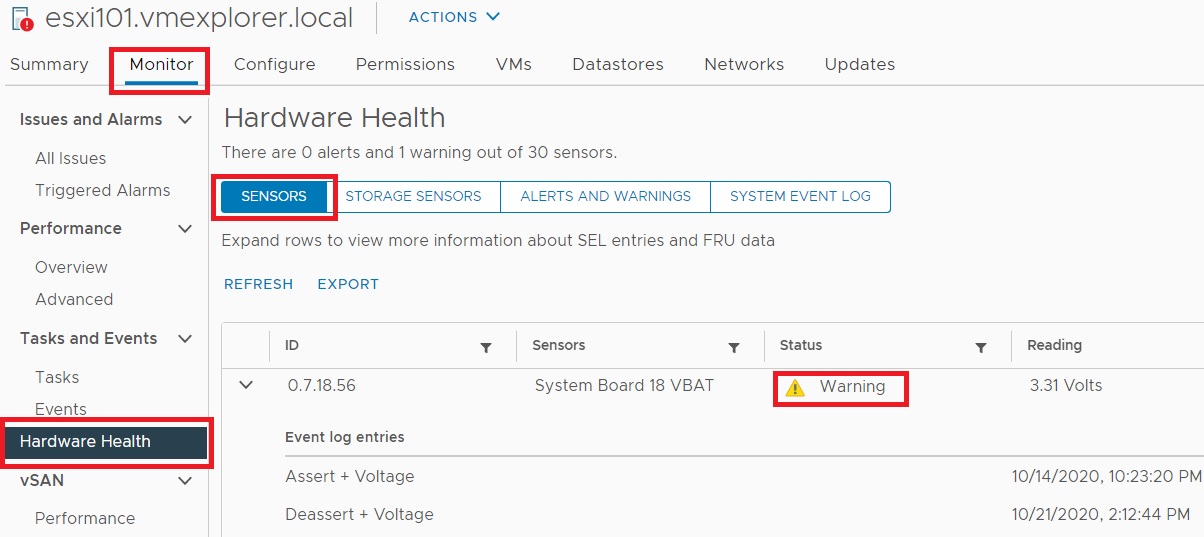
Next I started looking into this error. On the host exhibiting the error, I went into Monitor > Hardware Health > Sensors. The first sensor to appear gave me some detail around the sensor fault but not quite enough information to figure out what the issue was. I noted the sensor column stated – ‘System Board 18 VBAT’
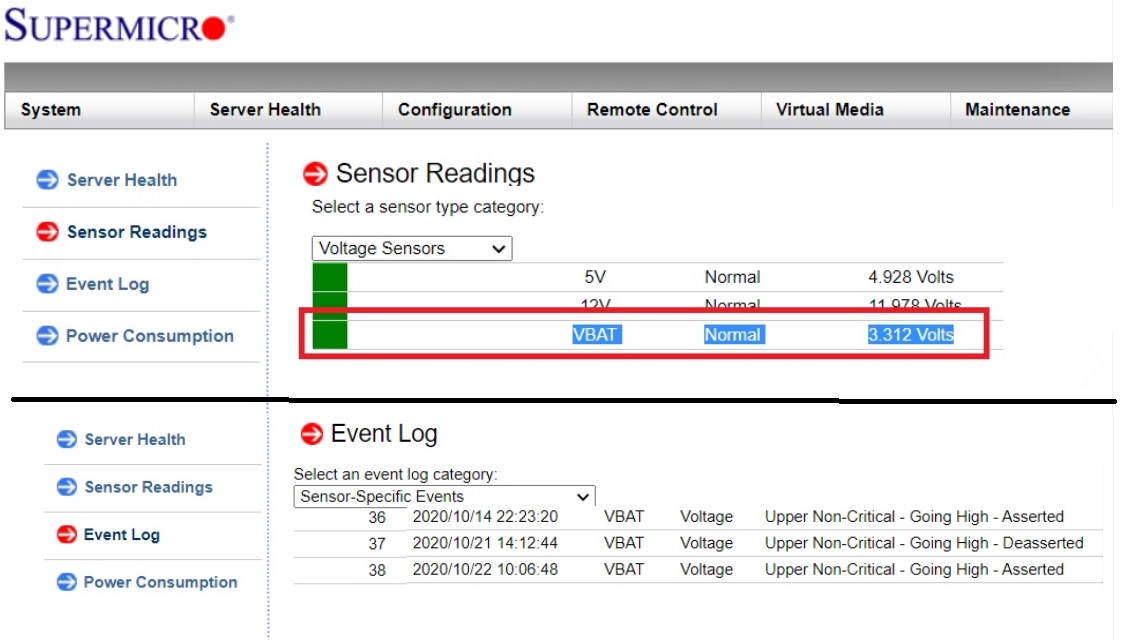
My host motherboards are equipped with remote management. I went into the Supermicro Management interface to see if I could find out more information. Under Sensor Readings, I found some more information around VBAT. Looks like 3.3v DC is what its expecting, and the event log seems to be registering errors around it, but still not enough to know what exactly is faulting.
With this information I launched vRLI and went into Interactive Analytics. I choose the last 48 hours and typed ‘vbat’ into the search field. The first hit that came up stated – ‘Sensor 56 type voltage, Description System Board 18 VBAT state assert for…’ This was very similar to the errors I noted from ESXi and from the Supermicro motherboard.

Finally, a quick google led me to Intel webpage. Turns out VBAT was just a CMOS battery issue.

I powered down the host and pulled out the old CMOS battery. The old battery was pretty warm to the touch. I placed it on a volt meter and it read less than one volt.
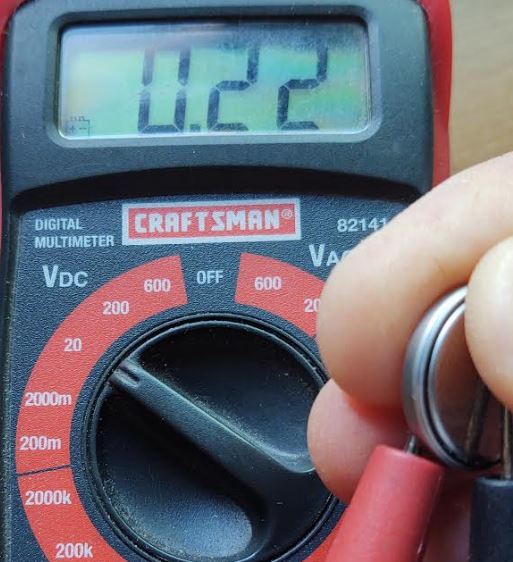
I checked the voltage on the new battery, it came back with 3.3v and I inserted the new battery into the host. Since the change the system board has not reported any new errors.
Next I go into vRNI to ensure the error has disappeared from the logs. I type in ‘vbat’, set my date/time range, and view the results. From the results, you can see that the errors stopped about 16:00 hours. That is about the time I put the new battery in, and its been error free from for the last hour. Over the next day or two I’ll check back and make sure its error free. Additionally, I could setup an alarm to trigger if the error returns.

Using vRLI allow me to help me troubleshoot, resolve, alert, and monitor results.
If you like my ‘no-nonsense’ videos and blogs that get straight to the point… then post a comment or let me know… Else, I’ll start posting really boring content!
Update to VMware Security-Advisory VMSA-2020-0023.1 | Critical, Important CSSv3 5.9-9.8 OpenSLP | New ESXi Patches Released
VMware Security team released this updated information, follow up with VMware if you have questions.
Important Update Notes
The ESXi patches released on October 20, 2020 did not address CVE-2020-3992 completely. The ESXi patches listed in the Response Matrix in section 3a have been updated to contain the complete fix for CVE-2020-3992.
In Reference to OpenSLP vulnerability in Section 3a
VMware ESXi 7.0 ESXi70U1a-17119627 (Updated)
VMware ESXi 6.7 ESXi670-202011301-SG (Updated)
Download
Documentation
Note; VMware Cloud Foundation ESXi 3.x & 4.x are still pending at this time.
VMware ESXi
- VMware vCenter
- VMware Workstation Pro / Player (Workstation)
- VMware Fusion Pro / Fusion (Fusion)
- NSX-T
- VMware Cloud Foundation
| VMSA-2020-0023.1 | Severity: Critical | ||
| CVSSv3 Range | 5.9-9.8 | ||
| Issue date: | 10/20/2020 and updated 11/04/2020 | ||
| Synopsis: | VMware ESXi, vCenter, Workstation, Fusion and NSX-T updates address multiple security vulnerabilities | ||
| CVE numbers: | CVE-2020-3981 CVE-2020-3982 CVE-2020-3992 CVE-2020-3993 CVE-2020-3994 CVE-2020-3995 | ||
| 1. Impacted Products | ||||||||||||||||
|
||||||||||||||||
| 2. Introduction | ||||||||||||||||
| Multiple vulnerabilities in VMware ESXi, Workstation, Fusion and NSX-T were privately reported to VMware. Updates are available to remediate these vulnerabilities in affected VMware products. | ||||||||||||||||
| 3a. ESXi OpenSLP remote code execution vulnerability (CVE-2020-3992) | Critical | |||||||||||||||
| IMPORTANT: The ESXi patches released on October 20, 2020 did not address CVE-2020-3992 completely, see section (3a) Notes for an update.
Description: Known Attack Vectors A malicious actor residing in the management network who has access to port 427 on an ESXi machine may be able to trigger a use-after-free in the OpenSLP service resulting in remote code execution. Resolution To remediate CVE-2020-3992 apply the patches listed in the ‘Fixed Version’ column of the ‘Response Matrix’ found below. Workarounds Workarounds for CVE-2020-3992 have been listed in the ‘Workarounds’ column of the ‘Response Matrix’ below. Notes The ESXi patches released on October 20, 2020 did not address CVE-2020-3992 completely. The ESXi patches listed in the Response Matrix below are updated versions that contain the complete fix for CVE-2020-3992. |
||||||||||||||||
| Response Matrix | Critical | |||||||||||||||
| Product | Version | Running On | CVE Identifier | CVSSv3 | Fixed Version | Workarounds | ||||||||||
| ESXi | 7.0 | Any | CVE-2020-3992 | 9.8 | ESXi70U1a-17119627 Updated | KB76372 | ||||||||||
| ESXi | 6.7 | Any | CVE-2020-3992 | 9.8 | ESXi670-202011301-SG Updated | KB76372 | ||||||||||
| ESXi | 6.5 | Any | CVE-2020-3992 | 9.8 | ESXi650-202011401-SG | KB76372 | ||||||||||
| Cloud Foundation (ESXi) | 4.x | Any | CVE-2020-3992 | 9.8 | Patch Pending | KB76372 | ||||||||||
| Cloud Foundation (ESXi) | 3.x | Any | CVE-2020-3992 | 9.8 | Patch Pending | KB76372 | ||||||||||
| Only section 3a has been updated at this time; The rest of the VMSA is the same; only the links to the new ESX 7U1a and 6.7 updates have been included below this line. | ||||||||||||||||
| 3b. NSX-T Man-in-the-Middle vulnerability MITM (CVE-2020-3993) | Important | |||||||||||||||
| Description: VMware NSX-T contains a security vulnerability that exists in the way it allows a KVM host to download and install packages from NSX manager. VMware has evaluated the severity of this issue to be in the Important severity range with a maximum CVSSv3 base score of 7.5.Known Attack Vectors A malicious actor with MITM positioning may be able to exploit this issue to compromise the transport node.Resolution To remediate CVE-2020-3993 apply the patches listed in the ‘Fixed Version’ column of the ‘Response Matrix’ found below. Workarounds: None |
||||||||||||||||
| Response Matrix | Important | |||||||||||||||
| Product | Version | Running On | CVE Identifier | CVSSv3 | Fixed Version | Workarounds | ||||||||||
| NSX-T | 3.x | Any | CVE-2020-3993 | 7.5 | 3.0.2 | None | ||||||||||
| NSX-T | 2.5.x | Any | CVE-2020-3993 | 7.5 | 2.5.2.2.0 | None | ||||||||||
| Cloud Foundation (NSX-T) | 4.x | Any | CVE-2020-3993 | 7.5 | 4.1 | None | ||||||||||
| Cloud Foundation (NSX-T) | 3.x | Any | CVE-2020-3993 | 7.5 | 3.10.1.1 | None | ||||||||||
| 3c. Time-of-check to time-of-use TOCTOU out-of-bounds read vulnerability (CVE-2020-3981) | Important | |||||||||||||||
| Description: VMware ESXi, Workstation and Fusion contain an out-of-bounds read vulnerability due to a time-of-check time-of-use issue in ACPI device. VMware has evaluated the severity of this issue to be in the Important severity range with a maximum CVSSv3 base score of 7.1.Known Attack Vectors A malicious actor with administrative access to a virtual machine may be able to exploit this issue to leak memory from the vmx process.Resolution To remediate CVE-2020-3981 apply the patches listed in the ‘Fixed Version’ column of the ‘Response Matrix’ found below. Workarounds: None |
||||||||||||||||
| Response Matrix | Important | |||||||||||||||
| Product | Version | Running On | CVE Identifier | CVSSv3 | Fixed Version | Workarounds | ||||||||||
| ESXi | 7.0 | Any | CVE-2020-3981 | 7.1 | ESXi_7.0.1-0.0.16850804 | None | ||||||||||
| ESXi | 6.7 | Any | CVE-2020-3981 | 7.1 | ESXi670-202008101-SG | None | ||||||||||
| ESXi | 6.5 | Any | CVE-2020-3981 | 7.1 | ESXi650-202007101-SG | None | ||||||||||
| Fusion | 12.x | OS X | CVE-2020-3981 | N/A | Unaffected | N/A | ||||||||||
| Fusion | 11.x | OS X | CVE-2020-3981 | 7.1 | 11.5.6 | None | ||||||||||
| Workstation | 16.x | Any | CVE-2020-3981 | N/A | Unaffected | N/A | ||||||||||
| Workstation | 15.x | Any | CVE-2020-3981 | 7.1 | Patch pending | None | ||||||||||
| Cloud Foundation (ESXi) | 4.x | Any | CVE-2020-3981 | 7.1 | 4.1 | None | ||||||||||
| Cloud Foundation (ESXi) | 3.x | Any | CVE-2020-3981 | 7.1 | 3.10.1 | None | ||||||||||
| 3d. TOCTOU out-of-bounds write vulnerability (CVE-2020-3982) | ||||||||||||||||
| Description: VMware ESXi, Workstation and Fusion contain an out-of-bounds write vulnerability due to a time-of-check time-of-use issue in ACPI device. VMware has evaluated the severity of this issue to be in the Moderate severity range with a maximum CVSSv3 base score of 5.9.Known Attack Vectors A malicious actor with administrative access to a virtual machine may be able to exploit this vulnerability to crash the virtual machine’s vmx process or corrupt hypervisor’s memory heap. Resolution To remediate CVE-2020-3982 apply the patches listed in the ‘Fixed Version’ column of the ‘Response Matrix’ found below. Workarounds: None |
||||||||||||||||
| Response Matrix | Moderate | |||||||||||||||
| Product | Version | Running On | CVE Identifier | CVSSv3 | Fixed Version | Workarounds | ||||||||||
| ESXi | 7.0 | Any | CVE-2020-3982 | 5.9 | ESXi_7.0.1-0.0.16850804 | None | ||||||||||
| ESXi | 6.7 | Any | CVE-2020-3982 | 5.9 | ESXi670-202008101-SG | None | ||||||||||
| ESXi | 6.5 | Any | CVE-2020-3982 | 5.9 | ESXi650-202007101-SG | None | ||||||||||
| Fusion | 12.x | OS X | CVE-2020-3982 | N/A | Unaffected | N/A | ||||||||||
| Fusion | 11.x | OS X | CVE-2020-3982 | 5.9 | 11.5.6 | None | ||||||||||
| Workstation | 16.x | Any | CVE-2020-3982 | N/A | Unaffected | N/A | ||||||||||
| Workstation | 15.x | Any | CVE-2020-3982 | 5.9 | Patch pending | None | ||||||||||
| Cloud Foundation (ESXi) | 4.x | Any | CVE-2020-3982 | 5.9 | 4.1 | None | ||||||||||
| Cloud Foundation (ESXi) | 3.x | Any | CVE-2020-3982 | 5.9 | 3.10.1 | None | ||||||||||
| 3e. vCenter Server update function MITM vulnerability (CVE-2020-3994) | Important | |||||||||||||||
| Description: VMware vCenter Server contains a session hijack vulnerability in the vCenter Server Appliance Management Interface update function due to a lack of certificate validation. VMware has evaluated the severity of this issue to be in the Important severity range with a maximum CVSSv3 base score of 7.5.
Known Attack Vectors A malicious actor with network positioning between vCenter Server and an update repository may be able to perform a session hijack when the vCenter Server Appliance Management Interface is used to download vCenter updates. Resolution To remediate CVE-2020-3994 apply the patches listed in the ‘Fixed Version’ column of the ‘Response Matrix’ found below. Workarounds: None |
||||||||||||||||
| Response Matrix | Important | |||||||||||||||
| Product | Version | Running On | CVE Identifier | CVSSv3 | Fixed Version | Workarounds | ||||||||||
| vCenter Server | 7.0 | Any | CVE-2020-3994 | N/A | Unaffected | N/A | ||||||||||
| vCenter Server | 6.7 | vAppliance | CVE-2020-3994 | 7.5 | 6.7u3 | None | ||||||||||
| vCenter Server | 6.7 | Windows | CVE-2020-3994 | N/A | Unaffected | N/A | ||||||||||
| vCenter Server | 6.5 | vAppliance | CVE-2020-3994 | 7.5 | 6.5u3k | None | ||||||||||
| vCenter Server | 6.5 | Windows | CVE-2020-3994 | N/A | Unaffected | N/A | ||||||||||
| Cloud Foundation (vCenter) | 4.x | Any | CVE-2020-3994 | N/A | Unaffected | N/A | ||||||||||
| Cloud Foundation (vCenter) | 3.x | Any | CVE-2020-3994 | 7.5 | 3.9.0 | None | ||||||||||
| 3f. VMCI host driver memory leak vulnerability (CVE-2020-3995) | Important | |||||||||||||||
| Description: The VMCI host drivers used by VMware hypervisors contain a memory leak vulnerability. VMware has evaluated the severity of this issue to be in the Important severity range with a maximum CVSSv3 base score of 7.1.
Known Attack Vectors A malicious actor with access to a virtual machine may be able to trigger a memory leak issue resulting in memory resource exhaustion on the hypervisor if the attack is sustained for extended periods of time. Resolution To remediate CVE-2020-3995 apply the patches listed in the ‘Fixed Version’ column of the ‘Response Matrix’ found below. Workarounds: None. |
||||||||||||||||
| Response Matrix | Important | |||||||||||||||
| Product | Version | Running On | CVE Identifier | CVSSv3 | Fixed Version | Workarounds | ||||||||||
| ESXi | 7.0 | Any | CVE-2020-3995 | N/A | Unaffected | N/A | ||||||||||
| ESXi | 6.7 | Any | CVE-2020-3995 | 7.1 | ESXi670-201908101-SG | None | ||||||||||
| ESXi | 6.5 | Any | CVE-2020-3995 | 7.1 | ESXi650-201907101-SG | None | ||||||||||
| Fusion | 11.x | Any | CVE-2020-3995 | 7.1 | 11.1.0 | None | ||||||||||
| Workstation | 15.x | Any | CVE-2020-3995 | 7.1 | 15.1.0 | None | ||||||||||
| Cloud Foundation (ESXi) | 4.x | Any | CVE-2020-3995 | N/A | Unaffected | N/A | ||||||||||
| Cloud Foundation (ESXi) | 3.x | Any | CVE-2020-3995 | 7.1 | 3.9.0 | None | ||||||||||
| 4. References | ||||||||||||||||
| VMware ESXi 7.0 ESXi70U1a-17119627 (Updated)
VMware ESXi 6.7 ESXi670-202011301-SG (Updated) VMware ESXi670-202008101-SG (Included with August’s Release of ESXi670-202008001) VMware ESXi 6.7 ESXi670-202010401-SG VMware vCenter Server 6.7u3 VMware vCenter Server 6.5u3k VMware Workstation Pro 15.6 VMware Workstation Player 15.6 VMware Fusion 11.5.6 VMware NSX-T 3.0.2 VMware NSX-T 2.5.2.2.0 VMware vCloud Foundation 4.1 VMware vCloud Foundation 3.10.1 & 3.10.1 VMware vCloud Foundation 3.9.0 Mitre CVE Dictionary Links: FIRST CVSSv3 Calculator: |
||||||||||||||||
| 5. Change Log | ||||||||||||||||
| 2020-10-20 VMSA-2020-0023 Initial security advisory.
2020-11-04 VMSA-2020-0023.1 Updated ESXi patches for section 3a |
||||||||||||||||
| Disclaimer | ||||||||||||||||
| This enablement email derives from our VMware Security Advisory and is accurate at the time of creation. Bulletins maybe updated periodically, when using this email as future reference material, please refer to the full & updated VMware Security Advisory VMSA-2020-0023.1 | ||||||||||||||||
Home Lab Generation 7: Updating from Gen 5 to Gen 7
Not to long ago I updated my Gen 4 Home Lab to Gen 5 and I posted many blogs and video around this. The Gen 5 Lab ran well for vSphere 6.7 deployments but moving into vSphere 7.0 I had a few issues adapting it. Mostly these issues were with the design of the Jingsha Motherboard. I noted most of these challenges in the Gen 5 wrap up video. Additionally, I had some new networking requirements mainly around adding multiple Intel NIC ports and Home Lab Gen 5 was not going to adapt well or would be very costly to adapt. These combined adaptions forced my hand to migrate to what I’m calling Home Lab Gen 7. Wait a minute, what happen to Home Lab Gen 6? I decided to align my Home Lab Generation numbers to match vSphere release number, so I skipped Gen 6 to align.
First: I review my design goals:
- Be able to run vSphere 7.x and vSAN Environment
- Reuse as much as possible from Gen 5 Home lab, this will keep costs down
- Choose products that bring value to the goals, are cost effective, and if they are on the VMware HCL that a plus but not necessary for a home lab
- Keep networking (vSAN / FT) on 10Gbe MikroTik Switch
- Support 4 x Intel Gbe Networks
- Ensure there will be enough CPU cores and RAM to be able to support multiple VMware products (ESXi, VCSA, vSAN, vRO, vRA, NSX, LogInsight)
- Be able to fit the the environment into 3 ESXi Hosts
- The environment should run well, but doesn’t have to be a production level environment
Second – Evaluate Software, Hardware, and VM requirements:
My calculated numbers from my Gen 5 build will stay rather static for Gen 7. The only update for Gen 7 is to use the updated requirements table which can be found here >> ‘HOME LABS: A DEFINITIVE GUIDE’

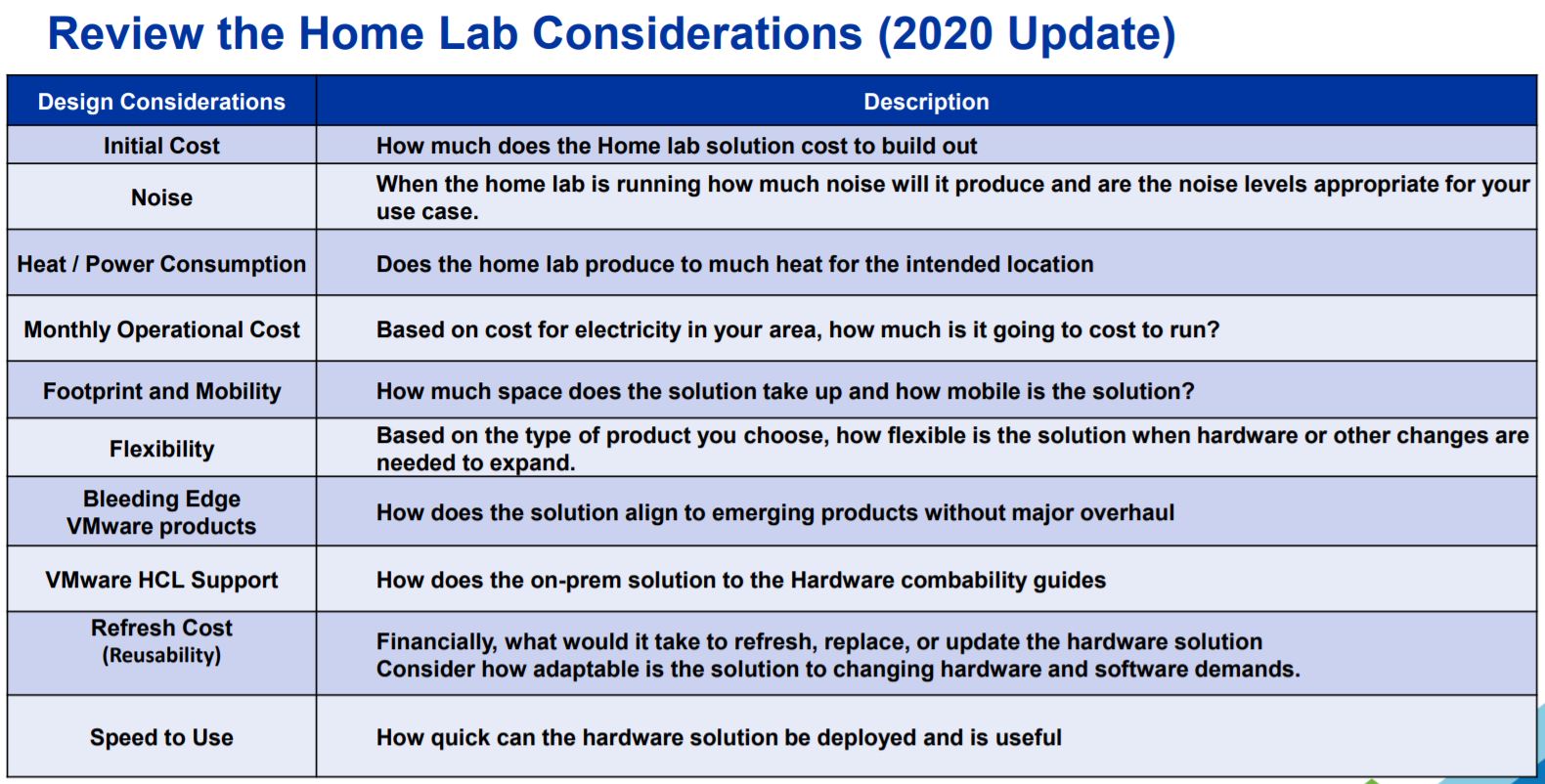
Third – Home Lab Design Considerations
This too will be very similar to Gen 5, but I do review this table and made any last changes to my design
Four – Choosing Hardware
Based on my estimations above I’m going to need a very flexible Mobo, supporting lots of RAM, good network connectivity, and should be as compatible as possible with my Gen 5 hardware. I’ve reused many parts from Gen 5 but the main change came with the Supermicro Motherboard and the addition of 2TB SAS HDD listed below.
Note: I’ve listed the newer items in Italics all other parts I’ve carried over from Gen 5.
Overview:
- My Gen 7 Home Lab is based on vSphere 7 (VCSA, ESXi, and vSAN) and it contains 3 x ESXi Hosts, 1 x Windows 10 Workstation, 4 x Cisco Switches, 1 x MikroTik 10gbe Switch, 2 x APC UPS
ESXi Hosts:
- Case:
- Rosewill RISE Glow EATX (Newegg $54)
- Motherboard:
- Supermicro X9DRD-7LN4F-JBOD (Ebay $159)
- Mobo Stands: 4mm Nylon Plastic Pillar (Amazon $8)
- CPU:
- CPU: Xeon E5-2640 v2 8 Cores / 16 HT (Ebay $30 each)
- CPU Cooler: DEEPCOOL GAMMAXX 400 (Amazon $19)
- CPU Cooler Bracket: Rectangle Socket 2011 CPU Cooler Mounting Bracket (Ebay $16)
- RAM:
- 128GB DDR3 ECC RAM (Ebay $170)
- Disks:
- 64GB USB Thumb Drive (Boot)
- 2 x 200 SAS SSD (vSAN Cache)
- 2 x 2TB SAS HDD (vSAN Capacity – See this post)
- 1 x 2TB SATA (Extra Space)
- SAS Controller:
- 1 x IBM 5210 JBOD (Ebay)
- CableCreation Internal Mini SAS SFF-8643 to (4) 29pin SFF-8482 (Amazon $18)
- Network:
- Motherboard Integrated i350 1gbe 4 Port
- 1 x MellanoxConnectX3 Dual Port (HP INFINIBAND 4X DDR PCI-E HCA CARD 452372-001)
- Power Supply:
- Antec Earthwatts 500-600 Watt (Adapters needed to support case and motherboard connections)
- Adapter: Dual 8(4+4) Pin Male for Motherboard Power Adapter Cable (Amazon $11)
- Adapter: LP4 Molex Male to ATX 4 pin Male Auxiliary (Amazon $11)
- Power Supply Extension Cable: StarTech.com 8in 24 Pin ATX 2.01 Power Extension Cable (Amazon $9)
- Antec Earthwatts 500-600 Watt (Adapters needed to support case and motherboard connections)
Network:
- Core VM Switches:
- 2 x Cisco 3650 (WS-C3560CG-8TC-S 8 Gigabit Ports, 2 Uplink)
- 2 x Cisco 2960 (WS-C2960G-8TC-L)
- 10gbe Network:
- 1 x MikroTik 10gbe CN309 (Used for vSAN and Replication Network)
- 2 ea. x HP 684517-001 Twinax SFP 10gbe 0.5m DAC Cable (Ebay)
- 2 ea. x MELLANOX QSFP/SFP ADAPTER 655874-B21 MAM1Q00A-QSA (Ebay)
Battery Backup UPS:
- 2 x APC NS1250
Windows 10 Workstation:
- Case: Phanteks Enthoo Pro series PH-ES614PC_BK Black Steel
- Motherboard: MSI PRO Z390-A PRO
- CPU: Intel Core i7-8700
- RAM: 64GB DDR4 RAM
- 1TB NVMe
Thanks for reading, please do reach out if you have any questions.
If you like my ‘no-nonsense’ videos and blogs that get straight to the point… then post a comment or let me know… Else, I’ll start posting really boring content!
#VMware OCTO Initiative: Nonprofit Connect – Complementary Education and Enablement General Links
The VMware Office of the CTO Ambassadors (CTOA) is an internal VMware program which allows field employees to connect and advocate their customer needs inside of VMware. Additionally, the CTOA program enables field employees to engage in initiates to better serve our customers. This past year I’ve been working on an CTOA initiative known as Nonprofit Connect (NPC). NPC has partnered with the VMware Foundation to help VMware Non-profit customers through more effective and sustainable technology. Part of this program was creating and updating an enablement guide which helps Non-Profits gain access to resources. This resource is open to all our customers and is publicly posted >> NPC Enablement Guide
Michelle Kaiser is leading the Nonprofit Connect initiative and from what I’ve seen she and the team are doing a great job — Keep up the good work!
More information around NPC, CTOA, and the VMware Foundation can be found in the links below:
GA Release VMware NSX-T Data Center 3.1 | Announcement, information, and links
VMware Announced the GA Releases of VMware NSX-T Data Center 3.1
See the base table for all the technical enablement links including VMworld 2020 sessions and new Hands On Labs.
| Release Overview | |
| VMware NSX-T Data Center 3.1.0 | Build 17107167
|
|
| What’s New | |
NSX-T Data Center 3.1 includes a large list of new features to offer new functionalities for virtualized networking and security for private, public, and multi-clouds. Highlights include new features and enhancements in the following focus areas:
In addition to these enhancements, the following capabilities and improvements have been added.
Support for standby Global Manager Cluster Global Manager can now have an active cluster and a standby cluster in another location. Latency between active and standby cluster must be a maximum of 150ms round-trip time. With the support of Federation upgrade and Standby GM, Federation is now considered production ready.
Change the display name for TCP/IP stack: The netstack keys remain “vxlan” and “hyperbus” but the display name in the UI is now “nsx-overlay” and “nsx-hyperbus”. The display name will change in both the list of Netstacks and list of VMKNICs This change will be visible with vCenter 6.7 Improvements in L2 Bridge Monitoring and Troubleshooting Consistent terminology across documentation, UI and CLI Addition of new CLI commands to get summary and detailed information on L2 Bridge profiles and stats Log messages to identify the bridge profile, the reason for the state change, as well as the logical switch(es) impacted Support TEPs in different subnets to fully leverage different physical uplinks A Transport Node can have multiple host switches attaching to several Overlay Transport Zones. However, the TEPs for all those host switches need to have an IP address in the same subnet. This restriction has been lifted to allow you to pin different host switches to different physical uplinks that belong to different L2 domains. Improvements in IP Discovery and NS Groups: IP Discovery profiles can now be applied to NS Groups simplifying usage for Firewall Admins.
Policy API enhancements Ability to configure BFD peers on gateways and forwarding up timer per VRF through policy API. Ability to retrieve the proxy ARP entries of gateway through policy API.
NSX-T 3.1 is a major release for Multicast, which extends its feature set and confirms its status as enterprise ready for deployment. Support for Multicast Replication on Tier-1 gateway. Allows to turn on multicast for a Tier-1 with Tier-1 Service Router (mandatory requirement) and have Multicast receivers and sources attached to it. Support for IGMPv2 on all downlinks and uplinks from Tier-1 Support for PIM-SM on all uplinks (config max supported) between each Tier-0 and all TORs (protection against TOR failure) Ability to run Multicast in A/S and Unicast ECMP in A/A from Tier-1 → Tier-0 → TOR Please note that Unicast ECMP will not be supported from ESXi host → T1 when it is attached to a T1 which also has Multicast enabled. Support for static RP programming and learning through BS & Support for Multiple Static RPs Distributed Firewall support for Multicast Traffic Improved Troubleshooting: This adds the ability to configure IGMP Local Groups on the uplinks so that the Edge can act as a receiver. This will greatly help in triaging multicast issues by being able to attract multicast traffic of a particular group to Edge.
Inter TEP communication within the same host: Edge TEP IP can be on the same subnet as the local hypervisor TEP. Support for redeployment of Edge node: A defunct Edge node, VM or physical server, can be replaced with a new one without requiring it to be deleted. NAT connection limit per Gateway: The maximum NAT sessions can be configured per Gateway.
Improvements in FQDN-based Firewall: You can define FQDNs that can be applied to a Distributed Firewall. You can either add individual FQDNs or import a set of FQDNs from CSV files. Firewall Usability Features
Distributed IPS NSX-T will have a Distributed Intrusion Prevention System. You can block threats based on signatures configured for inspection. Enhanced dashboard to provide details on threats detected and blocked. IDS/IPS profile creation is enhanced with Attack Types, Attack Targets, and CVSS scores to create more targeted detection.
HTTP server-side Keep-alive: An option to keep one-to-one mapping between the client side connection and the server side connection; the backend connection is kept until the frontend connection is closed. HTTP cookie security compliance: Support for “httponly” and “secure” options for HTTP cookie. A new diagnostic CLI command: The single command captures various troubleshooting outputs relevant to Load Balancer.
TCP MSS Clamping for L2 VPN: The TCP MSS Clamping feature allows L2 VPN session to pass traffic when there is MTU mismatch.
NSX-T Terraform Provider support for Federation: The NSX-T Terraform Provider extends its support to NSX-T Federation. This allows you to create complex logical configurations with networking, security (segment, gateways, firewall etc.) and services in an infra-as-code model. For more details, see the NSX-T Terraform Provider release notes. Conversion to NSX-T Policy Neutron Plugin for OpenStack environment consuming Management API: Allows you to move an OpenStack with NSX-T environment from the Management API to the Policy API. This gives you the ability to move an environment deployed before NSX-T 2.5 to the latest NSX-T Neutron Plugin and take advantage of the latest platform features. Ability to change the order of NAT and FWLL on OpenStack Neutron Router: This gives you the choice in your deployment for the order of operation between NAT and FWLL. At the OpenStack Neutron Router level (mapped to a Tier-1 in NSX-T), the order of operation can be defined to be either NAT then firewall or firewall then NAT. This is a global setting for a given OpenStack Platform. NSX Policy API Enhancements: Ability to filter and retrieve all objects within a subtree of the NSX Policy API hierarchy. In previous version filtering was done from the root of the tree policy/api/v1/infra?filter=Type-, this will allow you to retrieve all objects from sub-trees instead. For example, this allows a network admin to look at all Tier-0 configurations by simply /policy/api/v1/infra/tier-0s?filter=Type- instead of specifying from the root all the Tier-0 related objects.
NSX-T support with vSphere Lifecycle Manager (vLCM): Starting with vSphere 7.0 Update 1, VMware NSX-T Data Center can be supported on a cluster that is managed with a single vSphere Lifecycle Manager (vLCM) image. As a result, NSX Manager can be used to install, upgrade, or remove NSX components on the ESXi hosts in a cluster that is managed with a single image.
Simplification of host/cluster installation with NSX-T: Through the “Getting Started” button in the VMware NSX-T Data Center user interface, simply select the cluster of hosts that needs to be installed with NSX, and the UI will automatically prompt you with a network configuration that is recommended by NSX based on your underlying host configuration. This can be installed on the cluster of hosts thereby completing the entire installation in a single click after selecting the clusters. The recommended host network configuration will be shown in the wizard with a rich UI, and any changes to the desired network configuration before NSX installation will be dynamically updated so users can refer to it as needed. Enhancements to in-place upgrades: Several enhancements have been made to the VMware NSX-T Data Center in-place host upgrade process, like increasing the max limit of virtual NICs supported per host, removing previous limitations, and reducing the downtime in data path during in-place upgrades. Refer to the VMware NSX-T Data Center Upgrade Guide for more details. Reduction of VIB size in NSX-T: VMware NSX-T Data Center 3.1.0 has a smaller VIB footprint in all NSX host installations so that you are able to install ESX and other 3rd party VIBs along with NSX on their hypervisors. Enhancements to Physical Server installation of NSX-T: To simplify the workflow of installing VMware NSX-T Data Center on Physical Servers, the entire end-to-end physical server installation process is now through the NSX Manager. The need for running Ansible scripts for configuring host network connectivity is no longer a requirement. ERSPAN support on a dedicated network stack with ENS: ERSPAN can now be configured on a dedicated network stack i.e., vmk stack and supported with the enhanced NSX network switch i.e., ENS, thereby resulting in higher performance and throughput for ERSPAN Port Mirroring. Singleton Manager with vSphere HA: NSX now supports the deployment of a single NSX Manager in production deployments. This can be used in conjunction with vSphere HA to recover a failed NSX Manager. Please note that the recovery time for a single NSX Manager using backup/restore or vSphere HA may be much longer than the availability provided by a cluster of NSX Managers. Log consistency across NSX components: Consistent logging format and documentation across different components of NSX so that logs can be easily parsed for automation and you can efficiently consume the logs for monitoring and troubleshooting. Support for Rich Common Filters: This is to support rich common filters for operations features like packet capture, port mirroring, IPFIX, and latency measurements for increasing the efficiency of customers while using these features. Currently, these features have either very simple filters which are not always helpful, or no filters leading to inconvenience. CLI Enhancements: Several CLI related enhancements have been made in this release: CLI “get” commands will be accompanied with timestamps now to help with debugging GET / SET / RESET the Virtual IP (VIP) of the NSX Management cluster through CLI § While debugging through the central CLI, run ping commands directly on the local machines eliminating extra steps needed to log in to the machine and do the same § View the list of core on any NSX component through CLI § Use the “*” operator now in CLI § Commands for debugging L2Bridge through CLI have also been introduced in this release Distributed Load Balancer Traceflow: Traceflow now supports Distributed Load Balancer for troubleshooting communication failures from endpoints deployed in vSphere with Tanzu to a service endpoint via the Distributed Load Balancer.
Events and Alarms
ERSPAN for ENS fast path: Support port mirroring for ENS fast path. System Health Plugin Enhancements: System Health plugin enhancements and status monitoring of processes running on different nodes to ensure that system is running properly by on-time detection of errors. Live Traffic Analysis & Tracing: A live traffic analysis tool to support bi-directional traceflow between on-prem and VMC data centers. Latency Statistics and Measurement for UA Nodes: Latency measurements between NSX Manager nodes per NSX Manager cluster and between NSX Manager clusters across different sites. Performance Characterization for Network Monitoring using Service Insertion: To provide performance metrics for network monitoring using Service Insertion.
Graphical Visualization of VPN: The Network Topology map now visualizes the VPN tunnels and sessions that are configured. This aids you to quickly visualize and troubleshoot VPN configuration and settings. Dark Mode: NSX UI now supports dark mode. You can toggle between light and dark mode. Firewall Export & Import: NSX now provides the option for you to export and import firewall rules and policies as CSVs. Enhanced Search and Filtering: Improved the search indexing and filtering options for firewall rules based on IP ranges. Reducing Number of Clicks: With this UI enhancement, NSX-T now offers a convenient and easy way to edit Network objects.
Multiple license keys: NSX now has the ability to accept multiple license keys of same edition and metric. This functionality allows you to maintain all your license keys without having to combine your license keys. License Enforcement: NSX-T now ensures that users are license-compliant by restricting access to features based on license edition. New users will be able to access only those features that are available in the edition that they have purchased. Existing users who have used features that are not in their license edition will be restricted to only viewing the objects; create and edit will be disallowed. New VMware NSX Data Center Licenses: Adds support for new VMware NSX Firewall and NSX Firewall with Advanced Threat Prevention license introduced in October 2020, and continues to support NSX Data Center licenses (Standard, Professional, Advanced, Enterprise Plus, Remote Office Branch Office) introduced in June 2018, and previous VMware NSX for vSphere license keys. See VMware knowledge base article 52462 for more information about NSX licenses.
Security Enhancements for Use of Certificates And Key Store Management: With this architectural enhancement, NSX-T offers a convenient and secure way to store and manage a multitude of certificates that are essential for platform operations and be in compliance with industry and government guidelines. This enhancement also simplifies API use to install and manage certificates. Alerts for Audit Log Failures: Audit logs play a critical role in managing cybersecurity risks within an organization and are often the basis of forensic analysis, security analysis and criminal prosecution, in addition to aiding with diagnosis of system performance issues. Complying with NIST-800-53 and industry-benchmark compliance directives, NSX offers alert notification via alarms in the event of failure to generate or process audit data. Custom Role Based Access Control: Users desire the ability to configure roles and permissions that are customized to their specific operating environment. The custom RBAC feature allows granular feature-based privilege customization capabilities enabling NSX customers the flexibility to enforce authorization based on least privilege principles. This will benefit users in fulfilling specific operational requirements or meeting compliance guidelines. Please note in NSX-T 3.1, only policy based features are available for role customization. FIPS – Interoperability with vSphere 7.x: Cryptographic modules in use with NSX-T are FIPS 140-2 validated since NSX-T 2.5. This change extends formal certification to incorporate module upgrades and interoperability with vSphere 7.0.
Migration of NSX for vSphere Environment with vRealize Automation: The Migration Coordinator now interacts with vRealize Automation (vRA) in order to migrate environments where vRealize Automation provides automation capabilities. This will offer a first set of topologies which can be migrated in an environment with vRealize Automation and NSX-T Data Center. Note: This will require support on vRealize Automation. Modular Distributed Firewall Config Migration: The Migration Coordinator is now able to migrate firewall configurations and state from a NSX Data Center for vSphere environment to NSX-T Data Center environment. This functionality allows a customer to do migrate virtual machines (using vMotion) from one environment to the other and keep their firewall rules and state. Migration of Multiple VTEP: The NSX Migration Coordinator now has the ability to migrate environments deployed with multiple VTEPs. Increase Scale in Migration Coordinator to 256 Hosts: The Migration Coordinator can now migrate up to 256 hypervisor hosts from NSX Data Center for vSphere to NSX-T Data Center. Migration Coordinator coverage of Service Insertion and Guest Introspection: The Migration Coordinator can migrate environments with Service Insertion and Guest Introspection. This will allow partners to offer a solution for migration integrated with complete migrator workflow. |
|
| Upgrade Considerations | |
| API Deprecations and Behavior Changes
Retention Period of Unassigned Tags: In NSX-T 3.0.x, NSX Tags with 0 Virtual Machines assigned are automatically deleted by the system after five days. In NSX-T 3.1.0, the system task has been modified to run on a daily basis, cleaning up unassigned tags that are older than one day. There is no manual way to force delete unassigned tags. I recommend you reviewing the known issues sections General | Installation | Upgrade | NSX Edge | NSX Cloud | Security | Federation |
|
| Enablement Links | |
| Release Notes | Click Here | What’s New | General Behavior Changes | API and CLI Resources | Resolved Issues | Known Issues |
| docs.vmware.com/NSX-T | Installation Guide | Administration Guide | Upgrade Guide | Migration Coordinator | VMware NSX Intelligence
REST API Reference Guide | CLI Reference Guide | Global Manager REST API |
| Upgrading Docs | Upgrade Checklist | Preparing to Upgrade | Upgrading | Upgrading NSX Cloud Components | Post-Upgrade Tasks |
| Installation Docs | Preparing for Installation | NSX Manager Installation | | Installing NSX Manager Cluster on vSphere | Installing NSX Edge
vSphere Lifecycle Manager | Host Profile integration | Getting Started with Federation | Getting Started with NSX Cloud |
| Migrating Docs | Migrating NSX Data Center for vSphere | Migrating vSphere Networking | Migrating NSX Data Center for vSphere with vRA |
| Requirements Docs | NSX Manager Cluster | System | NSX Manager VM & Host Transport Node System NSX Edge VM System | NSX Edge Bare Metal | Bare Metal Server System | Bare Metal Linux Container |
| Compatibility Information | Ports Used | Compatibility Guide (Select NSX-T) | Product Interoperability Matrix | |
| Downloads | Click Here |
| Hands On Labs (New) | HOL-2103-01-NET – VMware NSX for vSphere Advanced Topics
HOL-2103-02-NET – VMware NSX Migration Coordinator HOL-2103-91-NET – VMware NSX for vSphere Flow Monitoring and Traceflow HOL-2122-01-NET – NSX Cloud Consistent Networking and Security across Enterprise, AWS & Azure |
| VMworld 2020 Sessions | Update on NSX-T Switching: NSX on VDS (vSphere Distributed Switch) VCNC1197
Demystifying the NSX-T Data Center Control Plane VCNC1164 NSX-T security and compliance deep dive ISNS2256 NSX Data Center for vSphere to NSX-T Migration: Real-World Experience VCNC1590 |
| Blogs | NSX-T 3.0 – Innovations in Cloud, Security, Containers, and Operations |

VCSA 7 Error in method invocation [Errno 2] No such file or directory: ‘/storage/core/software-update/updates/index’
This could be my shortest blog to date, but it’s still good to note this error.
In my home lab I wanted to update my VCSA 7 appliance to 7.0u1. I went into the VCSA Management site, choose update, and the auto update started to look for files in the default repository. Then I got the following error:
Error in method invocation [Errno 2] No such file or directory: ‘/storage/core/software-update/updates/index’
Doing a bit of research I found out the following – When the VCSA cannot locate the default vmware.com site repository the VCSA will display this error.
In my case, my VCSA could not access the internet so it couldn’t locate the repository. Once I corrected a network issue, the VCSA was able to access the repository and it downloaded the upgrade options.

If you like my ‘no-nonsense’ blog articles that get straight to the point… then post a comment or let me know… Else, I’ll start writing boring blog content.
GA Release VMware PowerCLI 12.1.0 | Announcement, information, and links
VMware announced the GA Releases of the following: VMware PowerCLI 12.1.0
See the base table for all the technical enablement links including a VMworld 2020 session and new Hands On Lab
| Release Overview | |||||||||||||
 VMware PowerCLI is a command-line and scripting tool built on Windows PowerShell, and provides more than 700 cmdlets for managing and automating vSphere, VMware Cloud Director, vRealize Operations Manager, vSAN, NSX-T, VMware Cloud Services, VMware Cloud on AWS, VMware HCX, VMware Site Recovery Manager, and VMware Horizon environments. VMware PowerCLI is a command-line and scripting tool built on Windows PowerShell, and provides more than 700 cmdlets for managing and automating vSphere, VMware Cloud Director, vRealize Operations Manager, vSAN, NSX-T, VMware Cloud Services, VMware Cloud on AWS, VMware HCX, VMware Site Recovery Manager, and VMware Horizon environments.
|
|||||||||||||
| What’s New | |||||||||||||
| VMware PowerCLI 12.1.0 introduces the following new features, changes, and improvements:
Added cmdlets for
New Features
Added support for
|
|||||||||||||
| Upgrade Considerations | |||||||||||||
Ensure the following software is present on your system
|
|||||||||||||
| Updated Components | |||||||||||||
In VMware PowerCLI 12.1.0, the following modules have been updated:
|
|||||||||||||
| Enablement Links | |||||||||||||
| Release Notes | Click Here | What’s New in This Release | Resolved Issues | Known Issues | ||||||||||||
| docs.vmware.com/pCLI | Introduction | Installing | Configuring | cmdlet Reference | ||||||||||||
| Compatibility Information | Interoperability Matrix | Upgrade Path Matrix | ||||||||||||
| Blogs & Infolinks | VMware What’s New pCLI vRLCM | VMware What’s New pCLI with AWS | PM’s Blog pCLI SSO | ||||||||||||
| Download | Click Here | ||||||||||||
| VMworld 2020 Sessions | PowerCLI: Into the Deep [HCP1286] | ||||||||||||
| Hands On Labs | HOL-2111-04-SDC – VMware vSphere Automation – PowerCLI | ||||||||||||
VMware vSphere 7.0 Update 1 | vCenter, ESXi, vSAN | Information
VMware announced the GA Releases of the following:
- VMware vCenter 7.0 Update 1
- VMware ESXi 7.0 Update 1
- VMware vSAN 7.0 Update 1
See the base table for all the technical enablement links, now including VMworld 2020 OnDemand Sessions
.
| Release Overview |
| vCenter Server 7.0 Update 1 | ISO Build 16860138
ESXi 7.0 Update 1 | ISO Build 16850804 VMware vSAN 7.0 Update 1 | Build 16850804 |
| What’s New vCenter Server | |
Inclusive terminology: In vCenter Server 7.0 Update 1, as part of a company-wide effort to remove instances of non-inclusive language in our products, the vSphere team has made changes to some of the terms used in the vSphere Client. APIs and CLIs still use legacy terms, but updates are pending in an upcoming release.
|
|
| Upgrade/Install Considerations vCenter | |
| Before upgrading to vCenter Server 7.0 Update 1, you must confirm that the Link Aggregation Control Protocol (LACP) mode is set to enhanced, which enables the Multiple Link Aggregation Control Protocol (the multipleLag parameter) on the VMware vSphere Distributed Switch (VDS) in your vCenter Server system.
If the LACP mode is set to basic, indicating One Link Aggregation Control Protocol (singleLag), the distributed virtual port groups on the vSphere Distributed Switch might lose connection after the upgrade and affect the management vmknic, if it is on one of the dvPort groups. During the upgrade precheck, you see an error such as Source vCenter Server has instance(s) of Distributed Virtual Switch at unsupported lacpApiVersion. For more information on converting to Enhanced LACP Support on a vSphere Distributed Switch, see VMware knowledge base article 2051311. For more information on the limitations of LACP in vSphere, see VMware knowledge base article 2051307. Product Support Notices
|
|
| What’s New ESXi | |
What’s New
|
|
| Upgrade/Install Considerations ESXi | |
| In vSphere 7.x, the Update Manager plug-in, used for administering vSphere Update Manager, is replaced with the Lifecycle Manager plug-in. Administrative operations for vSphere Update Manager are still available under the Lifecycle Manager plug-in, along with new capabilities for vSphere Lifecycle Manager.
The typical way to apply patches to ESXi 7.x hosts is by using the vSphere Lifecycle Manager. For details, see About vSphere Lifecycle Manager and vSphere Lifecycle Manager Baselines and Images. You can also update ESXi hosts without using the Lifecycle Manager plug-in, and use an image profile instead. To do this, you must manually download the patch offline bundle ZIP file from the VMware download page or the Product Patches page and use the esxcli software profile command. |
|
| What’s New vSAN | |
| vSAN 7.0 Update 1 introduces the following new features and enhancements:
Scale Without Compromise
Simplify Operations
Note: vSAN 7.0 Update 1 improves CPU performance by standardizing task timers throughout the system. This change addresses issues with timers activating earlier or later than requested, resulting in degraded performance for some workloads. |
|
| Upgrade/Install Considerations vSAN | |
| For instructions about upgrading vSAN, see vSAN Documentation Upgrading the vSAN Cluster Before You Upgrade Upgrading vCenter Server Upgrading Hosts
Note: Before performing the upgrade, please review the most recent version of the VMware Compatibility Guide to validate that the latest vSAN version is available for your platform. vSAN 7.0 Update 1 is a new release that requires a full upgrade to vSphere 7.0 Update 1. Perform the following tasks to complete the upgrade: 1. Upgrade to vCenter Server 7.0 Update 1. For more information, see the VMware vSphere 7.0 Update 1 Release Notes. Note: vSAN retired disk format version 1.0 in vSAN 7.0 Update 1. Disks running disk format version 1.0 are no longer recognized by vSAN. vSAN will block upgrade through vSphere Update Manager, ISO install, or esxcli to vSAN 7.0 Update 1. To avoid these issues, upgrade disks running disk format version 1.0 to a higher version. If you have disks on version 1, a health check alerts you to upgrade the disk format version. Disk format version 1.0 does not have performance and snapshot enhancements, and it lacks support for advanced features including checksum, deduplication and compression, and encryption. For more information about vSAN disk format version, see KB2145267. Upgrading the On-disk Format for Hosts with Limited Capacity During an upgrade of the vSAN on-disk format from version 1.0 or 2.0, a disk group evacuation is performed. The disk group is removed and upgraded to on-disk format version 13.0, and the disk group is added back to the cluster. For two-node or three-node clusters, or clusters without enough capacity to evacuate each disk group, select Allow Reduced Redundancy from the vSphere Client. You also can use the following RVC command to upgrade the on-disk format: vsan.ondisk_upgrade –allow-reduced-redundancy When you allow reduced redundancy, your VMs are unprotected for the duration of the upgrade, because this method does not evacuate data to the other hosts in the cluster. It removes each disk group, upgrades the on-disk format, and adds the disk group back to the cluster. All objects remain available, but with reduced redundancy. If you enable deduplication and compression during the upgrade to vSAN 7.0 Update 1, you can select Allow Reduced Redundancy from the vSphere Client. Limitations For information about maximum configuration limits for the vSAN 7.0 Update 1 release, see the Configuration Maximums documentation. |
|
| Technical Enablement | |
| Release Notes vCenter | Click Here | What’s New | Earlier Releases | Patch Info | Installation & Upgrade Notes | Product Support Notices |
| Release Notes ESXi | Click Here | What’s New | Earlier Releases | Patch Info | Product Support Notices | Resolved Issues | Known Issues |
| Release Notes vSAN | Click Here | What’s New | VMware vSAN Community | Upgrades for This Release | Limitations | Known Issues |
| docs.vmware/vCenter | Installation & Setup | vCenter Server Upgrade | vCenter Server Configuration |
| Docs.vmware/ESXi | Installation & Setup | Upgrading | Managing Host and Cluster Lifecycle | Host Profiles | Networking | Storage | Security
Resource Management | Availability | Monitoring & Performance |
| docs.vmware/vSAN | Using vSAN Policies | Expanding & Managing a vSAN Cluster | Device Management | Increasing Space Efficiency | Encryption
Upgrading the vSAN Cluster Before You Upgrade Upgrading vCenter Server Upgrading Hosts |
| Compatibility Information | Interoperability Matrix vCenter | Configuration Maximums vSphere (All) | Ports Used vSphere (All)
Interoperability Matrix ESXi | Interoperability Matrix vSAN | Configuration Maximums vSAN | Ports Used vSAN |
| Blogs & Infolinks | What’s New with VMware vSphere 7 Update 1 | Main VMware Blog vSphere 7 | vSAN | vSphere | vCenter Server
Announcing the ESXi-Arm Fling | In-Product Evaluation of vSphere with Tanzu vSphere 7 Update 1 – Unprecedented Scalability YouTube A Quick Look at What’s New in vSphere 7 Update 1 | vSphere with Tanzu Overview in 3 Minutes VMware vSphere with Tanzu webpage | eBook: Deliver Developer-Ready Infrastructure Using vSphere with Tanzu What’s New in vSAN 7 Update 1 | PM’s Blog, Cormac vSAN 7.0 Update 1 |
| Download | vSphere | vSAN |
| VMworld 2020 OnDemand
(Free Account Needed) |
Deep Dive: What’s New with vCenter Server [HCP1100] | 99 Problems, But A vSphere Upgrade Ain’t One [HCP1830]
Certificate Management in vSphere [HCP2050] | Connect vSAN Capacity Across Clusters with VMware HCI Mesh [DEM3206] |
| VMworld HOL Walkthrough
(VMworld Account Needed) |
Introduction to vSphere Performance [HOL-2104-95-ISM] |
 vmexplorer