Author: Matt Mancini
Why I didn’t choose a Noctua replacement fan
We’ve all been there, we’ve picked out a new router, switch, or other device for our home lab and the fans are LOUD. First thing we do is to replace those fans with something a little more quiet. We hit up our favorite online store, maybe read some reviews, and choose a fan that fits. Sometimes that fan is an expensive Noctua fan because its promise of being quiet is so alluring. After the fan is replaced it is a bit more quiet but now the fan error lights are on or it malfunctions. Clearly it’s the wrong fan for our device.
In this blog I’ll go over some of the items you should look for when buying a replacement fan for your devices that can help you find a better fit and not break your wallet. Fair warning, the stock fans in these engineered devices were designed to be optimal for said device. Altering them in any way can be harmful to the device plus working on electronics without proper training is never advised.
First, identify the stock fan in your device and find its datasheet. You may need to remove the fan from your device. I recently replaced some fans in my Mellanox IS5022 InfiniBand Switch. The stock fan was made by Delta, the make #EPB0142VHD Subtype -R00, it has 3 wires, 12 Volt DC Brushless, and draws .18 AMPS. I underlined Subtype as it is very important when identifying your stock fan. In this case if I just search for the make I’ll get the wrong fan information. In fact EPB0142VHD with no subtype only has 2 wires.
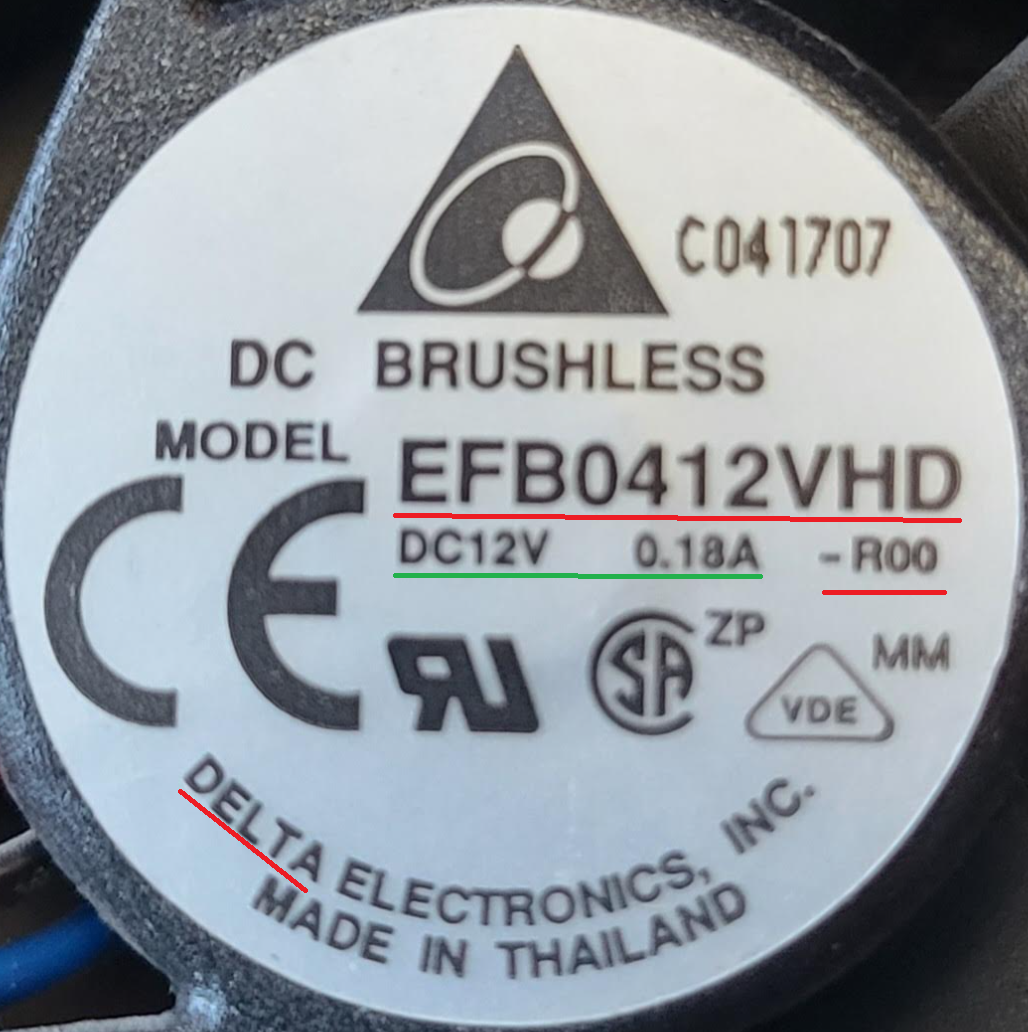
Second, I review the stock fan specification datasheet. I already know the Voltage and Amp rating but here are the things I also need:
- Fan Size – 40mm x 40mm x 20mm
- Hole Mount Size – 32 mm between mount points
- Hole diameter – 3.5 mm diameter.
- Length of Wires – 330 mm
- Identify the 3 wires and their purpose – 12v, Ground, and Lock Rotor
- Db Noise rating – 32-36 Dba
- RPM – 9000 RPM
- CFM – 10
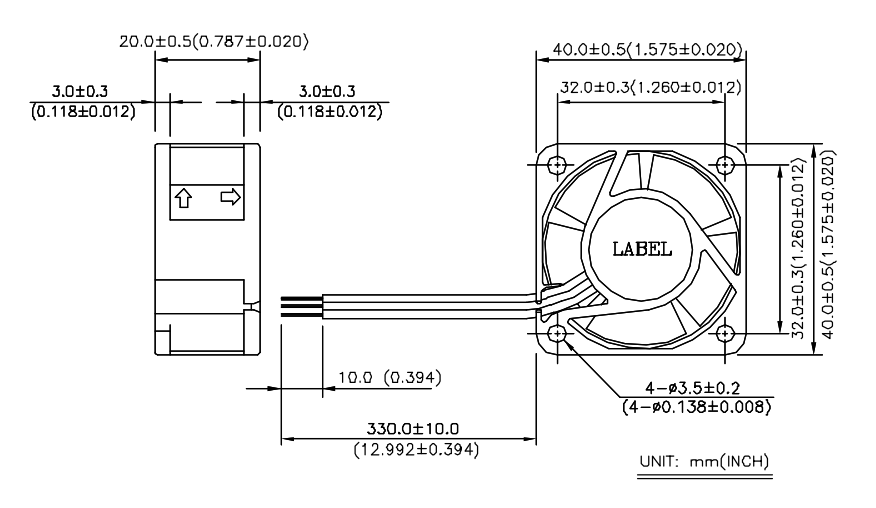
Not sure if you caught it but identifying the 3 wires on the stock fan is critical if you want to resolve these error lights. Most 3 wires fans are going to have 12v DC and Ground. It’s that 3rd wire that makes them unique and its one of the more important items you must find out to select the correct replacement fan.
The 3 most common types of 3 wire fans are:
- Step RPM Speed – think of this like gears on a bike. The fan speed steps from one RPM to another. Most have between 3-5 steps in RPM.
- PWM – Pulse Width Modulation, allows for granular speed control. Instead of instantly stepping to the next speed it is gradually sped up and down.
- Locked Rotor (sometimes called alert) – This is a fan spin error detection. Normally, the fan will spin at one speed. 40 mm Locked Rotor fans seem to be the most common for routers, switches, and other similar devices.
Another item is the length of the wires. The datasheet shows 330 mm (+-10mm), however the fan you order could be shorter. It’s best just to measure the stock fan, and make sure the replacement fan you ordered has enough length or room to stash the wires if they are too long.
Third, now that I understand my stock fan I’m ready to choose a replacement fan that meets with my goal of reducing fan noise. In most cases, fan noise is reduced by slowing the RPM. Additionally, there are fans specifically designed to reduce noise but they can be expensive. I thoroughly looked at 40mm Noctua fans but none of them matched the voltage and Locked Rotor requirements. However, I still see a lot of folks buying Noctua 40mm fans and then complaining about the fan error lights or issues with it malfunctioning. Most just ignore these errors or alter the fan wires to send a false message to the device. Both I don’t recommend.
In this case I choose the Sunon MagLev KDE1204PKV3 MS.AR.GN 40x40x20mm 3pin Low-Speed 5200RPM 6.3CFM (Locked Rotor Alarm Signal). Cost is about $6.50 US, compared to a non-compliant Noctura $14 US
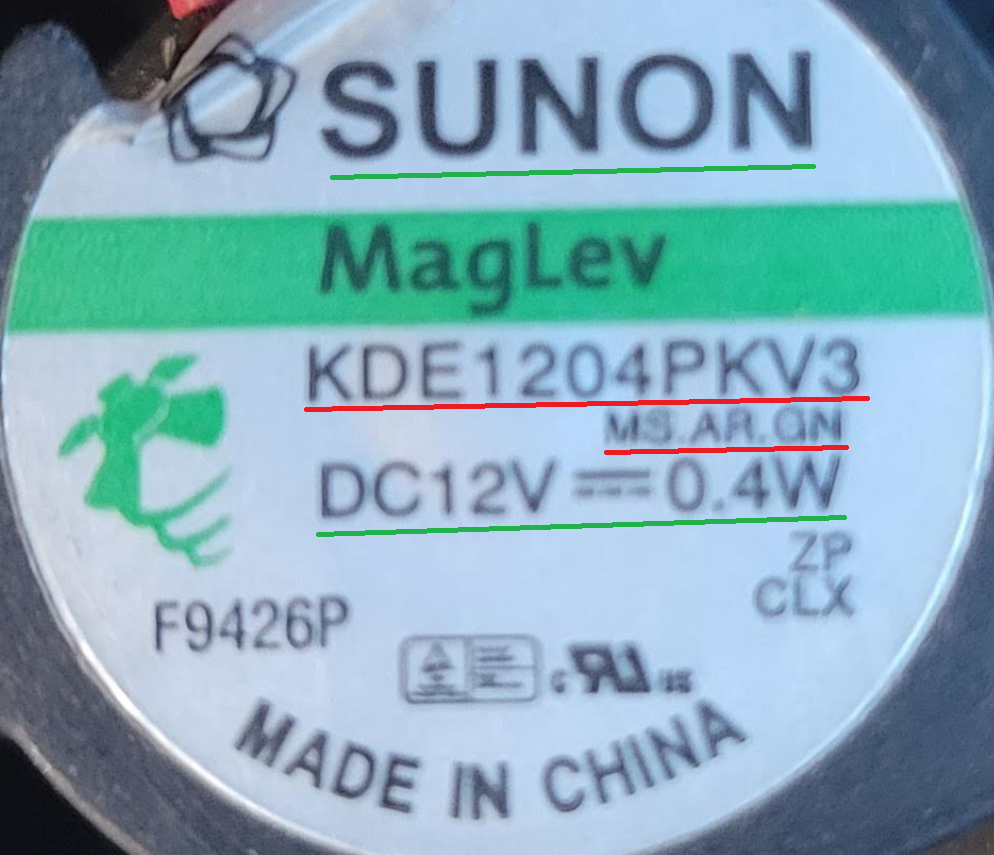
How do the stock and replacement fans compare:
| Item (recommendation) | Delta EPB0142VHD-R00 | Sunon KDE1204PKV3 MS.AR.GN |
| DC Volts (match) | 12 | 12 |
| Amps (do not exceed stock) | 0.18 | 0.03 |
| Fan Size (match) | 40mm x 40mm x 20mm | 40mm x 40mm x 20mm |
| Hole Mount Size (match) | 32 mm | 32 mm |
| Hole Diameter (close match) | 3.5 mm | 4 mm |
| Length of Wires (match) | 330 mm | 300 mm |
| 3 wire purpose (match) | 12v, Ground, Lock Rotor | 12v, Ground, Locked Rotor |
| Db Noise rating (reduce) | 32-36 Dba | 18 Dba |
| RPM (close match) | 9000 | 5200 |
| CFM (close match) | 10 | 6.3 |
Fourth, Prepare the fan to be installed. One item I didn’t mention was the fan edge connector. Most data sheets do not come with information on the edge connector as device manufactures may customize this. In this size of fan the edge connectors seem to be a standard size with some variants.
Some fans will need their wire order changed to match the circuitry on the device. Aligning these pins is critical, if they are wrong you could damage your device. For example your replacement fan came with Pin 1 12v Red, Pin 2 Ground Black, and Pin 3 Motor Lock Yellow (Sometimes White or Blue) you might need to reordered them to match your device. Simply use a wire pin removal tool, light pressure down, and push the pin out. Then, reorder the pins to match your device and you are good to go.

Next the replacement fan mount hole might be a factor. Some replacement fans come with screws or bolts that you may be able to use. If not, you may be able to use the stock hardware or hardware you provide. Either way, depending on the hole size you may have to work this out a bit. In my case, the stock fan screws worked perfectly. Tip – Don’t over crank or force in screws, it may damage your fan.
If your stock fan had a protection sleeve over the wires you may want to reuse it as some devices have sharp metal edges that may cut into your wires. Fan vibration may also cause this too. As an alternative, you may want to consider adding heat shrink when you re-pin the fan.
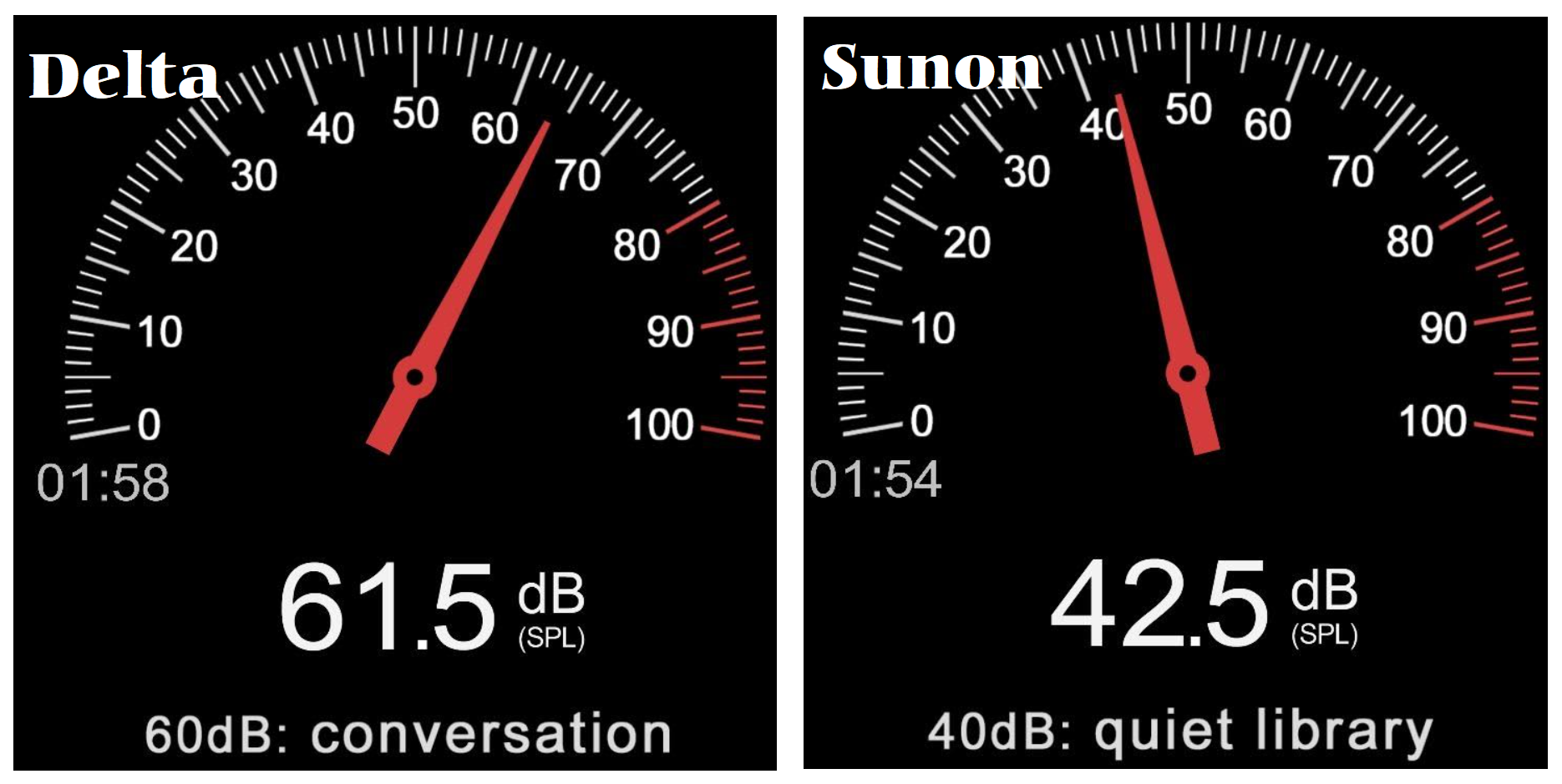
Lastly, how did my selection perform? Basically, the Sunon is a very close replacement to the Delta. It has a reduced RPM and CFM which drops its Db noise by 20 Db. Since I choose a replacement fan that is not an exact match, I’ll need to monitor the device and ensure its temps are within normal thresholds.
Very unscientifically, I used a Db meter app in my smartphone to measure the Db for the Delta and Sunon Fans. The noise reduction was notable and best of all no fan error lights.
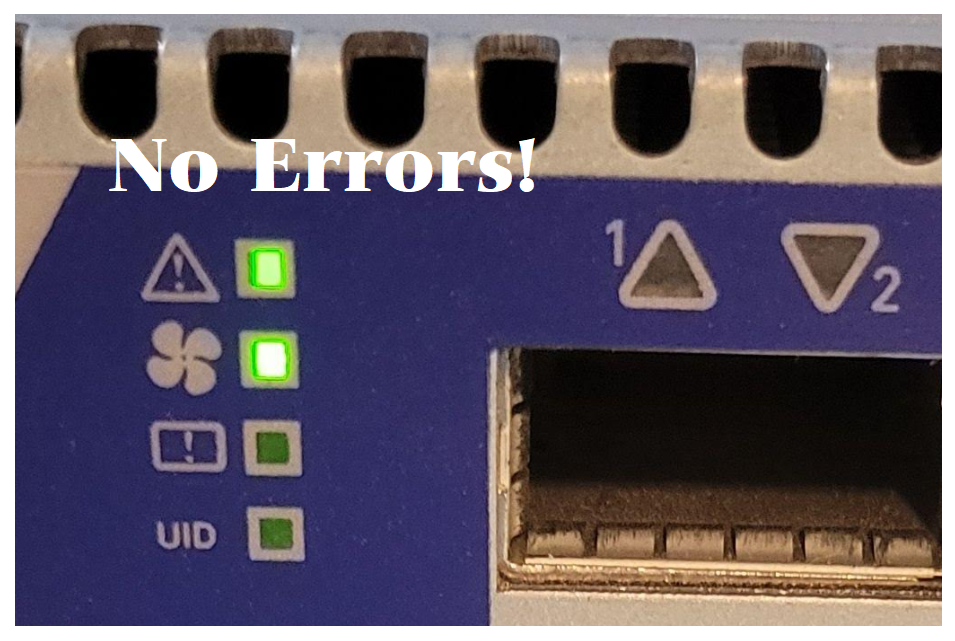
Summary, there is no doubt that Noctua makes a quality fan product but they can be expensive and sometimes do not meet the requirements of your stock fans. If you can find one that does, it may be worth the extra spend. However, by doing just a bit of research you are sure to land on a replacement fan that will meet your goals and not break your wallet. My goal was to reduce fan noise for my home lab and by doing my homework I hit a home run with the first fan I chose.
Thanks for reading and do feel free to leave a comment or suggestion.
A shout to VMware Embedded OEM Partners
Today, I’m honored to be recognized by our VMware Customer Experience and Success team for my efforts in supporting eOEM. However, building up to this day took a lot of effort and an a industrious sprit to ensure success for my partner. Inside of VMware, I became an internal advocate for the needs of our eOEM partners, and I’ll continue helping them through their challenges plus aligning them for success. They truly partner with you and help to ensure your success as much as theirs. In this blog are some of my thoughts around working with VMware eOEM and some secrets to my success.
For the past 11+ years I’ve been a Technical Account Manager (TAM) with VMware. From day 1 I was assigned a VMware Embedded OEM (eOEM) Partner and I’ve loved every minute of it. When I first started, inspiring the global industrial market to move into virtualization was no small task and while working with my eOEM Partner early on it was apparent they understood their customer at a very deep level. This was something I needed to master if I was going to be successful with eOEM customer. For the past 40+ years, my eOEM Partner has held an annual global industrial users group meeting. This event has helped to build a very loyal customer base. This event is very similar to VMUG in many ways and early on in my TAM assignment I knew this customer bond was extremely valuable. However, ensuring I understood their customers’ requirements and business objectives was the key to my success. I knew this event was an opportunity to learn as much as I could about industrial controls and their needs. When folks ask me about my first day with VMware, I like to tell them I was born at my partners event, meaning my first day with VMware was at their annual event. I was working the VMware booth talking about Industrial process and how it relates to VMware. I knew this was my opportunity to ask more questions to their customers then they asked of me. Additionally, during lunch breaks and nightly events I would always sit with folks I didn’t know and ask lots of questions. Sometimes it would be my partners employees or their customers, either way I would always push my boundaries to learn something new. Through event I started better understand their customer base and by leveraging this deep understanding of their business, I was able to help them become very successful in their market space. My eOEM Partner has been so pleased with my performance they have invited me back to their event every year since 2011 and now their customers ask for me by name.
Knowing your TAM customers business, ensuring support alignment, and being their best advocate are just a few examples of how I aligned my eOEM Partner for success. I put a focus on bringing the best value to our partner, helped them build a broad offering with our products, and in turn both companies have flourished. Additionally, having our efforts recognized helped to solidify the efforts that we both put into their product line. In 2017, we won two awards: Partner Innovation OEM Award and the TAM award for Emerging Trends and Technology. The team was presented the TAM award at VMworld 2017 by Pat Gelsinger.

Will ESXi 8 install on to the ASRockRack EPC621D8A motherboard?
In this video I show how I installed ESXi 8 on to the ASRockRack EPC621D8A motherboard and discuss some of the caveats of doing so.
Links in the video:
ASRockRack EPC621D8A motherboard: https://www.asrockrack.com/general/productdetail.asp?Model=EPC621D8A#specifications
VMware Comptibility Guide: https://www.vmware.com/resources/compatibility/detail.php?deviceCategory=server&productid=47030&deviceCategory=server&details=1&partner=600&page=1&display_interval=10&sortColumn=Partner&sortOrder=Asc
H3C NIC-GE-4P-360T-L3 NIC: https://www.vmware.com/resources/compatibility/detail.php?deviceCategory=io&productid=50861&deviceCategory=io&details=1&VID=8086&DID=37d1&SVID=8086&page=1&display_interval=10&sortColumn=Partner&sortOrder=Asc

Noctua NH-D9 DX-3647 4U Install
There aren’t many choices when it comes to Socket LGA 3647 CPU coolers and Noctua seems to have a solid, yet expensive, option. Based on their reputation in the industry alone I expected better instructions but this cooler soon let me down. After reading the instructions serval times I got it all together. I choose to make a video on the installation of this CPU cooler and share a few tips that might help others with their install.
Quick Start with Power CLI 12.7
I was tasked with setting and testing a quick PowerCLI command today and my system was a bit behind. Of course I took to Youtube to find how to get started quickly with PowerCLI but most of the videos I located were too complex. In this quick blog post I’m going to go over the steps I took to update my Windows Environment with PowerShell, Install PowerCLI, and get it up and running.
Note: this procedure is for Windows systems that are connected to the Internet. There are manual ways to install PowerCLI. However, this post doesn’t cover that process. Additionally, there are Prerequisites to installing PowerCLI, check out this link for more information.
First — I checked to see what version of PowerShell (PS) I have installed. I opened a PowerShell command window as Admin and entered the following command. $PSVersionTable. From the output I could see I had 5.1.19041…

I could have also entered $PS.versionTable.PSversion
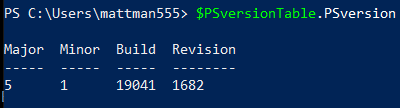
Note: Newer versions of Windows should have PowerShell installed by default. If you don’t have PowerShell installed follow this guide for 5.1.
Second – Now it was time to install PowerCLI
- Open the PS5 App as Admin
- Run this command to download – Install-Module -Name VMware.PowerCLI
- Read and answer Yes or All when prompted (Be patient it may take a bit)
- Next you’ll need to Set Execution Policies:
- Enter the command – ‘Set-ExecutionPolicy RemoteSigned’
- More info on Execution Policies HERE
- Next command: ‘Set-PowerCLIConfiguration -InvalidCertificateAction Ignore -Confirm:$false’
Third – Ensure PowerCLI Commands are working
- With the PowerShell APP open try this commend to see the version of PowerCLI
- ‘Get-PowerCLIVersion’ << Deprecated command, but works for now
- Also ‘Get-Module’ will tell you the version
- Connect to your vCenter Server
- Enter the command ‘Connect-VIServer [FQDN or IP]
- Once Connected try the command ‘Get-VM’ to see a list of VM’s
These commands might seem simple but I was amazed by the amount of trial and effort it took to get PowerCLI up and running. I’m sure there are other issues folks might run into. If you do run into an issue post a comment below and I’ll be glad to help out.
#VMUG Keynote around being Left-handed and DE&I
I had the honor of presenting the keynote session at the Phoenix Usercon last week. It was my first time in public talking about how my laterality (left-handedness) broadened my view of #diversityequityandinclusion. I got some really great feedback from the audience and I’m hoping it helped them broaden their view too. If you want to know more check out my article here. https://www.linkedin.com/…/being-left-handed-dei…/ #vmug #vexpert #diversity #vmware

10Gbe NAS Home Lab: Part 8 Interconnecting MikroTik Switches
It’s been a long wait for Part 8 but I was able to release it today! If you are interested on how to network performance test your storage environment this session might help. The purpose of this session is to show how to interconnect two MikroTik switches and ensure their performance is optimal when compared to a single switch. The two NAS devices in this session have different physical capabilities and by no means is this a comparison of their performance. The results are merely data points. Users should work with their vendor of choice to ensure best performance and optimization.

VMware vExpert Session: Home Labs A Definitive Guide June-2022
I have presented my HOME LABS: A DEFINITIVE GUIDE to various groups. However, in this session I present it to my fellow vExperts. During these sessions I go into detail around VMware Home lab design considerations, which is something we usually don’t think of when building a home lab.
If you are looking for the links in the video simply download the slides via this link:
I do hope you find this information very useful. Please feel free to ask any questions or post comments…
Thanks — Enjoy!

3 Interesting DIY PC / Server Case Options for Home Labs
I’ve been building White box PCs since the early 90’s and if you seen my home lab blogs and videos its a passion that has continued on for so many years. When I look for a case, I’m usually looking for practicality and usability as it relates to the indented design. As a DIY home lab builder, using commodity cases is normal but unique cases for home labs are not always easy to find. When I do look for unique Home Lab case ideas, I usually run into lists of the gamer builds that are not so much meant for Home Labs. In this blog I wanted to compile a list of cases that are a bit more unique but someone might want to use for a home lab. For each case, I listed out some of my thoughts around home lab use cases. Of course, deeper research will be needed to determine if they fit your indented use.
#1 – Cryorig TAKU, The PC Monitor Stand Mini ITX PC Case

USE CASE: Could be used for a stackable home lab or workstations
PROS:
- ~1U Formfactor | ++ Coolness factor
- Portability | Light Weight | Low Noise
- The slide out system tray makes for easy access to internal components, especially when stacked
CONS:
- Tight form factor limiting options
- Sometimes limited SFX Power Supplies Options
- ITX Standard might be hard for Home Lab deployments
- Limited to 3 Drives
- When opening cables may have to slide with it or be disconnected
- Company just starting out, hard to find replacement parts
Other Links:
- Cost ~$200
- Video Review
- Amazon
#2 – Fractal Design Define 7

USE CASE: Sure this may look like a standard PC Case, but what’s unique about this case is the MANY ways it can be configured and re-configured. Because of this unique flexibility it would work well as a Workstation or ESXi Host.
PROS:
- MANY case configurations options
- Want even more space? Look at the Define 7 XL
- Supports ATX and some E-ATX configurations
- Clean case design with 3 Color Options
- Horizontal and vertical PCI Slots
- Wire management
- Air Filters
- 9 Fan Connections
- Lots of Disk space
CONS:
- No 5.25″ disk bays
- No front facing USB or external ports (all on top)
- It’s big and the XL even bigger
- Some options sold separately
Other Links:
- Standard ~$140 | XL Version $220
- Amazon
- Video Review
- Manufacture Site
#3 – JONSBO N1 Mini-ITX NAS Chassis

USE CASE: With so many disk options could see this case being used for FreeNAS or even a vSAN cluster
PROS:
- LOTS of disk space 5 x 3.5 and 1 2.5
- MINI-ITX / Small form factor
- PCI Low Profile slot
- Upright or Lie-down configurations
- Check out the manufacture site for more and similar case designs
CONS:
- Does require SFX power supply
- Power/Cables may be hard to work with in the upright position
- The size may limit flexibility
- Only one PCI slot
- No 5.25″ disk bays
Other Links:
Home Lab Generation 7: Migration to ALL Flash vSAN
In this video I review and show how I migrated my vSAN Hybrid deployment to All Flash vSAN.
Video Highlights:
- I cover some of my goals and reasons why I have made this investment
- Review the changes required
- Talk about how I Backed Up and Migration of my current data using the LOCKERSTOR 10 and Synology 1621+
- The way I decommission vSAN with only 3-nodes
- I then build a new vSAN Cluster and migrated the data.
- Wrapping it up I review Parts List and show how I built the new vSAN Cluster.
NOTE: This is a non-production and non-supported home lab. Products used in this environment are in no way intended for production systems.
See helpful links and additional photos below.
Helpful Links:
- More about NVMe Bifurcation Link
- SuperMicro X9DRD-7LN4F-JB
- SuperMicro AOC-SLG3-2M2 User Manual and Product Page
- SuperMicro X9 support for AOC-SLG2-2m2
- Sabrent Rocket NVMe
- Dual M.2 PCIe Adapter Card for NVMe/SATA SSD
Photos not in the video:
Pre-Migration Host
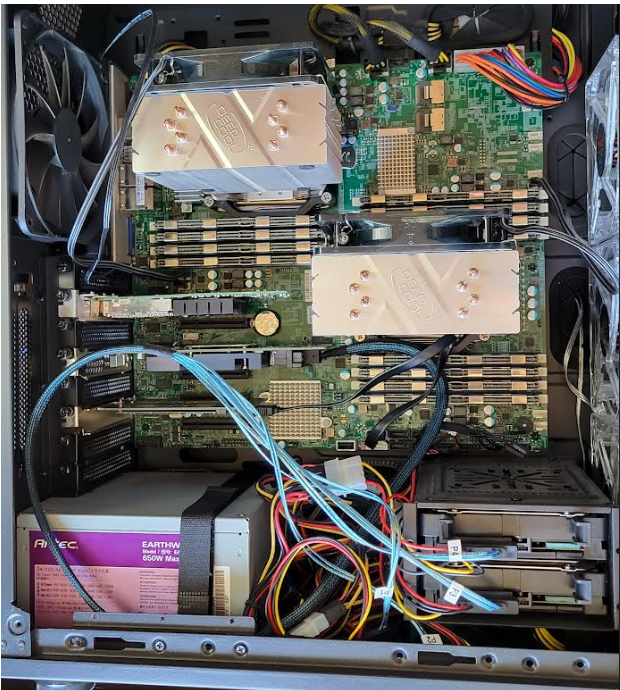
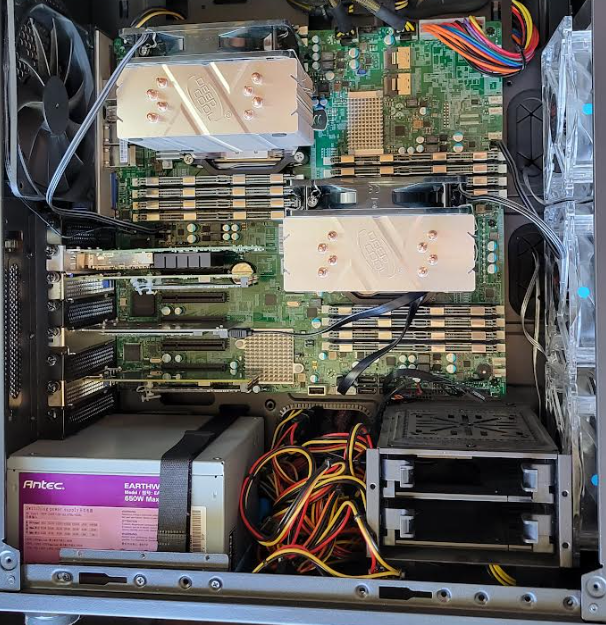
Post Migration Host (Much cleaner)
 vmexplorer