Month: December 2020

Possible Security issues with #solarwinds #loggly and #Trojan #BrowserAssistant PS

Posted on Updated on

Lately, I haven’t had much involvement with malware, trojans, and virus’.  However, most recently Norton Family started to alert me to a few websites I didn’t recognize on one of my personal PC’s.  Norton reported these three sites: loggly.com | pads289.net | sun346.net   Something I also noticed was all three sites were posting at the same date/time, and the Pads/Sun sites had the same ID number in their URL (see pic below).  This behavior just seemed odd.    I didn’t initially recognize any of these sites, but a quick search revealed loggly.com was a solarwinds product.  My mind started to wander, could this be related to their recent security issues?  Just to be clear, this post isn’t about any current issues with solarwinds, VMware, or others. These issues were located on my personal network.  I’m posting this information as I know many of us are working from home, have kids doing online school, and the last thing we need is a pesky virus slowing things down.

I use Norton Family on all of my personal PC and the first thing I did was block the sites on the affected PC and the via Internet firewall.
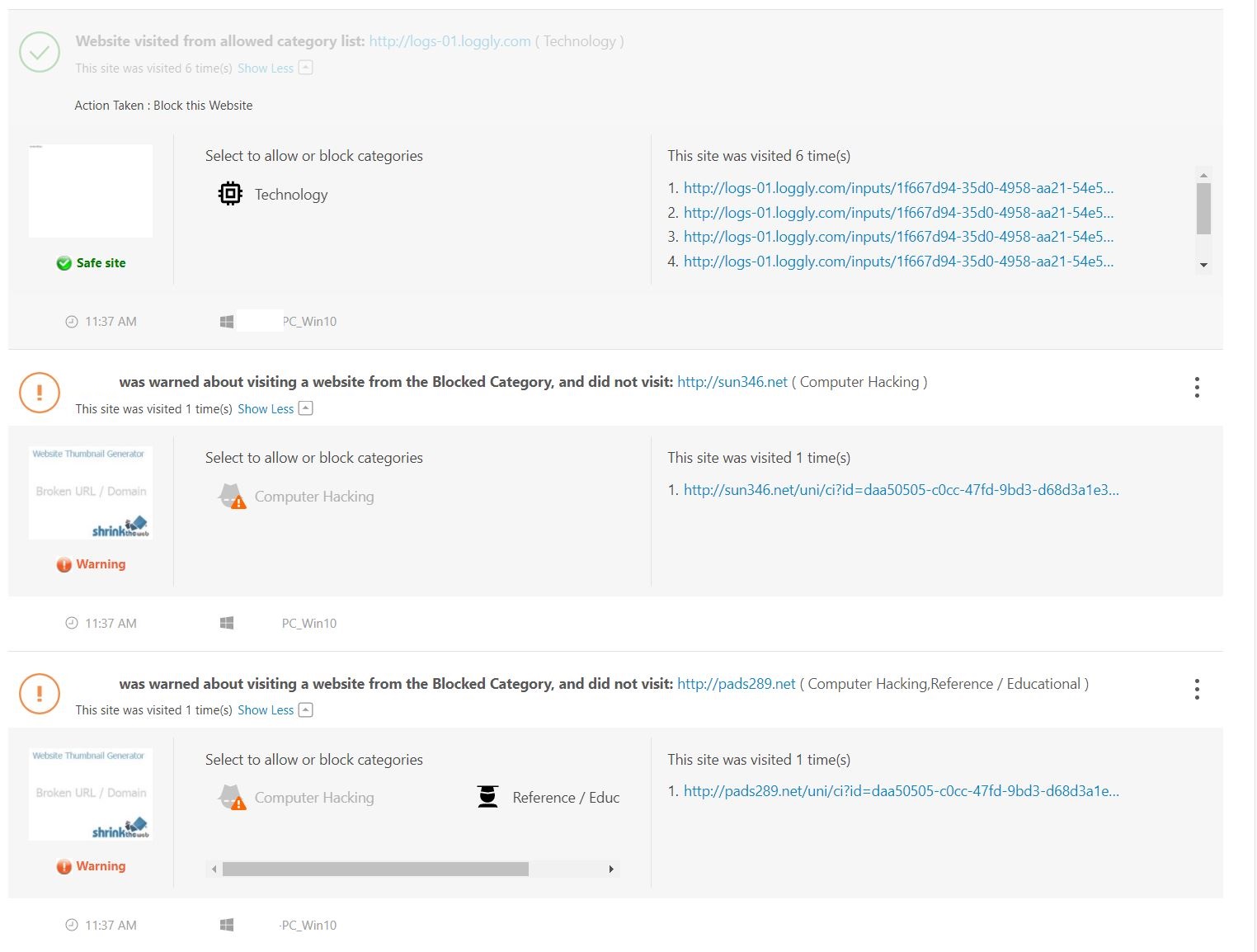
Next, I started searching the Inet to see what I could find out on these three sites.  Multiple security sites of these URLs turned up no warnings, no black lists, whois seemed normal, just pretty much nothing alarming.  In fact, I was even running Sophos UTM Home Firewall, and it never alerted on this either. If I went directly to these sites it resulted in a blank page.  Additionally, the PC seemed to run normal, no popups, or redirection of sites.  Really it had no issues at all except it just kept going to these odd sites.

That’s when I found urlscan.io.  I pointed it at one of the sites and I noticed there were several update.txt files.
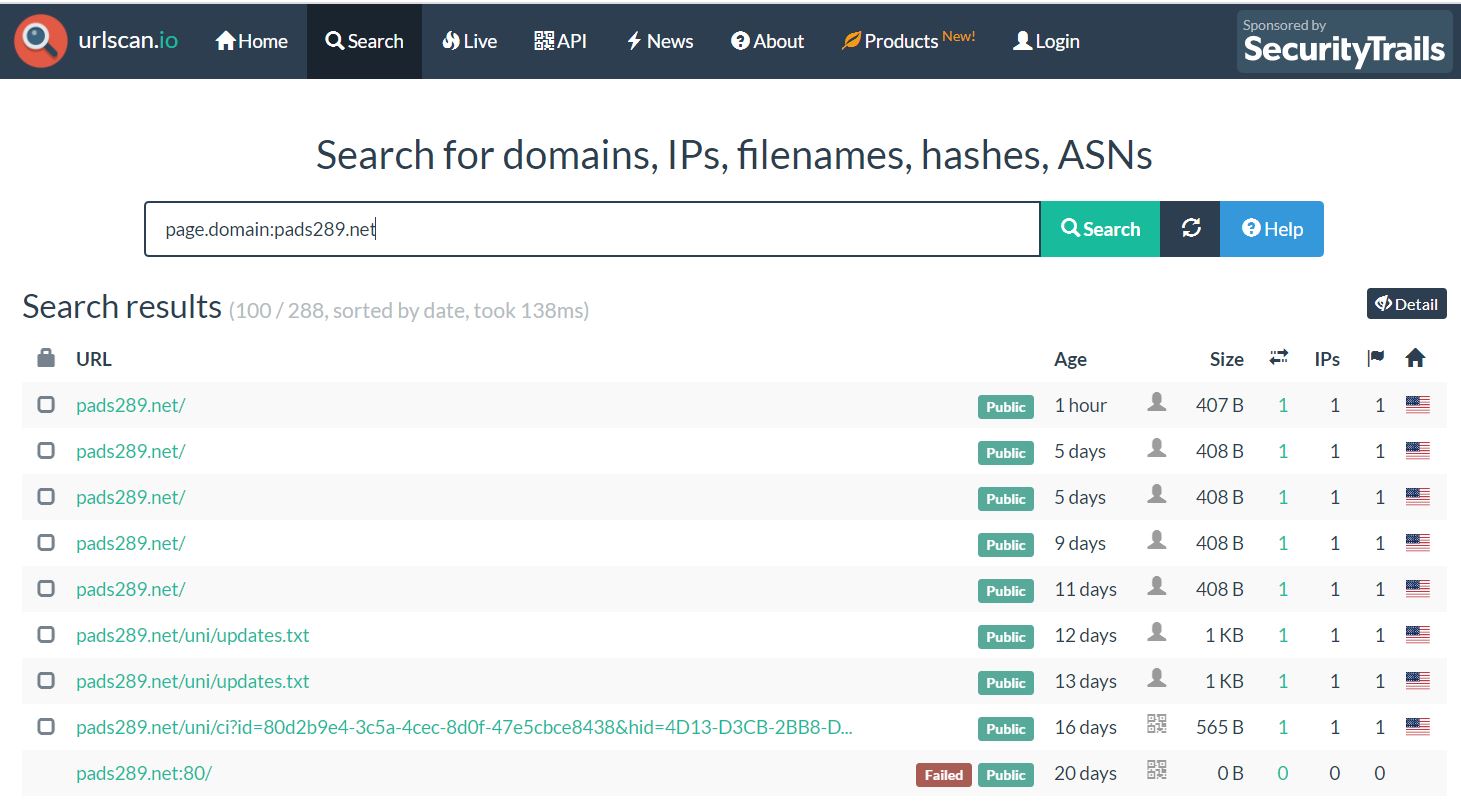
When I clicked on the update.txt it brought me to this screen where I could view the text file via the screenshot.

One thing I noticed about the text file was ‘Realistic Media Inc.’ and ‘Browser Assistant’,  and MSI installable. These things seemed like a programs that could be installed on a PC.

Looking at the installed programs on the affected PC and I found a match.

A quick search, and sure enough lots of hits on this Trojan.
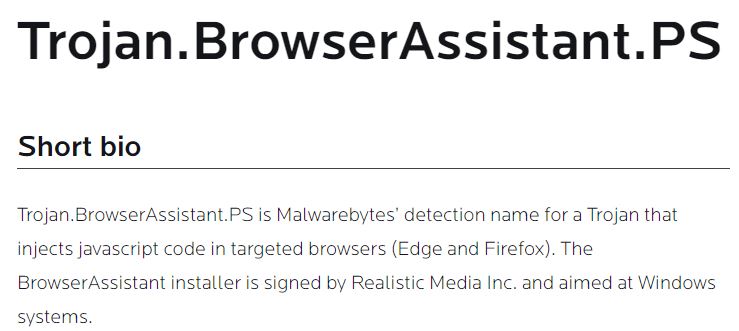
Next I ran Microsoft Safety Scanner, it removed some of it, and then I uninstalled the ‘Browser Assistant’ program.

Lastly, I sent an email into AWS and Solarwinds asking them to look into this issue.  

Within 24 hours Amazon Responded with:  “The security concern that you have reported is specific to a customer application and / or how an AWS customer has chosen to use an AWS product or service.  To be clear, the security concern you have reported cannot be resolved by AWS but must be addressed by the customer, who may not be aware of or be following our recommended security best practices.  We have passed your security concern on to the specific customer for their awareness and potential mitigation.” 

Within 24 hours Solarwinds responded with:  They are working with me to see if there are any issues with this. 

Summary:

This pattern for Trojans or Mal/ad-ware probably isn’t new to security folks but either way I hope this blog helps you to better understand odd behavior on your personal network.

Thanks for reading and please do reach out if you have any questions.

Reference Links / Tools:

If you like my ‘no-nonsense’ videos and blogs that get straight to the point… then post a comment or let me know… Else, I’ll start posting really boring content!

GA Release #VMware #vSphere + #vSAN 7.0 Update 1c/P02 | Announcement, information, and links

Posted on

Announcing GA Releases of the following

  • VMware vSphere 7.0 Update 1c/P02 (Including Tanzu)
  • VMware vSAN™ 7.0 Update 1c/P02

Note: The included ESXi patch pertains to the Low severity Security Advisory for VMSA-2020-0029 & CVE-2020-3999

See the base table for all the technical enablement links.

Release Overview
vCenter Server 7.0 Update 1c | ISO Build 1732751

ESXi 7.0 Update 1c | ISO Build 17325551

What’s New vCenter
  • Physical NIC statistics: vCenter Server 7.0 Update 1c adds five physical NIC statistics:droppedRx, droppedTx, errorsRx, RxCRCErrors and errorsTx, to the hostd.log file at /var/run/log/hostd.log to enable you detect uncorrected networking errors and take necessary corrective action
  • Advanced Cross vCenter vMotion: With vCenter Server 7.0 Update 1c, in the vSphere Client, you can use the Advanced Cross vCenter vMotion feature to manage the bulk migration of workloads across vCenter Server systems in different vCenter Single Sign-On domains. Advanced Cross vCenter vMotion does not depend on vCenter Enhanced Linked Mode or Hybrid Linked Mode and works for both on-premise and cloud environments. Advanced Cross vCenter vMotion facilitates your migration from VMware Cloud Foundation 3 to VMware Cloud Foundation 4, which includes vSphere with Tanzu Kubernetes Grid, and delivers a unified platform for both VMs and containers, allowing operators to provision Kubernetes clusters from vCenter Server. The feature also allows smooth transition to the latest version of vCenter Server by simplifying workload migration from any vCenter Server instance of 6.x or later
  • Parallel remediation on hosts in clusters that you manage with vSphere Lifecycle Manager baselines: With vCenter Server 7.0 Update 1c, you can run parallel remediation on ESXi hosts in maintenance mode in clusters that you manage with vSphere Lifecycle Manager baselines
  • Third-party plug-ins to manage services on the vSAN Data Persistence platform: With vCenter Server 7.0 Update 1c, you can enable third-party plug-ins to manage services on the vSAN Data Persistence platform from the vSphere Client, the same way you manage your vCenter Server system. For more information, see the vSphere with Tanzu Configuration and Management documentation.
What’s New vSphere With Tanzu
Supervisor Cluster

  • Supervisor Namespace Isolation with Dedicated T1 Router – Supervisor Clusters using NSX-T network uses a new topology where each namespace has its own dedicated T1 router.

·      Newly created Supervisor Clusters uses this new topology automatically.

·      Existing Supervisor Clusters are migrated to this new topology during an upgrade

  • Supervisor Clusters Support NSX-T 3.1.0 – Supervisor Clusters is compatible with NSX-T 3.1.0
  • Supervisor Cluster Version 1.16.x Support Removed – Supervisor Cluster Version 1.16.x is now removed. Supervisor Clusters running 1.16.x should be upgraded to a new version

Tanzu Kubernetes Grid Service for vSphere

  • HTTP/HTTPS Proxy Support  – Newly created Tanzu Kubernetes clusters can use a global HTTP/HTTPS Proxy for egress traffic as well as for pulling container images from internet registries.
  • Integration with Registry Service – Newly created Tanzu Kubernetes clusters work out of the box with the vSphere Registry Service. Existing clusters, once updated to a new version, also work with the Registry Service.
  • Configurable Node Storage  – Tanzu Kubernetes clusters can now mount an additional storage volume to virtual machines thereby increasing available node storage capacity. This enables users to deploy larger container images that might exceed the default 16GB root volume size.
  • Improved status information  WCPCluster and WCPMachine Custom Resource Definitions now implement conditional status reporting. Successful Tanzu Kubernetes cluster lifecycle management depends on a number of subsystems (for example, Supervisor, storage, networking) and understanding failures can be challenging. Now WCPCluster and WCPMachine CRDs surface common status and failure conditions to ease troubleshooting.

Missing new default VM Classes introduced in vSphere 7.0 U1

  • After upgrading to vSphere 7.0.1, and then performing a vSphere Namespaces update of the Supervisor Cluster, running the command “kubectl get virtualmachineclasses” did not list the new VM class sizes 2x-large, 4x-large, 8x-large. This has been resolved and all Supervisor Clusters will be configured with the correct set of default VM Classes. 
  • With ESXi 7.0 Update 1c, you can use the –remote-host-max-msg-len parameter to set the maximum length of syslog messages, to up to 16 KiB, before they must be split. By default, the ESXi syslog daemon (vmsyslogd), strictly adheres to the maximum message length of 1 KiB set by RFC 3164. Longer messages are split into multiple parts. Set the maximum message length up to the smallest length supported by any of the syslog receivers or relays involved in the syslog infrastructure
  • With ESXi 7.0 Update 1c, you can use the installer boot option systemMediaSize to limit the size of system storage partitions on the boot media. If your system has a small footprint that does not require the maximum 138 GB system-storage size, you can limit it to the minimum of 33 GB. The systemMediaSize parameter accepts the following values:
    • min (33 GB, for single disk or embedded servers)
    • small (69 GB, for servers with at least 512 GB RAM)
    • default (138 GB)
    • max (consume all available space, for multi-terabyte servers)

The selected value must fit the purpose of your system. For example, a system with 1TB of memory must use the minimum of 69 GB for system storage. To set the boot option at install time, for example systemMediaSize=small, refer to Enter Boot Options to Start an Installation or Upgrade Script. For more information, see VMware knowledge base article 81166.

VMSA-2020-0029 Information for ESXi
VMSA-2020-0029 Low
CVSSv3 Range 3.3
Issue date: 12/17/2020
CVE numbers: CVE-2020-3999
Synopsis: VMware ESXi, Workstation, Fusion and Cloud Foundation updates address a denial of service vulnerability (CVE-2020-3999)
ESXi 7 Patch Info VMware Patch Release ESXi 7.0 ESXi70U1c-17325551
This section derives from our full VMware Security Advisory VMSA-2020-0029 covering ESXi only.  It is accurate at the time of creation and it is recommended you reference the full VMSA for expanded or updated information.
What’s New vSAN
vSAN 7.0 Update 1c/P02 includes the following summarized fixes as documented within the Resolved Sections for vCenter & ESXi

  • DOM Scrubber enhancement feature to enhance DOM scrubber functionality
  • Improvements in checksum verification during write prepare in LLOG
  • Persistence in network settings of witness appliance while creating witness VM
  • Enhancement in storage capacity/usage calculation on host level
  • NFS File bench performance improvements
  • LSOM fixes for random high write latency spikes in vSAN all-flash
  • File services improvements


Technical Enablement
Release Notes vCenter Click Here  |  What’s New  |  Patches Contained in this Release  |  Product Support Notices  |  Resolved Issues  |  Known Issues
Release Notes ESXi Click Here  |  What’s New  |  Patches Contained in this Release  |  Product Support Notices  |  Resolved Issues  |  Known Issues
Release Notes vSAN 7.0 U1 Click Here  |  What’s New  |  VMware vSAN Community  |  Upgrades for This Release  |  Limitations  |  Known Issues
Release Notes Tanzu Click Here  |  What’s New  |  Learn About vSphere with Tanzu  |  Known Issues
docs.vmware.com/vSphere vCenter Server Upgrade  |   ESXi Upgrade  |  Upgrading vSAN Cluster  |   Tanzu Configuration & Management
Download Click Here
Compatibility Information ports.vmware.com/vSphere 7 + vSAN  |  Configuration Maximums vSphere 7  |  Compatibility Matrix  |  Interoperability
VMSA Reference VMSA-2020-0029  |  VMware Patch Release ESXi 7.0 ESXi70U1c-17325551

GA Release VMware NSX Data Center for vSphere 6.4.9 | Announcement, information, and links

Posted on Updated on

Announcing GA Releases of the following

  • VMware NSX Data Center for vSphere 6.4.9 (See the base table for all the technical enablement links.)


Release Overview
VMware NSX Data Center for vSphere 6.4.9 | Build 17267008 

NSX for vSphere 6.4 End Of General Support Was Extended to 01/16/2022

lifecycle.vmware.com

What’s New
NSX Data Center for vSphere 6.4.9 adds usability enhancements and addresses a number of specific customer bugs. 

  • vSphere 7.0 Update 1 Support
  • VMware NSX – Functionality Updates for vSphere Client (HTML): The following VMware NSX features are now available through the vSphere Client: Service Definitions for Guest Introspection and Network Introspection. For a list of supported functionality, please see VMware NSX for vSphere UI Plug-in Functionality in vSphere Client.
  • Guest Introspection: Adds the ability to change logging level without requiring a restart of 3rd-party Guest Introspection partner service.
Minimum Supported Versions & Depreciated Notes
VMware declares minimum supported versions, this content has been simplified, please view the full details in the  Versions, System Requirements, and Installation section.

For vSphere 6.5:

Recommended: 6.5 Update 3 Build Number 14020092.
Important: If you are using NSX Guest Introspection on vSphere 6.5, vSphere 6.5 P03 or higher is recommended.

VMware Product Interoperability Matrix | NSX-V 6.4.9 & vSphere 6.5

For vSphere 6.7:

Recommended: 6.7 Update 2
Important:  If you are using NSX Guest Introspection on vSphere 6.7, please refer to Knowledge Base Article KB57248 prior to installing NSX 6.4.6, and consult VMware Customer Support for more information.

For vSphere 7, Update 1 is now supported

Note vSphere 6.0 has reached End of General Support and is not supported with NSX 6.4.7 onwards.

Guest Introspection for Windows

It is recommended that you upgrade VMware Tools to 10.3.10 before upgrading NSX for vSphere.

End of Life and End of Support Warnings

For information about NSX and other VMware products that must be upgraded soon, please consult the VMware Lifecycle Product Matrix.

  • NSX for vSphere 6.1.x reached End of Availability (EOA) and End of General Support (EOGS) on January 15, 2017. (See also VMware knowledge base article 2144769.)
  • vCNS Edges no longer supported. You must upgrade to an NSX Edge first before upgrading to NSX 6.3 or later.
  • NSX for vSphere 6.2.x has reached End of General Support (EOGS) as of August 20, 2018.

General Behavior Changes

If you have more than one vSphere Distributed Switch, and if VXLAN is configured on one of them, you must connect any Distributed Logical Router interfaces to port groups on that vSphere Distributed Switch. Starting in NSX 6.4.1, this configuration is enforced in the UI and API. In earlier releases, you were not prevented from creating an invalid configuration.  If you upgrade to NSX 6.4.1 or later and have incorrectly connected DLR interfaces, you will need to take action to resolve this. See the Upgrade Notes for details.

In NSX 6.4.7, the following functionality is deprecated in vSphere Client 7.0:

  • NSX Edge: SSL VPN-Plus (see KB79929 for more information)
  • Tools: Endpoint Monitoring (all functionality)
  • Tools: Flow Monitoring (Flow Monitoring Dashboard, Details by Service, and Configuration)
  • System Events: NSX Ticket Logger

For the complete list of NSX installation prerequisites, see the System Requirements for NSX section in the NSX Installation Guide.

For installation instructions, see the NSX Installation Guide or the NSX Cross-vCenter Installation Guide.

Also refer to the complete Deprecated and Discontinued Functionality for all depreciated features, API Removals and Behavior Changes

General Upgrade Considerations
For more information, notes and considerations for upgrading please see the Upgrade Notes & FIPS Compliance section.

  • To upgrade NSX, you must perform a full NSX upgrade including host cluster upgrade (which upgrades the host VIBs). For instructions, see the NSX Upgrade Guide including the Upgrade Host Clusters section.
  • Upgrading NSX VIBs on host clusters using VUM is not supported. Use Upgrade Coordinator, Host Preparation, or the associated REST APIs to upgrade NSX VIBs on host clusters.
  • System Requirements: For information on system requirements while installing and upgrading NSX, see the System Requirements for NSX section in NSX documentation.
  • Upgrade path for NSX: The VMware Product Interoperability Matrix provides details about the upgrade paths from VMware NSX.
  • Cross-vCenter NSX upgrade is covered in the NSX Upgrade Guide.
  • Downgrades are not supported:
    • Always capture a backup of NSX Manager before proceeding with an upgrade.
    • Once NSX has been upgraded successfully, NSX cannot be downgraded.
  • To validate that your upgrade to NSX 6.4.x was successful see knowledge base article 2134525.
  • There is no support for upgrades from vCloud Networking and Security to NSX 6.4.x. You must upgrade to a supported 6.2.x release first.
  • Interoperability: Check the VMware Product Interoperability Matrix for all relevant VMware products before upgrading.
    • Upgrading to NSX Data Center for vSphere 6.4.7: VIO is not compatible with NSX 6.4.7 due to multiple scale issues.
    • Upgrading to NSX Data Center for vSphere 6.4: NSX 6.4 is not compatible with vSphere 5.5.
    • Upgrading to NSX Data Center for vSphere 6.4.5: If NSX is deployed with VMware Integrated OpenStack (VIO), upgrade VIO to 4.1.2.2 or 5.1.0.1, as 6.4.5 is incompatible with previous releases due to spring package update to version 5.0.
    • Upgrading to vSphere 6.5: When upgrading to vSphere 6.5a or later 6.5 versions, you must first upgrade to NSX 6.3.0 or later. NSX 6.2.x is not compatible with vSphere 6.5. See Upgrading vSphere in an NSX Environment in the NSX Upgrade Guide.
    • Upgrading to vSphere 6.7: When upgrading to vSphere 6.7 you must first upgrade to NSX 6.4.1 or later. Earlier versions of NSX are not compatible with vSphere 6.7. See Upgrading vSphere in an NSX Environment in the NSX Upgrade Guide.
  • Partner services compatibility: If your site uses VMware partner services for Guest Introspection or Network Introspection, you must review the  VMware Compatibility Guide before you upgrade, to verify that your vendor’s service is compatible with this release of NSX.
  • Networking and Security plug-in: After upgrading NSX Manager, you must log out and log back in to the vSphere Web Client. If the NSX plug-in does not display correctly, clear your browser cache and history. If the Networking and Security plug-in does not appear in the vSphere Web Client, reset the vSphere Web Client server as explained in the NSX Upgrade Guide.
  • Stateless environments: In NSX upgrades in a stateless host environment, the new VIBs are pre-added to the Host Image profile during the NSX upgrade process. As a result, NSX on stateless hosts upgrade process follows this sequence:
  • Service Definitions functionality is not supported in NSX 6.4.7 UI with vSphere Client 7.0:
    For example, if you have an old Trend Micro Service Definition registered with vSphere 6.5 or 6.7, follow any one of these two options:
    1. Option #1: Before upgrading to vSphere 7.0, navigate to the Service Definition tab in the vSphere Web Client, edit the Service Definition to 7.0, and then upgrade to vSphere 7.0.
    2. Option #2: After upgrading to vSphere 7.0, run the following NSX API to add or edit the Service Definition to 7.0.

POST  https://<nsmanager>/api/2.0/si/service/<service-id>/servicedeploymentspec/versioneddeploymentspec

Upgrade Consideration for NSX Components
Support for VM Hardware version 11 for NSX components

  • For new installs of NSX Data Center for vSphere 6.4.2, the NSX components (Manager, Controller, Edge, Guest Introspection) are on VM Hardware version 11.
  • For upgrades to NSX Data Center for vSphere 6.4.2, the NSX Edge and Guest Introspection components are automatically upgraded to VM Hardware version 11. The NSX Manager and NSX Controller components remain on VM Hardware version 8 following an upgrade. Users have the option to upgrade the VM Hardware to version 11. Consult KB (https://kb.vmware.com/s/article/1010675) for instructions on upgrading VM Hardware versions.
  • For new installs of NSX 6.3.x, 6.4.0, 6.4.1, the NSX components (Manager, Controller, Edge, Guest Introspection) are on VM Hardware version 8.

NSX Manager Upgrade

  • Important: If you are upgrading NSX 6.2.0, 6.2.1, or 6.2.2 to NSX 6.3.5 or later, you must complete a workaround before starting the upgrade. See VMware Knowledge Base article 000051624 for details.
  • If you are upgrading from NSX 6.3.3 to NSX 6.3.4 or later you must first follow the workaround instructions in VMware Knowledge Base article 2151719.
  • If you use SFTP for NSX backups, change to hmac-sha2-256 after upgrading to 6.3.0 or later because there is no support for hmac-sha1. See VMware Knowledge Base article 2149282  for a list of supported security algorithms.
  • When you upgrade NSX Manager to NSX 6.4.1, a backup is automatically taken and saved locally as part of the upgrade process. See Upgrade NSX Manager for more information.
  • When you upgrade to NSX 6.4.0, the TLS settings are preserved. If you have only TLS 1.0 enabled, you will be able to view the NSX plug-in in the vSphere Web Client, but NSX Managers are not visible. There is no impact to datapath, but you cannot change any NSX Manager configuration. Log in to the NSX appliance management web UI at https://nsx-mgr-ip/ and enable TLS 1.1 and TLS 1.2. This reboots the NSX Manager appliance.

Controller Upgrade

  • The NSX Controller cluster must contain three controller nodes. If it has fewer than three controllers, you must add controllers before starting the upgrade. See Deploy NSX Controller Cluster for instructions.
  • In NSX 6.3.3, the underlying operating system of the NSX Controller changes. This means that when you upgrade from NSX 6.3.2 or earlier to NSX 6.3.3 or later, instead of an in-place software upgrade, the existing controllers are deleted one at a time, and new Photon OS based controllers are deployed using the same IP addresses.

When the controllers are deleted, this also deletes any associated DRS anti-affinity rules. You must create new anti-affinity rules in vCenter to prevent the new controller VMs from residing on the same host.

See Upgrade the NSX Controller Cluster for more information on controller upgrades.

 Host Cluster Upgrade

  • If you upgrade from NSX 6.3.2 or earlier to NSX 6.3.3 or later, the NSX VIB names change.
    The esx-vxlan and esx-vsip VIBs are replaced with esx-nsxv if you have NSX 6.3.3 or later installed on ESXi 6.0 or later.
  • Rebootless upgrade and uninstall on hosts: On vSphere 6.0 and later, once you have upgraded from NSX 6.2.x to NSX 6.3.x or later, any subsequent NSX VIB changes will not require a reboot. Instead hosts must enter maintenance mode to complete the VIB change. This affects both NSX host cluster upgrade, and ESXi upgrade. See the NSX Upgrade Guide for more information.

NSX Edge Upgrade

  • Validation added in NSX 6.4.1 to disallow an invalid distributed logical router configurations: In environments where VXLAN is configured and more than one vSphere Distributed Switch is present, distributed logical router interfaces must be connected to the VXLAN-configured vSphere Distributed Switch only. Upgrading a DLR to NSX 6.4.1 or later will fail in those environments if the DLR has interfaces connected to the vSphere Distributed Switch that is not configured for VXLAN. Use the API to connect any incorrectly configured interfaces to port groups on the VXLAN-configured vSphere Distributed Switch. Once the configuration is valid, retry the upgrade. You can change the interface configuration using

PUT /api/4.0/edges/{edgeId} or PUT /api/4.0/edges/{edgeId}/interfaces/{index}. See the NSX API Guide for more information.

  • Delete UDLR Control VM from vCenter Server that is associated with secondary NSX Manager before upgrading UDLR from 6.2.7 to 6.4.5:
    In a multi-vCenter environment, when you upgrade NSX UDLRs from 6.2.7 to 6.4.5, the upgrade of the UDLR virtual appliance (UDLR Control VM) fails on the secondary NSX Manager, if HA is enabled on the UDLR Control VM. During the upgrade, the VM with ha index #0 in the HA pair is removed from the NSX database; but, this VM continues to exist on the vCenter Server. Therefore, when the UDLR Control VM is upgraded on the secondary NSX Manager, the upgrade fails because the name of the VM clashes with an existing VM on the vCenter Server. To resolve this issue, delete the Control VM from the vCenter Server that is associated with the UDLR on the secondary NSX Manager, and then upgrade the UDLR from 6.2.7 to 6.4.5.
  • Host clusters must be prepared for NSX before upgrading NSX Edge appliances: Management-plane communication between NSX Manager and Edge via the VIX channel is no longer supported starting in 6.3.0. Only the message bus channel is supported. When you upgrade from NSX 6.2.x or earlier to NSX 6.3.0 or later, you must verify that host clusters where NSX Edge appliances are deployed are prepared for NSX, and that the messaging infrastructure status is GREEN. If host clusters are not prepared for NSX, upgrade of the NSX Edge appliance will fail. See Upgrade NSX Edge in the NSX Upgrade Guide for details.
  • Upgrading Edge Services Gateway (ESG):
    Starting in NSX 6.2.5, resource reservation is carried out at the time of NSX Edge upgrade. When vSphere HA is enabled on a cluster having insufficient resources, the upgrade operation may fail due to vSphere HA constraints being violated.

To avoid such upgrade failures, perform the following steps before you upgrade an ESG:

The following resource reservations are used by the NSX Manager if you have not explicitly set values at the time of install or upgrade.

  1. Always ensure that your installation follows the best practices laid out for vSphere HA. Refer to document KB1002080 .
  2. Use the NSX tuning configuration API:
    PUT https://<nsxmanager>/api/4.0/edgePublish/tuningConfiguration
    ensuring that values for edgeVCpuReservationPercentage and edgeMemoryReservationPercentage fit within available resources for the form factor (see table above for defaults).
  • Disable vSphere’s Virtual Machine Startup option where vSphere HA is enabled and Edges are deployed. After you upgrade your 6.2.4 or earlier NSX Edges to 6.2.5 or later, you must turn off the vSphere Virtual Machine Startup option for each NSX Edge in a cluster where vSphere HA is enabled and Edges are deployed. To do this, open the vSphere Web Client, find the ESXi host where NSX Edge virtual machine resides, click Manage > Settings, and, under Virtual Machines, select VM Startup/Shutdown, click Edit, and make sure that the virtual machine is in Manual mode (that is, make sure it is not added to the Automatic Startup/Shutdown list).
  • Before upgrading to NSX 6.2.5 or later, make sure all load balancer cipher lists are colon separated. If your cipher list uses another separator such as a comma, make a PUT call to https://nsxmgr_ip/api/4.0/edges/EdgeID/loadbalancer/config/applicationprofiles and replace each  <ciphers> </ciphers> list in <clientssl> </clientssl> and <serverssl> </serverssl> with a colon-separated list. For example, the relevant segment of the request body might look like the following. Repeat this procedure for all application profiles:

<applicationProfile>

<name>https-profile</name>

<insertXForwardedFor>false</insertXForwardedFor>

<sslPassthrough>false</sslPassthrough>

<template>HTTPS</template>

<serverSslEnabled>true</serverSslEnabled>

<clientSsl>

<ciphers>AES128-SHA:AES256-SHA:ECDHE-ECDSA-AES256-SHA</ciphers>

<clientAuth>ignore</clientAuth>

<serviceCertificate>certificate-4</serviceCertificate>

</clientSsl>

<serverSsl>

<ciphers>AES128-SHA:AES256-SHA:ECDHE-ECDSA-AES256-SHA</ciphers>

<serviceCertificate>certificate-4</serviceCertificate>

</serverSsl>

</applicationProfile>


  • Set Correct Cipher version for Load Balanced Clients on vROps versions older than 6.2.0: vROps pool members on vROps versions older than 6.2.0 use TLS version 1.0 and therefore you must set a monitor extension value explicitly by setting “ssl-version=10” in the NSX Load Balancer configuration. See Create a Service Monitor in the NSX Administration Guide for instructions.

{

“expected” : null,

“extension” : “ssl-version=10”,

“send” : null,

“maxRetries” : 2,

“name” : “sm_vrops”,

“url” : “/suite-api/api/deployment/node/status”,

“timeout” : 5,

“type” : “https”,

“receive” : null,

“interval” : 60,

“method” : “GET”

}

  • After upgrading to NSX 6.4.6, L2 bridges and interfaces on a DLR cannot connect to logical switches belonging to different transport zones:  In NSX 6.4.5 or earlier, L2 bridge instances and interfaces on a Distributed Logical Router (DLR) supported use of logical switches that belonged to different transport zones. Starting in NSX 6.4.6, this configuration is not supported. The L2 bridge instances and interfaces on a DLR must connect to logical switches that are in a single transport zone. If logical switches from multiple transport zones are used, edge upgrade is blocked during pre-upgrade validation checks when you upgrade NSX to 6.4.6. To resolve this edge upgrade issue, ensure that the bridge instances and interfaces on a DLR are connected to logical switches in a single transport zone.
  • After upgrading to NSX 6.4.7, bridges and interfaces on a DLR cannot connect to dvPortGroups belonging to different VDS: If such a configuration is present, NSX Manager upgrade to 6.4.7 is blocked in pre-upgrade validation checks. To resolve this, ensure that interfaces and L2 bridges of a DLR are connected to a single VDS.
  • After upgrading to NSX 6.4.7, DLR cannot be connected to VLAN-backed port groups if the transport zone of logical switch it is connected to spans more than one VDS: This is to ensure correct alignment of DLR instances with logical switch dvPortGroups across hosts. If such configuration is present, NSX Manager upgrade to 6.4.7 is blocked in pre-upgrade validation checks. To resolve this issue, ensure that there are no logical interfaces connected to VLAN-backed port groups, if a logical interface exists with a logical switch belonging to a transport zone spanning multiple VDS.
  • After upgrading to NSX 6.4.7, different DLRs cannot have their interfaces and L2 bridges on a same network: If such a configuration is present, NSX Manager upgrade to 6.4.7 is blocked in pre-upgrade validation checks. To resolve this issue, ensure that a network is used in only a single DLR.


Technical Enablement
Release Notes Click Here  |  What’s New  |  Versions, System Requirements, and Installation  |  Deprecated and Discontinued Functionality

Upgrade Notes  |  FIPS Compliance  |  Resolved Issues  |  Known Issues

docs.vmware.com/nsx-v Installation  |   Cross-vCenter Installation  |   Administration  |   Upgrade  |   Troubleshooting  |   Logging & System Events

API Guide  |  vSphere CLI Guide  |  vSphere Configuration Maximums

Networking Documentation Transport Zones  |  Logical Switches  |  Configuring Hardware Gateway  |  L2 Bridges  |  Routing  |  Logical Firewall

Firewall Scenarios  |  Identity Firewall Overview  |  Working with Active Directory Domains  |  Using SpoofGuard

Virtual Private Networks (VPN)  |  Logical Load Balancer  |  Other Edge Services

Compatibility Information Interoperability Matrix  |  Configuration Maximums  | ports.vmware.com/NSX-V
Download Click Here
VMware HOLs HOL-2103-01-NET – VMware NSX for vSphere Advanced Topics