Month: February 2017
DCUI from ssh for vSphere 6 — so awesome!
This is one of those great command line items to put in your toolkit that will impress your co-workers. I think this command is one of the least known commands but could have a huge impact on an admins ability to manage their environment. The vSphere command is simply ‘dcui’ and it is a very simple way to access the DCUI without having to go into your remote IPMI tools (ilo, iDRAC, KVM over IP, etc). The only down side compared to IPMI tools is it doesn’t work when you reboot your system as you’ll lose your ssh session.
How to use it:
- After your server is fully booted, start an ssh session to your target server and logon
- From the command prompt type in dcui and press enter

- From there you can use the dcui remotely.
- Press CTRL + C to exit

Tips:
- Have your ssh screen size where you want it prior to going into the dcui. If you resize after connecting it will exit out of the DCUI
- The DCUI command worked great in putty but it did not work with the MAC Terminal program. Not sure why, but if you got this working on a MAC then post up!
If you like my ‘no-nonsense’ blog articles that get straight to the point… then post a comment or let me know… Else, I’ll start writing boring blog content.
Using VMware Fusion for your VM Remote Console
These last few months I’ve been working to totally rebuild my Home Lab and I ran into a neat feature of Fusion. This blog article is a quick tip on using Fusion for your VM Remote console.
Issue – When you want to start a remote console to your VM’s typically you download and install VMRC (VMware Remote Console) service. Sometimes getting it to run can be a bit of a burden (Normally an OS issue).
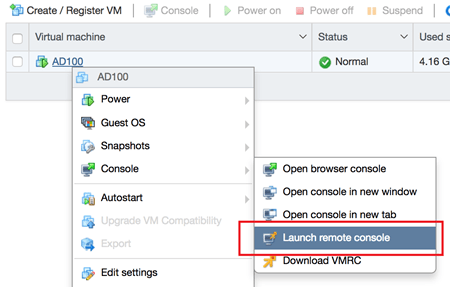
Observation – While on my MAC I was setting up a VM via the Web Host Client and I need to mount an ISO. When I right clicked on the VM I choose ‘Launch Remote Console’ vs. the normal ‘Download VMRC’
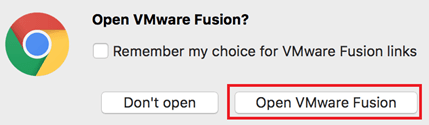
After clicking I was prompted to choose Fusion
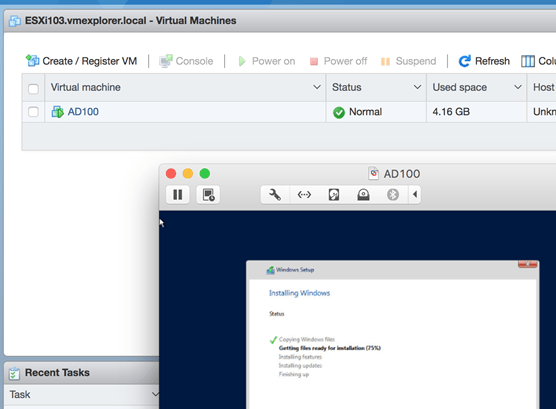
And there it was… a simple way to work with VM’s via Fusion! From there I mounted my ISO and started the rebuild of my home lab.
If you like my ‘no-nonsense’ blog articles that get straight to the point… then post a comment or let me know… Else, I’ll start writing boring blog content.
 vmexplorer