P2V GOLD – Remove all Windows Non-Present devices at once via GUI and CLI!
Issue >> If you’ve done any type of Windows P2V (Physical 2 Virtual) then you’d know all about the value in removing non-present or ghosted devices. Normally non-present devices are harmless but from time to time they can cause you an issue or two. P2V best practice is to remove non-present devices enabling a pristine OS. The issue with removing non-present devices is the time to complete the task. Currently, with the manual way, you’d have to go to command line, enter a few commands, and then manually remove each non-present device from device manager. If you have to remove 200+ non-present devices that could take several hours to complete.
Manual Way:
Go to Start – Run and type CMD and press Enter.
At the CMD Prompt type:
- set devmgr_show_nonpresent_devices=1 (this will enable hidden devices)
- start devmgmt.msc (this will start device manager)
In device manager go to View > Show Hidden Devices
Manually look for and remove each device that is greyed out.
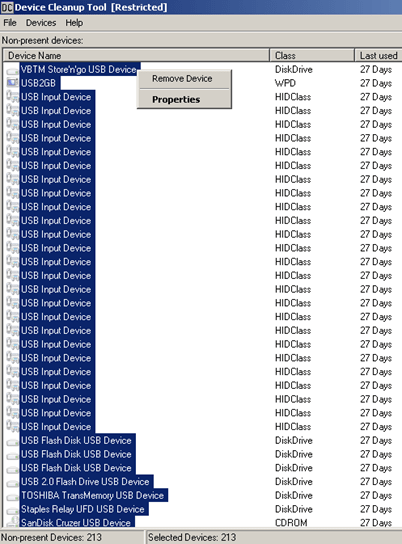
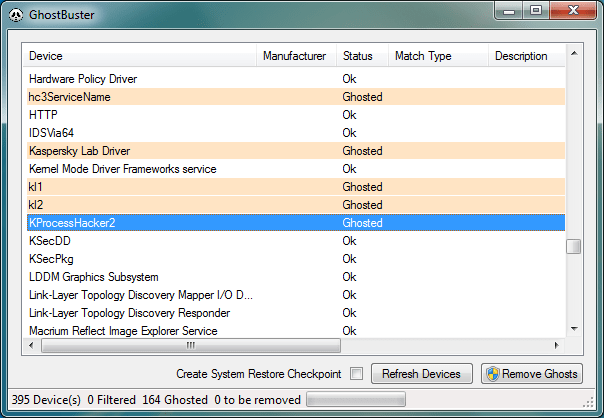
Automated Solution >> I located 3 great tools that remove all the non-present devices at once — Device Clean up Tool GUI based, Device Clean up Tool CLI based, and Ghostbuster GUI based. All the links are below.
Other Notes >> Personally, I used the Device Cleanup Tool GUI and I was able to remove 213 devices from my recent P2V. Not only did it clean up my OS but it also fixed a pesky USB issue I was having.
Device Cleanup Tool V0.5 – removes non-present devices from the Windows device management

If you like my ‘no-nonsense’ blog articles that get straight to the point… then post a comment or let me know… Else, I’ll start writing boring blog content.
 vmexplorer