Month: December 2012
My Commodore 64 Never lets me down
I got a call today from 000-000-0000, a person with a strong accent says “Hello Sir, I am from Technical support. Our servers have alerted us that there is a virus on your computer”
Matt: “Oh, my really? A Virus what should I do?” < Said in my best non-technical dorky voice
Strong Accent(SA): “You must on your keyboard press Window Key R.”
Matt: “So I press Windows Key R? Where is the windows key?”
SA: “Windows key is next to the Control key on your right side of your keyboard.”
Matt: “Okay, Control, Control, Control Key, where are you?”
SA: “Did you Press it?”
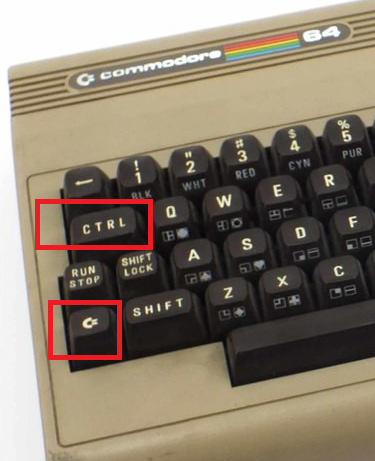 Matt: “I don’t see a Windows Key.
I do see a key that looks like a
C with an = sign, is that the one?”
SA: “No, its next to the CTRL key.”
Matt: “OH, CTRL, there it is. Okay Pressing C= and R. Okay, a Blue screen opens, it says LOAD”*”,8,1. Now what do I do?”
SA: “Did you press Windows R? You need to press CTRL and R.”
Matt: “OH, CTRL and R. Okay, Pressing, okay a Blue screen appears. Its says LOAD”*”,8,1.”
SA: “Are you sure you pushed CTRL?”
Matt: “Yes, I did. The blue screen says, Commodore 64, 38911 Bytes Free.”
SA: “Are you on a Windows Box?”
Matt: “Did you think I was using a windows PC? No I’m on a Commodore 64, and its not prone to those Windows Viruses.”
SA: “Oh, what is a Commodore 64?”
Matt: “It’s this really great system, but it can’t divide by zero very well.”
SA: “Oh….. Long pause… ”
Matt: “You should try one.”
SA: Hangs up
Next time you call trying to scam a technical professional… Make sure they didn’t grow up with a Commodore computer!

Home Lab – VMware ESXi 5.1 with iSCSI and freeNAS
Recently I updated my home lab with a freeNAS server (post here). In this post, I will cover my iSCSI setup with freeNAS and ESXi 5.1.
Keep this in mind when reading – This Post is about my home lab. My Home Lab is not a high-performance production environment, its intent is to allow me to test and validate virtualization software. Some of the choices I have made here you might question, but keep in mind I’ve made these choices because they fit my environment and its intent.
Overall Hardware…
Click on these links for more information on my lab setup…
- ESXi Hosts – 2 x ESXi 5.1, iCore 7, USB Boot, 32GB RAM, 5 x NICS
- freeNAS SAN – freeNAS 8.3.0, 5 x 2TB SATA III, 8GB RAM, Zotac M880G-ITX Mobo
- Networking – Netgear GSM7324 with several VLAN and Routing setup
Here are the overall goals…
- Setup iSCSI connection from my ESXi Hosts to my freeNAS server
- Use the SYBS Dual NIC to make balanced connections to my freeNAS server
- Enable Balancing or teaming where I can
- Support a CIFS Connection
Here is basic setup…
freeNAS Settings
Create 3 networks on separate VLANs – 1 for CIFS, 2 x for iSCSI < No need for freeNAS teaming
CIFS
The CIFS settings are simple. I followed the freeNAS guide and set up a CIFS share.
iSCSI
Create 2 x iSCSI LUNS 500GB each
Setup the basic iSCSI Settings under “Servers > iSCSI”
- I used this doc to help with the iSCSI setup
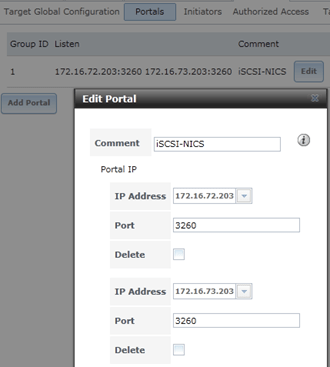
- The only exception is – Enable both of the iSCSI network adapters in the “Portals” area
ESXi Settings
Setup your iSCSI vSwitch and attach two dedicated NICS
Setup two VMKernel Ports for iSCSI connections
Ensure that the First VMKernel Port group (iSCSI72) goes to ONLY vmnic0 and vice versa for iSCSI73

Enable the iSCSI LUNs by following the standard VMware instructions
Note – Ensure you bind BOTH iSCSI VMKernel Ports

Once you have your connectivity working, it’s time to setup round robin for path management.
Right click on one of the LUNS, choose ‘Manage Paths…’
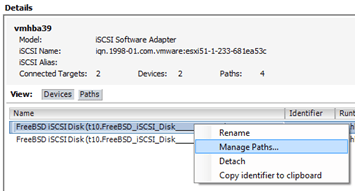
Change the path selection on both the LUNS to ‘Round Robin’
Tip – After the fact if you make changes to your iSCSI settings, then ensure you check your path selection as it may go back to default

Notes and other Thoughts…
Browser Cache Issues — I had issues with freeNAS updating information on their web interface, even after reboots of the NAS and my PC. I moved to Firefox and all issues went away. I then cleared my cache in IE and these issues were gone.
Jumbo Frames — Can I use Jumbo Frames with the SYBA Dual NICs SY-PEX24028? – Short Answer is NO I was unable to get them to work in ESXi 5.1. SYBA Tech support stated the MAX Jumbo frames for this card is 7168 and it supports Windows OS’s only. I could get ESXi to accept a 4096 frame size but nothing larger. However, when enabled none of the LUNS would connect, once I moved the frame size back to 1500 everything worked perfectly. I beat this up pretty hard, adjusting all types of ESXi, networking, and freeNAS settings but in the end, I decided the 7% boost that Jumbo frames offer wasn’t worth the time or effort.
Summary…
These settings will enable my 2 ESXi Hosts to balance their connections to my iSCSI LUNS hosted by freeNAS server without the use of freeNAS Networking Teaming or aggregation. By far it is the simplest way to setup and the out of the box performance works well.
My advice is — go simple with these settings for your home lab and save your time to beat up more important issues like “how do I shutdown windows 8” J
I hope you found this post useful and if you have further questions or comments feel free to post up or reach out to me.
 vmexplorer