Month: September 2010
FREE EMC Vplex Training
Check it out… EMC has FREE vplex online Training for EMC Customers…
https://education.emc.com/cust/training/featured_courses/?WT.mc_id=eml_custednl_vplex_09272010
From their Website…
Take advantage of these limited time zero-cost promotional offers. Whether you are new to us, or have already taken advantage of our broad course offering set, these promotional offers will allow you to come up to speed on specific topics without any investment!
Access data anywhere in the private cloud with EMC VPLEX. Check out our FREE e-Learning courses.
VPLEX Architectural Overview »
VPLEX Administration and Storage Provisioning »
EMC / NetApp Deployment Documents..
Here are some quick links to some great documents recently released…
NetApp and VMware vSphere Storage Best Practices v2.1 08/2010 – This is a great read!
http://media.netapp.com/documents/tr-3749.pdf
EMC with View using XP and Windows 7 – These are some of the best View documents I’ve seen!
http://www.emc.com/collateral/software/white-papers/h8043-windows-virtual-desktop-view-wp.pdf
Vmworld 2010 – Opening was too cool
If you haven’t seen this yet it’s worth a look…
VMworld 2010 – TA8623 Storage Super-Heavyweight Challenge EMC, NetApp, HP, and Dell
At VMworld I got a attend TA8623 Storage Super-Heavyweight Challenge with Adam Carter of HP, Eric Schott of Dell, Vaughn Stewart of NetApp, and Chad Sakac of EMC.
It was really nice to see and hear these that these Super-Heavyweights could sit on the same stage, answer questions from the audience, and talk about what they do best – STORAGE.
At times there was a punch or two, but it was really minor. What I took away from this session was it didn’t matter who you go with but buy a product that works best in your environment.
KUDOS to these guys who put their differences behind them and really talked about technology and less about who they worked for!
Here’s the Video – (BTW – I ask the first question in this session, it was a lame question but the best one I could think of at the time, someone had to get things going..)
VMware View Technical Deep Dive with Trace3, NetApp, and VMware
You might want to check this conference out… I went to their road show last year and it was top notch!
This time they are focused on View 4.5, very cool!
http://www.goresponse.com/vmware/go/rshow/lp.cfm/x/0af2e42c17
Here are the dates and times…
Orange County, CA
Tuesday, September, 28
9:00 a.m.–4:00 p.m.
San Diego, CA
Wednesday, September, 29
9:00 a.m.–4:00 p.m.
Los Angeles, CA
Thursday, September, 30
9:00 a.m.–4:00 p.m.
Denver, CO
Tuesday, October, 5
9:00 a.m.–4:00 p.m.
Scottsdale, AZ
Wednesday, October, 13
9:00 a.m.–4:00 p.m.
See you there!
Storage – LUN Naming Standard
I started working with my networking and storage teams to develop a LUN naming standard in hopes to better organize our LUN names.
We have a Fibre Channel SAN and needed a standard that is easy for us to follow and ID our LUNS quickly.
Some of the information in the standard might seem redundant (Like LUN ID) but we wanted to have a LUN name that was informational and would work for multiple teams.
Here are some Examples…
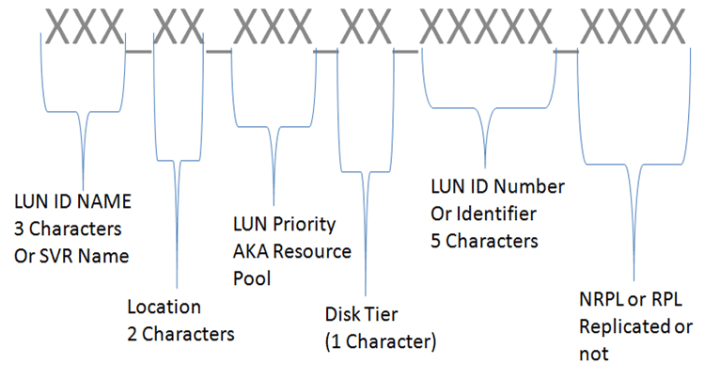
GP1_AC_MED_02_00ABC_NRPL
General Purpose LUN, Building AC, MED Resource Pool, Disk Tier 02, LUN ID 00ABC, Not Replicated
NOTES02_AB_MAX_1_00CDF_RPL
Notes Server 02, Building AB, MAX Resource Group, Disk Tier 02, LUNC IS 00CDF, Replicated
Here is the breakdown…
LUN ID Name (No more than 10 characters, Normal is 3) – Is the name of the LUN, or specific server, or purpose
Location (2 Characters) – The building where the LUN is normally located
LUN Priority (3 Characters) – Is the name of the resource pool the LUN is attached to, this helps with DR recovery
LUN ID (5 Characters) – This is the LUN ID assigned by the SAN at the time of creation, helps with combination with the SAN team
Replication (4 Characters) – Use NRPL for not replicated and RPL for replicated
 vmexplorer