vmware
VMworld 2020 | Second Day Summary
VMworld 2020 DAY 2 is now in the books and a fellow co-worker did this fantastic write up. I cannot take not credit for this post expect reformatting it to be posted on my blog.
~Enjoy!
Here is your recap of day 2 of VMworld 2020. The links to vmworld sessions will require your vmworld registration username and password to view. Your account will also enable you to catch up on over 900+ sessions on-demand on our VMworld platform through Thursday, October 8th and afterwards when our sessions move to our VMworld On-Demand Video Library.
VMworld 2020 Day 2: The Challenges Facing Our Time
- Fireside Chat: The Extraordinary Events of 2020
We started out with an inspiring conversation with Pat Gelsinger, CEO of VMware, and NYC Business News Anchor, Hope King. The two dived into broad issues such as the pandemic and social justice as well as their thoughts about the cloud industry, and VMware’s commitment to be a force for good. If you missed this inspiring discussion, there are a few more opportunities to catch it on the Vision & Innovation channel before it goes on-demand.
Hear More From Our CEO’s Fireside Chat With Hope King [VI3353]
Breaking News: Extended Access to Complimentary Premium Digital Training
Did you hear the news today during Sumit Dhawan’s session, Our Customer Commitment: Working Together to Maximize Your Value, at VMworld? In case you missed it, to continue enabling our customers to grow their skills and better face current IT challenges, we are extending complimentary access to premium digital training.
View this FAQ for more details about this special offer and how to get complimentary access to the VMware Customer Connect Learning™ Premium Subscription for a full year (from date of enrollment). With 24/7 access to training delivered by top VMware experts and Certified Instructors, Connect Learning (previously VMware Learning Zone) is your single source for digital training from VMware. In addition to the content available with the Basic Subscription (over 1,300 training videos and 65 free eLearning courses), the Premium Subscription* includes access to valuable content such as:
- Advanced troubleshooting, configuration, and solution-oriented best practice videos
- 12 Exam Preps (over 650 videos)
- NEW – VMware Certified Technical Associate training content
Demo Zones, Hands-on Labs and Odyssey, and Throwdown Videos
We had insightful discussions and learnings from the VMware and Sponsor Demo Zones and hands-on labs interactive simulations. Showcasing 130+ VMware product demos and 100+ joint solutions with our 51 sponsors. And of course, our beloved hands-on labs with over 9,500+ labs delivered with Automate your VMware Cloud on AWS holding the top spot. We hope you had a chance to check out the Command Center too.
New Hands On Labs have been released see here
EUC Product News
VMworld 2020: All of Our EUC Announcements, Themes & Everything Else You Need to Know
This morning in our Digital Workspace Showcase Keynote. We had a lot of news to cover in a short amount of time, but rest assured that we have plenty of breakout sessions, blog posts and demos detailing all our announcements in depth.
More importantly, I would like to say how grateful all of us at VMware are for the opportunity to help so many of our customers through the changing work environment this year. We have learned many lessons in the process, and we have seen again and again the value of a flexible, modern
digital workspace.
- Lessons learned about the role of a digital workspace platform
- Employee engagement
- IT Modernization
- Zero Trust Security
Horizon News
Four Reasons Horizon is the Choice for Modern and Secure Hybrid-Cloud VDI & Apps: Updates From VMworld 2020 Introducing Workspace Security VDI
We are excited to announce the general availability of Workspace Security VDI, which delivers an intrinsically secure virtual desktop and application solution that has been designed and fully tested by a single vendor. By combining Horizon and VMware Carbon Black Cloud into a single, unified solution, Workspace Security VDI consolidates multiple endpoint security capabilities such as threat identification and prevention, endpoint detection and response, auditing capabilities and the ability to investigate data breaches into a cohesive solution.
VMware Horizon Now Runs on Microsoft Azure VMware Solution
Microsoft recently announced the general availability of Azure VMware Solution (AVS) – a hosted service from Microsoft based on VMware Cloud Foundation that gives our customers the ability to extend the power of Horizon and vSphere to Azure. As a result, you can move on-premises Horizon deployments to Azure as part of a cloud migration, or transform your Horizon environment into an elastic hybrid and multi-cloud desktop virtualization platform that can help you conquer the challenges of today’s fluctuating workplace. Quickly provision and scale Horizon virtual desktop and application workloads leveraging key technologies such as Instant Clones and Blast Extreme protocol. To learn more, read this blog.
Simplified, Modernized Management with (More) Services From the Cloud
The Horizon Control Plane simplifies management with services that connect entitlement and management layers across Horizon pods in different data centers and clouds. The newly integrated Universal Broker delivers a global entitlement layer that intelligently provisions end users to their personal desktop or app in any connected pod or cloud based on availability or proximity to provide the best possible user experience. Image and application management is also simplified with services that can be used across pods and clouds – create an image or app package once and distribute to Horizon deployments as needed. These features, coupled with real-time performance monitoring and end-to-end security, unlock key hybrid and multi-cloud use cases such as work from home, business continuity, real-time bursting, disaster recovery and high availability which simplify and optimize your cloud investment.
Horizon 8: Unleashing the Power of Secure Hybrid and Multi-Cloud Deployments with a Modern Platform
Made available in August this year, Horizon 8 delivers a modern platform for virtual desktop and app delivery across the hybrid cloud, from the market leaders in SDDC and digital workspaces. The release delivered expanded support for hybrid and multi-cloud architectures that allow organizations to scale flexibly across public and private clouds such as VMware Cloud on AWS and Microsoft Azure – now also with support for Google Cloud, VMware Cloud on Dell EMC, as well as Azure VMware Solution. Full support for new RESTful APIs help automate rich capabilities and orchestrate services on the Horizon platform, modernizing services and processes with speed, providing endless possibilities to enhance and streamline their Horizon environment. The list goes on – read the launch blog for more detailed information.
Reimagining Security for Today’s Future Ready Workforce
We unveiled earlier today VMware’s new security solutions and our Future Ready Workforce Solutions as they are a true testament to our unique approach to the future of work. Founded on an intrinsic security approach that builds security into every control plane– from network, endpoint, cloud, identity all the way to workload, VMware turns each of these vectors into points of security control, significantly reducing the attack surface. Furthermore, it unifies these threat vectors in the context of apps and data across any app, any cloud, and any device in an industry first approach to increase the level of security for today’s distributed workforce.
Holistic Vision for the Future of Work
This powerful rethink, substantiated through our Future Ready Workforce Solutions, is designed to meet the needs of today’s distributed workforce. During this pandemic, the scale of employees working from home has pushed network capacities, security at the edge and good digital
workspace experiences to the limit. VMware has been able to address these fundamental needs by leveraging key elements of SD-WAN network services and security through Secure Access Services Edge (SASE), Endpoint Security and Digital Workspace. These technologies work together to
deliver any application from any cloud onto any device, so organizations can unlock the value of this holistic approach – enabling powerful workforce experiences, end to end zero trust security controls, and simplified management, no matter where one is working.
Future Ready Workforce Solutions: Reaping the Rewards
End to End Zero Trust Security: As the perimeter of an organization has now extended to the home, VMware Future Ready Workforce solutions are uniquely positioned to deliver end to end Zero Trust security. Organizations can build trust in devices that are accessing enterprise data with Workspace ONE UEM, better secure them with Carbon Black Endpoint solutions and use it to drive dynamic conditional access decisions to validate user identity as well. Least privilege capabilities that start from devices or virtual sessions with Unified Access Gateway (UAG) and extend to the network with NSX micro-segmentation enable a user session to be protected. And now with our VMware SASE Platform, we have a convergent infrastructure that offers end to end Zero Trust security enabling any user access to any app from any device.
VMware Cloud Disaster Recovery – On Demand DRaaS
Overview of VMware Cloud Disaster Recovery, an easy- to-use cloud-based DRaaS solution. It combines efficient cloud storage with simple SaaS-based management for IT resiliency at scale. Customers benefit from consistent, familiar VMware operations across production and DR sites, a pay-when-you-need-failover capacity model for DR resources, and instant power-on capabilities for fast recovery.
VMworld Announcements From The Office Of The CTO
A Deep Dive into the Tanzu Service Mesh Autoscaling VMworld 2020 Keynote Demo
Summary
The demo shows ACME Inc., a cloud native application, working as expected under normal traffic conditions, and without autoscaling, however, once traffic rapidly increases, the application starts to perform poorly. A quick inspection of the application determines that autoscaling is not configured on the application, therefore in order to remediate, an administrator installs autoscaling YAML to help activate TSM autoscaling at runtime without needing to redeploy the application. Immediately after the autoscaling is turned on, microservices instances are being scaled and the latency is back to normal levels. The demo then shows that when traffic subsides, the TSM autoscaler starts to descale the microservice instances without causing latency or performance issues. Finally, the demo finishes with a quick sneak into the Service Level Objectives (SLO) feature of TSM.
The rest of this post walks through how to set up process in 5 step process.
Key highlights of the demo:
- Ability to configure autoscaling functionality without intrusion to application logic.
- Visualize the ACME cloud native application from within TSM.
- Inspect performance charts of how each microservice is scaling.
Behind the Scenes of the Folding@home Demo at VMworld 2020 Keynote
The VMware Folding@home appliance project I started with Team VMware #52737. Since the release of our Fling, we have seen over 42,000 downloads, and watched our Team VMware FAH community grow to over 1000 users. When Chris Wolf asked if I could demo Folding@home in the VMware CTO general session keynote at VMworld, I knew it needed to be cool! This is the Office of the CTO, after all. While fighting diseases like COVID-19, Cancer, and Alzheimer’s as citizen scientists is very cool into itself (or very hot if you are next to your folding computer!), many of us have been deploying appliances to ESXi for over a decade, and it does not make for a fascinating demo.
Demo Challenge #1: Make it easy to be a Force for Good at the click of a button with vRA
Demo Challenge #2: Deploy and Manage the VMware Appliance for Folding@home on VMware Cloud on AWS
Demo Challenge #3: Securely manage Folding@home Clients running in the cloud from my couch!
You can learn more about the Folding@home project with Dr. Gregory Bowman, Director of Folding@home, in the VMworld on-demand session “Citizen Philanthropy in Action: Folding@home” [OCTO2230].
A Deeper Dive into Bitfusion Device Plugin for GPU Sharing on Kubernetes
Machine Learning (ML) applications are increasingly being embraced by organizations to accelerate business growth. As the scale of the ML applications grows, IT infrastructure has challenges to meet the requirements of ML workloads. Infrastructure must be flexible to allow ML developers’ work to be productive through cloud native platforms like Kubernetes. Nowadays, more businesses are leveraging Kubernetes to deploy and manage their ML workloads.
Bitfusion allows more applications to gain access to shared GPUs via the network
Kubernetes usually consists of a cluster of worker nodes that can have a ML workload scheduled to any of its worker nodes. Many ML application use cases need hardware accelerators such as GPU, requiring each worker node to have at least one accelerator installed locally. These accelerators, like GPU, are an expensive infrastructure. Fortunately, VMware vSphere 7 comes with a feature called Bitfusion, which can create pools of hardware accelerators. Different nodes across the network can share GPUs in a pool. vSphere Bitfusion increases the utilization of GPUs, and eliminates the need for local hardware accelerators of every node.
Extending capabilities to Kubernetes, making it easy for any Kubernetes pod to gain access to remote GPUs
Kubernetes provides a device plugin framework for the developer to advertise system hardware resource to the kubelet. The Office of the CTO, Cloud Native Lab at China R&D created a device plugin that monitors Bitfusion GPU resources and properly allocates the GPU resource to Kubernetes’ workloads (i.e. pods). Since device plugins are a standard approach for Kubernetes to customize hardware resources, the plugin supports Kubernetes advanced features such as resource quota and ensures the plugin is fully aligned with the Kubernetes ecosystem.
The Bitfusion device plugin implements Kubernetes’ device plugin framework and updates the kubelet periodically about the available Bitfusion GPU resources. The information collected is then used when Kubernetes schedules workloads with GPU requirements. The Bitfusion device plugin can be installed as a DaemonSet of Kubernetes so that every worker node can have a running copy of the device plugin to report GPU resources from the Bitfusion pool.
VMworld Industry News
Lumen Teams with VMware to Expand Edge Compute Capabilities for the 4th Industrial Revolution
Lumen Technologies (NYSE: LUMN) and VMware, Inc. (NYSE: VMW) are announcing a significant collaboration covering edge compute, networking, and security. VMware and Lumen Technologies, or simply Lumen, are taking their current partnership further with the agreement for Lumen to deliver edge services using integrated VMware technologies. This collaboration will help enterprises expand across data center, cloud and edge, moving business applications that require low latency and efficient localization closer to digital interactions. At VMworld, Lumen and VMware will be presenting:
This press release features multimedia. View the full release here: https://www.businesswire.com/news/home/20200929005451/en/
- How Lumen can migrate and manage workloads across a range of VMware technologies.
- Lumen’s edge computing solutions, and how enterprise customers can rely on a consistent experience across a range of hybrid cloud venues, including the VMware Cloud.
- Lumen’s portfolio of solutions built on and integrated with the VMware Cloud Foundation, allowing companies to deploy business innovations with single-digit millisecond latency to over 2,200 public data centers and more than 170,000 on-fiber enterprise locations across the globe.
Key Facts:
- Lumen is a VMware Principal Partner and is VMware Cloud Verified.
- Lumen Private Cloud on VMware Cloud Foundation™ is Lumen’s managed private cloud service, built on VMware Cloud Foundation, available in 100+ of Lumen edge computing locations.
- Lumen provides fiber-based networking connectivity and managed solutions, with a service portfolio that spans content delivery, cybersecurity, and cloud collaboration.
VMware and NVIDIA to Enable Next-Gen Hybrid Cloud Architecture and Bring AI to Every Enterprise
VMware and NVIDIA today announced a broad partnership to deliver both an end-to-end enterprise platform for AI and a new architecture for data center, cloud and edge that uses NVIDIA® DPUs (data processing units) to support existing and next-generation applications.
Through this collaboration, the rich set of AI software available on the NVIDIA NGCTM hub will be integrated into VMware vSphere, VMware Cloud Foundation and VMware Tanzu. This will help accelerate AI adoption, enabling enterprises to extend existing infrastructure for AI, manage all applications with a single set of operations, and deploy AI-ready infrastructure where the data resides, across the data center, cloud and edge.
Additionally, as part of Project Monterey separately announced today, the companies will partner to deliver an architecture for the hybrid cloud based on SmartNIC technology, including NVIDIA’s programmable NVIDIA BlueField®-2. The combination of VMware Cloud Foundation and NVIDIA BlueField-2 will offer next-generation infrastructure that is purpose-built for the demands of AI, machine learning, high-throughput and data-centric apps. It will also deliver expanded application acceleration beyond AI to all enterprise workloads and provide an extra layer of security through a new architecture that offloads critical data center services from the CPU to SmartNICs and programmable DPUs.
“We are partnering with NVIDIA to bring AI to every enterprise; a true democratization of one of the most powerful technologies,” said Pat Gelsinger, CEO of VMware. “We’re also collaborating to define a new architecture for the hybrid cloud—one purpose built to support the needs and demands of the next generation of applications. Together, we’re positioned to help every enterprise accelerate their use of breakthrough applications to drive their business.”
“AI and machine learning have quickly expanded from research labs to data centers in companies across virtually every industry and geography,” said Jensen Huang, founder and CEO of NVIDIA. “NVIDIA and VMware will help customers transform every enterprise data center into an accelerated AI supercomputer. NVIDIA DPUs will give companies the ability to build secure, programmable, software-defined data centers that can accelerate all enterprise applications at exceptional value.”
- UCSF Advances Healthcare with NVIDIA and VMware
- Enterprise-Ready Platform for AI
- Delivering New Hybrid Cloud Architecture for Next Gen Apps
- Early Access for Visionary Enterprises
Partner News From VMworld 2020
Dell Technologies Innovations Advance Management, Automation and Protection of VMware Environments
Story Highlights – New HCI, cloud, storage and data protection integration with latest VMware releases help customers innovate across edge locations, data centers and hybrid clouds
News summary
- Dell Technologies Cloud Platform and Dell EMC VxRail now support VMware vSphere with Tanzu and the latest VMware Cloud Foundation, vSphere, and vSAN releases, offering an easy path to Kubernetes adoption while delivering enhancements for traditional workloads
- Dell EMC PowerMax storage replication, now integrated with VMware vVols, simplifies management and improves access to mission-critical applications
- Dell EMC ObjectScale, built on VMware Cloud Foundation, allows developers to provision cloud-scale storage for modern applications
- Dell EMC PowerProtect Data Manager advancements include industry-first protection for VMware Cloud Foundation infrastructure layers and Kubernetes environments
- VMware Cloud on Dell EMC empowers organizations to support their remote workforce through VMware Horizon, security and compliance certifications
Druva Achieves VMware Ready Certification for VMware Cloud on AWS and VMware Cloud on Dell EMC
Druva Inc., the leader in Cloud Data Protection and Management, today announced it has been certified as VMware Ready for VMware Cloud. This new certification, unveiled at VMworld 2020, recognizes Druva as a validated and tested solution to protect, backup, and recover VMware Cloud
on AWS environments as well as a broader VMware Cloud portfolio: VMware Cloud on Dell EMC and VMware Cloud on AWS. Regardless of where customers run their VMware infrastructure, they can now have confidence that their data is comprehensively protected and always available with Druva Cloud Platform.
Kenna Security Delivers Risk-Based Vulnerability Management for New VMware Carbon Black Cloud Workload Protection Solution
Kenna Security, the enterprise leader in risk-based vulnerability management, and VMware Carbon Black, a leader in cloud-native next-generation endpoint security, are partnering to power the vulnerability assessment and risk scoring capabilities of Carbon Black Cloud WorkloadTM. As a result of this partnership, enterprises running VMware Carbon Black Cloud Workload will be able to efficiently and effectively prioritize critical vulnerabilities and reduce risk to their servers and workloads.
By leveraging Kenna Security capabilities, VMware Carbon Black is able to provide an elegant solution to a long-standing challenge in enterprise cybersecurity. Many organizations have the capacity to patch only a fraction of the vulnerabilities threatening their environments. Additionally, traditional scanning is often too cumbersome for the large number of endpoints in their environment. Although not all vulnerabilities pose a proven risk of weaponization, the challenge for organizations is identifying which vulnerabilities to focus on. With the inclusion of Kenna’s vulnerability assessment capabilities, VMware Carbon Black Cloud Workload is able to efficiently focus resources on the specific critical vulnerabilities facing each organization.
Ordr Announces Integration with VMware for Campus and Data Center Device Visibility Made Simple
Ordr, a leader in security for enterprise IoT and unmanaged devices, today announced the integration of Ordr Systems Control Engine (SCE) with VMware NSX-T and VMware NSX Intelligence to provide organizations with comprehensive IoT visibility, accelerated data center microsegmentation, and enhanced day-two operations capabilities.
Ordr SCE and NSX-T provide ongoing programmatic synchronization from Ordr to VMware NSX for profile objects and the respective device IP addresses they contain. With the ability to share detailed campus-related device type data points with NSX, organizations now see which types of campus devices are communicating with the data center. Coupled with NSX Intelligence, organizations gain powerful visualization of how these Ordr-defined campus group objects are communicating to various virtual machines (VMs) within the data center.
“The combination of Ordr with VMware NSX and NSX Intelligence gives organizations the ability to understand how campus and branch devices communicate with data center workloads, quickly identify unmanaged campus devices, and use those insights to streamline NSX policy generation for VMs,” said Iain Leiter, Senior Technical Solutions Architect, Ordr. “Organizations will also be able to minimize the business impact of firewall changes by visualizing allowed or blocked campus traffic.”
Pensando Partners with VMware on Project Monterey to Co-Develop Next-generation Infrastructure Platform
Today at VMworld® 2020, Pensando Systems announced it is collaborating with VMware, Inc. on Project Monterey to co-develop a platform to support the requirements of modern applications. VMware will leverage the Pensando Distributed Services Platform to deliver industry leading performance and latency, zero-trust security, and simplified operations to VMware Cloud Foundation deployments in virtualized, containerized and bare metal environments.
“Customers around the globe rely on VMware Cloud Foundation to deploy and manage modern applications across multiple environments,” said Krish Prasad, senior vice president and general manager, Cloud Platform Business Unit, VMware. “Together with Pensando, we are building the next generation of more secure and agile infrastructure, leveraging the new breed of accelerators exemplified by the Pensando Distributed Services Platform, to support the evolving requirements of these applications. The work between VMware and Pensando on Project Monterey will help mutual customers benefit substantially from increased performance, enhanced security and a consistent operating model.”
Pure Storage Expands Design Partnership with VMware, Delivering Enhanced Solutions to Accelerate Hybrid Cloud
Pure Storage (NYSE: PSTG), the IT pioneer that delivers storage as-a-service in a multi-cloud world, announced a spectrum of enhancements to its hybrid cloud solutions across the VMware portfolio, enabling any enterprise to focus on innovation rather than infrastructure. New solution enhancements from Pure help enterprises maximize their VMware investments, delivering agility and efficiency for modern applications across on-premises and cloud environments. Customers will have improved availability of their data services, enabling them to meet demanding Service-level Agreements (SLAs).
- vSphere Virtual Volumes as principal storage for VMware Cloud Foundation.
- VMware and Pure enable vSphere Virtual Volumes as Principal storage for VMware Cloud Foundation. Customers can now realize the value of Pure Storage and vSphere Virtual Volumes natively within VMware Cloud Foundation. FlashStack™ delivers the performance, availability, and economics required for a VMware Cloud Foundation hybrid cloud in a single architecture, with the simplicity of integrated application to infrastructure management.
- Support for vSphere Virtual Volumes storage with Site Recovery Manager.
- Modern data protection is a critical component for any VMware deployment including those leveraging vSphere Virtual Volumes on Pure. For VMware infrastructure, VMware Site Recovery Manager provides an enterprise solution for automated disaster recovery. As the leader in vSphere Virtual Volumes storage, Pure co-engineered the integration of vSphere Virtual Volumes with SRM. This allows enterprises to consume vSphere Virtual Volumes on Pure while protecting their mission critical applications from disaster.
- VMware Tanzu and container integration. Pure is a VMware Design Partner for the Cloud Native Storage and vSphere Virtual Volumes programs, providing persistent storage that enables true hybrid cloud mobility for containers running on VMware. Cloud Native Storage and vSphere Virtual Volumes enable workloads in Kubernetes environments to utilize Pure FlashArray™ as CSI-compliant persistent storage, bringing world-class all-flash performance and data services to containerized applications in addition to VMware vSphere environments.
- NVMe-oF with vSphere 7. Pure is VMware’s Design Partner for modern data fabric support on vSphere. With vSphere 7, VMware and Pure have worked to provide native end-to-end support for NVMe over Fabrics (NVME-oF) using Pure’s DirectFlash® Fabric. NVMe is a revolution in the storage world, providing lower latency and higher throughput than legacy SCSI devices. This capability unleashes the raw performance of the Pure FlashArray and maximizes performance density in the data center. Mutual customers can enjoy a modern data experience that maximizes the performance and consolidation of critical applications, VMs, and containers.
Rackspace Technology Makes Significant Investment in Extending its VMware Multi-Cloud Solutions
Rackspace Technology™ (NASDAQ: RXT), a leading end-to-end multicloud technology solutions company, today announced it has strengthened its strategic alliance with VMware by expanding its managed services across VMware-based multicloud solutions. Rackspace Technology now includes support for Azure VMware Solution, Google Cloud VMware Engine, VMware Cloud on Dell EMC, Dell Technologies Cloud Platform (DTCP), and VMware Tanzu.
By expanding its portfolio of VMware multicloud solutions, Rackspace Technology is working to give customers the greatest choice in integrating VMware-based private clouds into multicloud solutions. A few key benefits:
- Through managed services for the key hyperscalers, customers can accelerate their move to the cloud by extending their VMware environments to AWS, Azure and Google Cloud.
- Rackspace Technology becomes the first MSP partner of VMware Cloud on Dell EMC where a new Cloud Center of Excellence (COE) has been established to provide mutual customers the ideal cloud service. This important milestone validates the attraction of this local cloud service.
- By providing managed services for Dell Technologies Cloud Platform (DTCP), customers benefit from a hyper-converged infrastructure based on Dell VxRail and designed specifically for VMware-based software-defined data centers. This managed solution will help to reduce costs and the operational burden of running a private cloud. Rackspace Technology is one of Dell Technologies largest global DTCP certified partners. Organizations can develop, test, and run cloud native applications alongside legacy applications on a single platform.
- Delivering managed services for VMware Tanzu provides a cohesive and nimble platform to support customers’ ongoing digital transformations.
VMworld 2020 | First Day Summary
VMworld 2020 DAY 1 is now in the books and a fellow co-worker did this fantastic write up. I cannot take not credit for this post expect reformatting it to be posted on my blog.
~Enjoy!
VMworld 2020 kicked off this morning and is continuing on throughout the night, ending early Oct 1st. VMworld this year is online, Free* and continuous delivery vmworld; stretching the globe. Aptly themed “Together, Anything is Possible.” (*A paid pass was available for deep dive, limited sessions)
- No Cost Online Premium Digital Training Breaking News from VMworld: Extended Access to Complimentary Premium Digital Training For A Full Year
I have summarized and linked the announcements, OnDemand sessions, note that any OnDemand session links will require a vmworld 2020 registered account to view the embedded videos.
VMware Announces Intent to Acquire SaltStack
Applications drive digital transformation, and application needs drive multi-cloud strategies. VMware’s cloud strategy has been defined by the notion that all roads lead to the app. VMware Cloud supports the broadest multi-cloud environment, spanning all clouds and application types to deliver consistent infrastructure and operations, and enable a consistent developer model. As any good strategy goes, we are continually listening to customers and looking for ways to improve our VMware Cloud portfolio. Today, I’m pleased to announce VMware’s intent to acquire SaltStack, a pioneer in building intelligent, event-driven automation software.
So, why is SaltStack important to VMware’s customers? Because time is money and speed is the new currency for digital transformation, VMware works hard to give customers a fast and simple path to cloud for their VMware-based workloads. We started by giving customers a home for these workloads in the cloud with VMware Cloud on AWS, which we build, run and sell alongside our strategic public cloud partner AWS. Over the past several years, this has expanded, and customers can now tun VMware-based workloads on every major hyperscaler and more than 200 Cloud Verified partners globally.
To get our customers to the cloud, we offer VMware HCX, which allows customers to literally mass migrate 1,000s of vSphere workloads in a short amount of time. Customers can automate infrastructure across clouds with VMware vRealize, and the next logical step was to enable more seamless onboarding and better cross-cloud orchestration with configuration management. This is what we are getting with SaltStack.
Once closed, SaltStack will allow us to deliver full-stack automation from infrastructure to applications with the ability to do software configuration inside VMs and containers. SaltStack has built a phenomenal open source community, which we will continue to grow and foster consistent with our open source strategy. And while our strategy has been one of supporting best-in-class choice of supporting configuration management, we believe many customers will want something simple and integrated.
Successful companies in this new era will not be the biggest or the fastest, but the ones that are agile, can adapt their business models to the needs of the current times and, simply put, are fast. And cloud is a key ingredient to deliver on that business agility, and we expect SaltStack will help our customers on their multi-cloud journey.
Keynote Recap
Day 1 kicked off with an inspiring and informative general session led by VMware CEO, Pat Gelsinger. Focusing on the digital foundation for an unpredictable world with your business, your apps, and your data at the core. Delivering five critical building blocks – app modernization, multi-cloud, digital workspace, virtual cloud network, and intrinsic security – to help our customers with their digital transformation. There were also several major announcements along with inspiring testimonials from across the globe.
Other notes:
- ESXi being installed on SmartNics
- Saying goodbye to Wi-Fi with Enterprise 5G
- Open Radio Access Network, Software Defined 5G Network with VMware NSX
We also heard from VMware COO, Sanjay Poonen, starting with our five priorities being vertically delivered throughout healthcare, education, public sectors, retailers, and financial services industries. He also discussed VMware’s “any app, any cloud, any device” technology strategy with the help of Dormain Drewitz, Purnima Padmanabhan, and Lilit Div.
Several prominent thought leaders made an appearance, sharing their perspectives from their diverse industries. These luminaries included:
-
- Claire Babineaux-Fontenot, Feeding America CEO, using VMware technology in their data centers to respond to their demands and delivering 1.5M lbs. of food to ensure no one goes home hungry.
- John Donahoe, Nike CEO, using VMware products in their digital transformation to help deliver great consumer and employee experiences seamlessly.
- Jensen Huang, NVIDIA CEO, announcing Project Monterey unleashing AI for every enterprise in accelerating data and security processing to line speed.
- Lori Beer, JPMC, diving into their private cloud infrastructure where they are seeing their provisioning times decreased significantly with their key measure being speed of delivery.
The world has quickly changed this year, and it’s continuing to – but VMware is always ready to help you meet the need
View the Day One VMworld General Session OnDemand
We were also treated to a thought-provoking conversation with Lori Beer, Global CIO, JP Morgan Chase, joins Sanjay Poonen for a fireside chat. Beer will share her perspective on managing through a pandemic, transforming a business with technology, cyber security in the enterprise, and inclusive strategies for talent. Also joining Sanjay, Indra Nooyi, former CEO of PepsiCo, on her perspective on transforming a business and the importance of creating an environment that everybody can bring their own self to. We also heard from Stephan Bancel, CEO of
Moderna, on how his team was able to pivot the company and work together to fight COVID-19.
View some of Sanjay’s Fireside Chats OnDemand:
- Fireside Chat: Sanjay and Lori Beer, Global CIO, JP Morgan Chase [V13460D]
- Fireside Chat: Sanjay and Indra Nooyi [VI3156]
- Fireside Chat: Sanjay and Stephane Bancel [VI3157D]
Networking and Security
A huge focus on security is front and center at VMworld, here is a summary of the announcements.
Office workers, apps, data, and devices are increasingly distributed. And that creates new security, scale, and performance challenges. Of course, that’s in addition to the growing challenges we already face in our data centers and in operating across multiple clouds. Today, we announced several compelling innovations that will dramatically improve your organization’s security posture, starting with the VMware SASE Platform.
Hair pinning network traffic to enforce security policy has long been impractical. SASE makes it simple for you to bring essential network and security services near your end users, regardless of where they work. VMware SASE Platform takes advantage of VMware SD-WAN’s massive global footprint of more than 2,700 cloud service nodes across 130 points of presence (POPs).
The key components of the VMware SASE Secure Access Service Edge solution include:
- VMware SD-WAN, our industry leading platform for transforming wide area networking. The SD-WAN Maestro’s Hat Trick: VMware Named a Leader in the Gartner 2020 Magic Quadrant for WAN Edge Infrastructure
- Cloud Access Service Broker (CASB), Secure Web Gateway (SWG) and remote browser isolation via our new collaboration with Menlo Security. These offerings will be sold and supported by VMware.
- VMware NSX Stateful Layer 7 Firewall SaaS offering.
- Zero Trust Network Access, which leverages VMware SD-WAN and VMware Workspace ONE in an integrated offering to provide optimal performance and policy-based access centered on the user and device identity for each connection.
- Edge Network Intelligence, which is the integration of the technology we acquired from Nyansa. The solution uses machine learning-based predictive analytics to ensure SLAs are met, along with providing security and visibility to end-user and IoT devices.
While the SASE announcement is big news, there are several additional security announcements that I believe you’ll find of interest:
-
- VMware Workspace Security VDI: VMware Workspace ONE Horizon and VMware Carbon Black Cloud are integrated into a single unified solution that leverages behavioral detection to protect against ransomware and file-less malware. On VMware vSphere, the solution is integrated into VMware Tools, removing the need to install and manage additional security agents.
- VMware Workspace Security Remote: An integrated solution that provides endpoint management, endpoint security and remote IT for physical Mac and Windows 10 devices. The solution includes the next-generation antivirus, audit and remediation, and detection and response capabilities of Carbon Black Cloud. It also includes the analytics, automation, device health, orchestration, and zero-trust access of the Workspace ONE platform.
- VMware Carbon Black Cloud Workload: Agentless security for virtual machines on vSphere—the realization of the vision that we articulated at VMworld 2019. This solution makes it much easier for infrastructure operations and security operations to collaborate.
Security risk visibility is now built into VMware vCenter, providing the same visibility as seen in Carbon Black Cloud, thus streamlining collaboration and more proactive threat remediation. Security is now dynamically ingrained in the VM lifecycle as a part of VMware Tools, making security intrinsic to the infrastructure.
VMware will offer a 6-month unlimited free trial of VMware Carbon Black Workload Essentials to all current customers with vSphere 6.5 and above, as well as VMware Cloud Foundation 4.0.
We also plan to introduce a Carbon Black Cloud module for hardening and better securing Kubernetes workloads, giving security teams policy governance and control of their Kubernetes environments. - VMware NSX Advanced Threat Prevention brings the technology from our recent Lastline acquisition to the VMware NSX Service-defined Firewall. This solution is the only purpose-built, distributed, scale-out firewall designed to protect east-west traffic across multi-cloud environments. Lastline integration into the service-defined firewall uses unsupervised and supervised machine learning to identify threats and minimize false positives, with the ability to apply virtual patches at every workload and not just at the perimeter—an industry first.
We also announced several new capabilities across our network portfolio:
- VMware Container Networking with Antrea: A commercial offering consisting of signed images and binaries and full support for open source Project Antrea. VMware Container Networking with Antrea will be included in VMware NSX-T and vSphere 7 with Tanzu. While Antrea can get you started, when you look to scale container networking across clusters, NSX-T will get you there.
- NSX-T 3.1: New API-driven advanced routing and multicast capabilities, along with automated deployment of workflows through Terraform Provider.
- VMware vRealize Network Insight 6.0 Network Assurance and Verification: Now leverages formal verification to gather network state build and model how the network functions. The model is then used to provide continuous verification of business policies across virtual, physical, and multi-cloud networks. This allows IT and network operations to discover potential brownouts before they occur. Announcing vRealize Network Insight 6.0
More details about NSX-T 3.1 & Project Antrea in a section below
VMware vRealize Cloud Universal
On the cloud management front, we announced VMware vRealize Cloud Universal, which combines SaaS and on-premises management software into a single subscription license. This makes it easy to switch between vRealize Cloud solutions without acquiring different licensing.
We also introduced new federation capabilities for a consistent management experience across deployments, as well as Skyline integration, which provides a single integrated workflow to proactively identify and resolve potential and existing issues.
VMware vRealize AI
Starting in 2018, we previewed Project Magna. And now in 2020, we are once again delivering on technology showcased at previous VMworld conferences. Project Magna is now generally available as VMware vRealize AI, which uses reinforcement learning to self-tune application performance.
Early adopters have seen performance improvements as high as 50% for read-and-write I/O with the read-and-write cache optimizations that vRealize AI made to their vSAN environments. Best of all, this is just the beginning.
You will see more capabilities moving forward, bringing your organization a highly intelligent, self-optimizing infrastructure.
Announcing VMware Cloud Disaster Recovery: On-demand DRaaS to Protect your vSphere Workloads
We are very excited to announce VMware Cloud Disaster Recovery – a new VMware on-demand disaster recovery (DR) offering that will be delivered as a simple easy-to-use SaaS solution with the benefits of cloud economics. Based on technology from VMware’s recent acquisition of Datrium, it will enable IT and business continuity teams to resume critical business operations after a disaster event.
Disaster Recovery is Critical for Every Business, and DRaaS Adoption is on the Rise
In a recent analyst survey, 76 percent of respondents reported an incident during the past two years that required an IT DR plan, while more than 50 percent reported at least two incidents (1). At the same time, cyberattacks are on the rise, increasing business risk. In 2019, 52 percent of global enterprise network security decision-makers had experienced at least one sensitive data breach in the past 12 months (2). And just this month, security researchers reported a seven-fold year-on-year increase in ransomware reports (3). Therefore, it’s no wonder that CxOs and board members increasingly care about DR.
Although organizations realize the importance of implementing a robust DR solution for business continuity, compliance with industry regulations, protection against disasters, ransomware and security breaches, traditional DR solutions can be complex, expensive, and unreliable, leaving many teams less than confident that their DR plan will work when needed. Hence, many are turning to disaster recovery as a service (DRaaS) because of its simplified operations and low total cost of ownership (TCO). In other words, many are seeing DR as an ultimate rentable IT service, and hence why DRaaS adoption is on the rise.
To get an even closer look at the solution, take the VMworld Hands-on Lab. Or check out our product page. Thank you!
- VMware Cloud Disaster Recovery Product Page
- VMworld 2020 Sessions: HCI2876, HCI2886, HCI2865
- VMworld Hands-on Lab: HOL-2193
Project Monterey Tech Preview
VMware has been pursuing SmartNIC virtualization and integration opportunities over the past couple of years.
Nvidia’s Blog VMware’s Press Release
In March 2019, we demonstrated ESXi running on a SmartNIC. And last year at VMworld, we demonstrated four hypervisors running simultaneously on the same server with no nesting. Our vision for opportunities related to SmartNICs and composable infrastructure was further solidified at VMworld 2020 with the announcement of Project Monterey.
Applications, data, infrastructure, and security services are seeing increasingly demanding performance requirements. Simultaneously, IT organizations are looking to find greater opportunities for automation and efficiency. Project Monterey takes advantage of emergent hardware innovations to offer new approaches to hybrid cloud architecture and operations.
We’re sharing this information now to open doors for further opportunities to shape this innovation with our customers and technology partners. Leading SmartNIC vendors are already working with us on Project Monterey, which is currently centered around three key use cases:
- Network performance and security:Consider running security services such as a L4-7 firewall on SmartNIC, decoupling it from the host platform and achieving line rate performance. Organizations can further isolate tenants, running independent workloads on SmartNICs or even run multiple network functions in isolation on the SmartNIC via isolation provided by the hypervisor (e.g., ESXi on Arm).
2. Storage performance and dynamic composition:As with networking, you have new opportunities for combinations of scale-up and scale-out architectures by taking advantage of processors on SmartNICs to accelerate a variety of storage functions, such as compression and encryption. Project Monterey will also provide further capabilities to scale storage capacity on-demand to meet performance or capacity requirements.
3. Bare metal workloads and composability: This is where Project Monterey really gets interesting. Imagine running the ESXi control plane on a SmartNIC, freeing all the x86 host cores to run other workloads, inclusive of bare metal. That allows you to run workloads on bare metal, while still being able to integrate them with core SDDC services, such as VMware vSAN and NSX. From a flexibility perspective, these options take VMware Cloud Foundation to a new level in terms of the ability to dynamically support a variety of hardware interfaces, composing infrastructure on-demand.
For an in-depth look at Project Monterey, take a look at Kit Colbert’s blog post.
VMware Delivers the Next Wave of Virtual Cloud Network Innovation to Connect and Protect Today’s Distributed, Multi-Cloud Enterprise
NSX-T 3.1, SmartNics & Project Antrea
Delivering the Next Wave of Virtual Cloud Network Innovation
VMware will deliver new Virtual Cloud Network innovations across three areas – automation that enables the public cloud experience; modern application connectivity and security services; and solutions that re-imagine what’s possible in network security.
Network Automation that Delivers a Public Cloud Experience: VMware will add more cloud automation and scale, uptime and resiliency, ML-based predictive analytics, and intelligence to the virtual cloud network. VMware NSX-T 3.1 will support even larger-scale global deployments and disaster recovery use cases and automated deployment workflows. VMware will double the scale of NSX Federation, add new API-driven advanced routing and multicast capabilities, and offer Terraform Provider support. VMware vRealize Network Insight 6.0 will bring new assurance and verification capabilities as well as expanded VMware SD-WAN visibility. These updates will enable better planning for virtual and physical networks, improved network uptime and resiliency, faster troubleshooting, and proactive identification of potential network problems based on intent, and more effectiveness in achieving service level agreements. VMware Edge Network Intelligence is a new AIOps solution based on technology acquired from Nyansa. It will provide automated and actionable intelligence that helps assure users and IoT devices on campus, in branches, or in the
home get the network performance they need to support applications.
Connecting and Protecting Modern Apps: Organizations looking to improve productivity, agility, and customer experience are embracing a container-based, micro-services architecture and standardizing on Kubernetes for container management. The connectivity and security needed to address microservices requirements while at the same time connecting Kubernetes clusters to the infrastructure introduces the need for a rich multilayer networking stack. VMware is extending the Virtual Cloud Network to connect and protect these environments through VMware Tanzu Service Mesh powered by NSX and support for Project Antrea, an open source that enables Kubernetes networking and security wherever Kubernetes runs including on-premise vSphere, public clouds as well as edge. Tanzu Service Mesh includes new capabilities focused on improving application continuity, resiliency, and security. The new VMware Container Networking with Antrea is a commercial offering consisting of signed images and binaries and full support for Project Antrea. VMware Container Networking with Antrea will be included in VMware NSX-T and vSphere 7 with Tanzu. Applications running on Kubernetes clusters using Antrea as the Container Networking Interface (CNI) can be discovered, connected, and better protected by Tanzu Service Mesh.
Re-imagining Network Security: VMware will deliver unmatched levels of firewall performance and programmable intelligence to the Virtual Cloud Network by enabling VMware NSX to run on leading SmartNICs. This includes advanced security for bare metal and highly sensitive workloads such as databases which are hard to protect today. Additionally, it enables “air gapping” of infrastructure, separating applications and hypervisors from the security controls on the SmartNIC. VMware is also announcing VMware NSX Advanced Threat Prevention, which combines NSX Distributed IDS/IPS with advanced malware detection (sandboxing) and AI-powered network traffic analysis (NTA) acquired from Lastline, Inc. These NTA capabilities use unsupervised and supervised ML machine learning models to more accurately identify threats and minimize false positives compared to other network traffic analysis tools. The solution delivers an industry-first ability to apply virtual patches at every workload, something traditionally only implemented at the perimeter, enabling more effective response to sophisticated threats before they disrupt business.
Additional VMware & Nvidia Partnership Announcements
VMware and NVIDIA announced that, together, they will deliver an end-to-end enterprise platform for AI as well as a new architecture for data center, cloud and edge that uses NVIDIA DPUs to support existing and next-generation applications.
“We’re going to bring the power of AI to every enterprise. We’re going to bring the NVIDIA AI computing platform and our AI application frameworks onto VMware,” Huang said.
Through this collaboration, the rich set of AI software available on the NVIDIA NGC hub will be integrated into VMware vSphere, VMware Cloud Foundation and VMware Tanzu.
“For every virtual infrastructure admin, we have millions of people that know how to run the vSphere stack,” Gelsinger said. “They’re running it every day, all day long, it’s now the same tools, the same processes, the same networks, the same security, is now fully being made available on the GPU infrastructure.”
Ref: Understanding DPU, (CPU & GPU)
Multi-Cloud
As with our technology strategy, we remain focused on aligning our innovations toward a multi-cloud future that offers consistent infrastructure and operations, along with a native developer experience.
IT operations should not have barriers to managing and operating data center, multi-cloud, and edge environments. Customers should have a consistent and well-integrated set of tools and processes. Developers should also have the flexibility to use their tools and APIs of choice. Today, VMware admins can simply provision a Kubernetes namespace to developers, and ops can manage all the underlying infrastructure considerations using their tools of choice. The same holds true for managing applications and services in public clouds.
VMware solutions help IT operations manage and monitor environments, enforce policy and automate remediations without impacting developers’ ability to use the tools and APIs offered by the cloud provider. With that as the strategic backdrop, let’s dig into our multi-cloud announcements.
Azure VMware Solution
Following the announcement that Azure VMware Solution is generally available, there is now a production VMware footprint in every major public cloud:
- AWS
- Azure
- Google Cloud
- IBM Cloud
- Oracle Cloud
With the Azure VMware Solution, organizations benefit from the cost savings of Azure Hybrid Benefit, integration with Microsoft Office 365 and other native Azure services, as well as Azure console integration.
There are also several new capabilities for VMware Cloud on AWS, including:
- VMware Cloud Disaster Recovery: On-demand Disaster Recovery as a Service (DRaaS) that gives you cloud economies and is backed by Amazon S3 storage. The Live Pilot Light option provides instant power-on for VMs running on VMware Cloud on AWS. The service includes several compelling features, including no VM format conversions, continuous DR health checks, built-in audit reports and optimized failbacks.
- VMware Tanzu support: Makes it simple to extend on-premises Tanzu deployments to VMC and across clouds.
- VMware Transit Connect: Provides any-to-any connectivity between on-premises, VMC on AWS SDDCs and AWS VPCs using AWS Transit Gateway and AWS Direct Connect Gateway.
- New regional compliance listings (G-Cloud, HIPAA BAA, EBA) and white papers (UK NCSC 14 Principles, FISC).
- Enhanced automation and operations: Expanded vRealize Operations, Cloud Automation, Orchestrator, Log Insight and Network Insight support.
- Enhanced HCX capabilities: Replication Assisted vMotion, local routing for migrated VMs and migration grouping.
VMware Cloud on Dell EMC
Interest continues to grow in VMware Cloud on Dell EMC, which allows you to realize the benefit of cloud IaaS with the flexibility to run the service in your on-premises data center. VMware Cloud on Dell EMC now includes support for VMware HCX-based workload migration, making it simple to migrate VMs to the new environment.
In addition, several compliance and regulatory certifications have been achieved, including:
- EU GDPR compliance
- ISO 27001
- ISO 27018
- AICPA SOC 2
- CCPA compliance
There are also many more performance, scalability and sizing options, which you can read about here.
Announcements links in short
- Read Kit Colbert’s blog post “Announcing Project Monterey – Redefining Hybrid Cloud Architecture”
- Learn more about VMware Cloud Foundation
- Read a summary of today’s news from Chris Wolf: VMworld 2020: Innovating with the Expectation of Change
- VMware Announces Future-Ready Workforce Solutions to Address the Needs of the Distributed Workforce
- VMware Delivers Intrinsic Security to the World’s Digital Infrastructure
- VMware Empowers Customers to Build their Multi-Cloud Future
- VMware Expands Tanzu Portfolio and Partnerships to Accelerate Customers’ Infrastructure and Application Modernization Efforts
- VMware vSphere 7 U1 with NVIDIA Multi-Instance GPUs (MIG) for Machine Learning Applications
- SASE Blog Series: Why is SASE akin to Networking Nirvana?
- VMware Edge Network Intelligence: Network Intelligence for the Globally Distributed Enterprise
- VMware & zScaler
Missed out on day 1? Don’t worry, there’s still time to register for another innovative day at VMworld 2020 and access to the OnDemand Sessions. Get up to speed with our Know Before You Go.
037 #vmwaredailytip | How to transfer large files with 7zip | #VMUG #vExpert
In this straight to the point video blog I go over how and why you’d want to to use 7-zip to split up a large file.
Content Links: https://youtu.be/n1cxGq0QNgA
#vmwaredailytip(s) are very quick tips to help you expand your knowledge around working with virtualization. These tips are not meant to be all encompassing but more of a way to build your awareness. Feel free to comment your related tips below!
Home Lab Generation 7: Upgrading vSAN 7 Hybrid capacity step by step
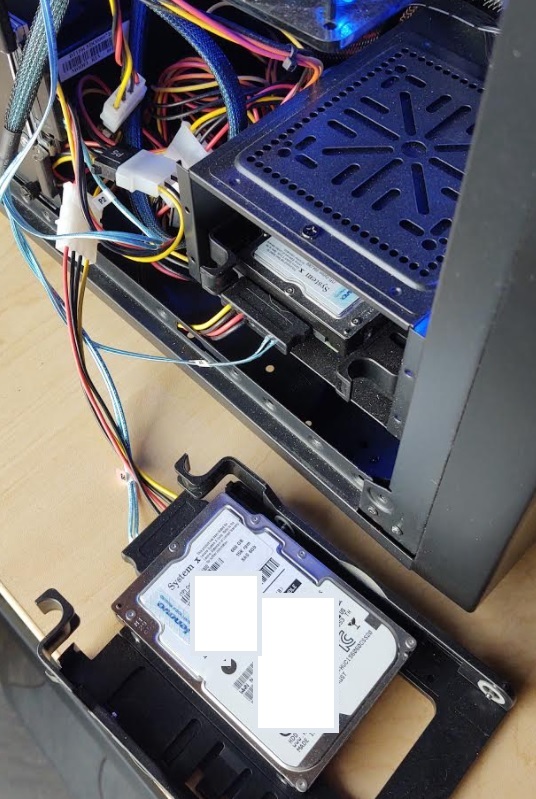
My GEN5 Home Lab is ever expanding and the space demands on the vSAN cluster were becoming more apparent. This past weekend I updated my vSAN 7 cluster capacity disks from 6 x 600GB SAS HDD to 6 x 2TB SAS HDD and it went very smoothly. Below are my notes and the order I followed around this upgrade. Additionally, I created a video blog (link further below) around these steps. Lastly, I can’t stress this enough – this is my home lab and not a production environment. The steps in this blog/video are just how I went about it and are not intended for any other purpose.
Current Cluster:
- 3 x ESXi 7.0 Hosts (Supermicro X9DRD-7LN4F-JBOD, Dual E5 Xeon, 128GB RAM, 64GB USB Boot)
- vSAN Storage is:
- 600GB SAS Capacity HDD
- 200GB SAS Cache SDD
- 2 Disk Groups per host (1 x 200GB SSD + 1 x 600GB HDD)
- IBM 5210 HBA Disk Controller
- vSAN Datastore Capacity: ~3.5TB
- Amount Allocated: ~3.7TB
- Amount in use: ~1.3TB
Proposed Change:
- Keep the 6 x 200GB SAS Cache SDD Drives
- Remove 6 x 600GB HDD Capacity Disk from hosts
- Replace with 6 x 2TB HDD Capacity Disks
- Upgraded vSAN Datastore ~11TB
Upgrade Notes:
- I choose to backup (via clone to offsite storage) and power off most of my VMs
- I clicked on the Cluster > Configure > vSAN > Disk Management
- I selected the one host I wanted to work with and then the Disk group I wanted to work with
- I located one of the capacity disks (600GB) and clicked on it
- I noted its NAA ID (will need later)
- I then clicked on “Pre-check Data Migration” and choose ‘full data migration’
- The test completed successfully
- Back at the Disk Management screen I clicked on the HDD I am working with
- Next I clicked on the ellipse dots and choose ‘remove’
- A new window appeared and for vSAN Data Migration I choose ‘Full Data Migration’ then clicked remove
- I monitored the progress in ‘Recent Tasks’
- Depending on how much data needed to be migrated, and if there were other objects being resynced it could take a bit of time per drive. For me this was ~30-90 mins per drive
- Once the data migration was complete, I went to my host and found the WWN# of the physical disk that matched the NAA ID from Step 5
- While the system was still running, removed disk from the chassis, and replaced it with the new 2TB HDD
- Back at vCenter Server I clicked on the Host on the Cluster > Configure > Storage > Storage Devices
- I made sure the new 2TB drive was present
- I clicked on the 2TB drive, choose ‘erase partitions’ and choose OK
- I clicked on the Cluster > Configure > vSAN > Disk Management > ‘Claim Unused Disks’
- A new Window appeared and I choose ‘Capacity’ for the 2TB HDD, ‘Cache’ for the 200GB SDD drives, and choose OK
- Recent Task showed the disk being added
- When it was done I clicked on the newly added disk group and ensured it was in a health state
- I repeated this process until all the new HDDs were added
Final Outcome:
- After upgrade the vSAN Storage is:
- 2TB SAS Capacity HDD
- 200GB SAS Cache SDD
- 2 Disk Groups per host (1 x 200GB SSD + 1 x 2TB HDD)
- IBM 5210 HBA Disk Controller
- vSAN Datastore is ~11.7TB

Notes & other thoughts:
- I was able complete the upgrade in this order due to the nature my home lab components. Mainly because I’m running a SAS Storage HBA that is just a JBOD controller supporting Hot-Pluggable drives.
- Make sure you run the data migration pre-checks and follow any advice it has. This came in very handy.
- If you don’t have enough space to fully evacuate a capacity drive you will either have to add more storage or completely remove VM’s from the cluster.
- Checking Cluster>Monitor>vSAN>Resyncing Objects, gave me a good idea when I should start my next migration. I look for it to be complete before I start. If you have an very active cluster this maybe harder to achieve.
- Checking the vSAN Cluster Health should be done, especially the Cluster > Monitor > Skyline Health > Data > vSAN Object Health, any issues in these areas should be looked into prior to migration
- Not always, but mostly, the disk NAA ID reported in vCenter Server/vSAN usually coincides with the WWN Number on the HDD
- By changing my HDDs from 600GB SAS 10K to 2TB SAS 7.2K there will be a performance hit. However, my lab needed more space and 10k-15K drives were just out of my budget.
- Can’t recommend this reference Link from VMware enough: Expanding and Managing a vSAN Cluster
Video Blog:
Various Photos:
 |
 |
If you like my ‘no-nonsense’ videos and blogs that get straight to the point… then post a comment or let me know… Else, I’ll start posting really boring content!
036 #vmwaredailytip | Tips I used to pass the VCP-DCV 6.7 Delta 2V0-21.19D Exam | #VMUG #vExpert
In this straight to the point video blog go over some of the items I discovered preparing and taking my VCP-6.7 Delta exam.
Content Links: https://youtu.be/PE0evoGMK08
#vmwaredailytip(s) are very quick tips to help you expand your knowledge around working with virtualization. These tips are not meant to be all encompassing but more of a way to build your awareness. Feel free to comment your related tips below!
035 #vmwaredailytip | #VMworld Updates / #vSpeakingPodcast / #vSANChat | #VMUG #vExpert
In this straight to the point video blog I talk about VMworld 2020 Schedule Builder, various twitter accounts to follow, and #vSANchat!
Content Links: https://youtu.be/ZeAQeXnRZsI
#vmwaredailytip(s) are very quick tips to help you expand your knowledge around working with virtualization. These tips are not meant to be all encompassing but more of a way to build your awareness. Feel free to comment your related tips below!
034 #vmwaredailytip | Correlating build numbers and versions of #VMware products | #VMUG #vExpert
In this straight to the point video blog I show how I find and use the KB – Correlating build numbers and versions of VMware products.
Content Links: https://youtu.be/n73funRhpCI
#vmwaredailytip(s) are very quick tips to help you expand your knowledge around working with virtualization. These tips are not meant to be all encompassing but more of a way to build your awareness. Feel free to comment your related tips below!
033 #vmwaredailytip | Prepare for #vmworld with #vmware 30-Minute Lightning Labs | #VMUG #vExpert
In this straight to the point video blog I show how I use VMware Lightning labs to prepare for VMworld 2020.
Content Links: https://youtu.be/V_FbDQzEhp0
#vmwaredailytip(s) are very quick tips to help you expand your knowledge around working with virtualization. These tips are not meant to be all encompassing but more of a way to build your awareness. Feel free to comment your related tips below!
032 #vmwaredailytip | Top Sessions for VMworld you don’t want to miss | #VMUG #vExpert
In this straight to the point video blog I review some of the top posts around VMworld 2020 sessions.
Content Links: https://youtu.be/bs5fb3Dlv6g
#vmwaredailytip(s) are very quick tips to help you expand your knowledge around working with virtualization. These tips are not meant to be all encompassing but more of a way to build your awareness. Feel free to comment your related tips below!
031 #vmwaredailytip | Using the VMware Ports and Protocols page | #VMUG #vExpert
In this straight to the point video blog I do quick overview of the VMware Ports and Protocol web page and how to use it.
Content Links: https://youtu.be/3o4LR6f9wz0
#vmwaredailytip(s) are very quick tips to help you expand your knowledge around working with virtualization. These tips are not meant to be all encompassing but more of a way to build your awareness. Feel free to comment your related tips below!
 vmexplorer