vmware
Turning a ‘No you cannot attend’ to a ‘Yes’ for VMworld
 I’ve been lucky enough to make it to every VMworld since 2008 and 2014 will be my 7th. time in a row. In this blog post I wanted to share with you a breakdown of some of the tips and tricks I’ve used to get to these events. Being the former Phoenix VMUG leader I’ve shared these tips with fellow VMUG users and now I’m sharing them with all of you. Users would tell me cost is the number one reason why they don’t go – “My Company sees value in this event but will not pay for it”. This breaks down to Food, Hotel, Travel, and the infamous golden ticket, aka the VMworld pass. So how do users overcome the cost to attend? This is what this blog post is all about…
Working with your employer –
Having your employer pick up the tab not only benefits them as a company but yourself too. As you know VMworld is full of great content and the socialization aspects are second to none. Chances are you’ll be asked to put together a total cost to attend and this cost can be quite high for some companies on a tight budget. My suggestion is if you are getting the big ‘No’ then work with your boss around the total costs. First find out why it’s a ‘No’ and look for opportunities to overcome this. Maybe your company will pay for some of the items. Example – They might be able to cover airfare, but the rest is on you. Don’t forget if your company has a VMware TAM (Technical Account Manager) reach out them. Even if you are not directly working with the TAM they are your best resource not only for VMware Technology but also for getting you to VMworld. They don’t have passes but they usually know the community very well and can assist.
Sometimes I hear “My employer will not allow me to accept gifts”. True your company may have a policy around the type of gifts you can receive and by all means follow this policy. However, keep in mind you may be able to take vacation time and represent yourself at this event not your employer. Then there is a possibility gifts could be accepted but on the premises you don’t represent your company. Some companies are okay with this but just make sure they are. If you are able to do this I would suggest you represent it as ‘personal development’.
How do I get a free VMworld Pass?
This can be your biggest challenge. However here are some ways to get your hands on one.
-
Give-a-ways
- I can’t tell you how many vendors have giveaways contests right now — hit them early and enter as many contests as you can find
-
Tips-
- When you enter, find out who your local vendor contact is and let them know you entered. Then stay in contact with them.
- Keep in mind not all contests are the same, some are based on random drawing and others are not. This is why I say keep in contact with the vendor.
- How do I find give-a-ways >> Google ‘VMworld getting there for free’
-
Get the word out
- Tell your boss, workmates, vendors, and partners. Post on Twitter, Linked-In, etc. and Repeat again and again. By doing this you let others know about your strong interest in getting there, in turn they might get a lead for you.
- Most importantly, reach out to your local VMUG leader and ask them for tips in your area. They are usually well connected and might have a lead for you as well.
-
Follow Twitter and Linked-In – You never know who is going to post up “I have a pass and need to give it to someone”. Yes that is right, before the event you can transfer a pass to someone.
- New to Twitter, need contacts? It’s a pretty simple to get started. Simply find the #VMworld hastag, see who is posting to it and start following them. Then look at all their contacts and follow them too, soon you’ll have a gaggle of folks.
- This sound like work. Why do all this? Simple, distributed coverage model. The more people know the more likely they are to help and in turn the more likely you’ll succeed
-
Don’t forgo an Expo-Only or Solutions Exchange Pass
- If you get offered this pass take it. I can’t tell you how many vendors have these passes and have trouble giving them away, seriously this is gold but folks don’t know how to leverage them.
- First off this pass has great value, there is a TON of value here.
-
Second this pass can get you on to the Solutions Exchange floor where all the vendors and partners are.
- Once there start talking to all the vendors, fellow attendee, all those folks you meet on Twitter, etc. as you never know who has a full pass they couldn’t get rid of, take it and upgrade yours.
- Third, while you are there with an Expo Pass use Twitter and the VMworld hash tags to let folks know you’re here and you are looking for a full pass.
- Stop by the VMUG booth on the Expo floor, you never know who will be there and you never know if users there might be able to help you.
-
Vendors and Partners
-
Find out who is sponsoring VMworld this year, and then…
- Start calling the ones you know well, ask them for support getting there.
- Don’t forget to call the ones you don’t know so well too.
- If you have an upcoming deal on the table with a vendor, inquire if they will throw in passes, travel, etc.
-
What about Food, Hotel, and Travel Costs?
-
Food
- There will be free food everywhere, in-fact feel free to give some to the homeless I usually do.
- If you get a pass then lunch and usually breakfast are included.
- For dinner, find out where the nightly events are as they usually have food.
- Talk with Vendors as they might take you out, you never know.
-
Hotel
- Ask a Vendor to pay for just the room or ask them to gift hotel points to you.
- Room Share with someone at the event << Think about it, you won’t be in the room that often and chances are from 7AM till 10PM you’ll be out of your room.
-
Use travel sites to cut down the cost.
- Secret Hotels: Best Western Carriage Inn and The Mosser. Good if you’re on a budget but chances are they are full this year (2014).
- Use your hotel or other travel points to book the hotel for free.
- Get a low cost hotel away from the event, but watch your travel costs.
-
Travel
-
Airfare
- Ask a vendor to pay for just the airfare, or maybe they have points they can gift you.
- Use your own travel points to pay for this.
-
Rideshare to the event
- See if one of your connections are driving to the event, offer to split fuel costs.
- You drive someone to the event, and they pick up the hotel or vise versa.
-
Local Travel
-
Use the following –
- VMworld Shuttle
- Bus
- Uber
- BART
- Once again hit up those vendors, they might have a way to get you around for free
-
-
Finally here is a breakdown of how I got to so many events and how/who paid for it….
| Year | Pass | Travel | Food | Hotel |
| 2008 VMworld | Vendor Sponsor – Full Pass | Employer Paid | Vendor / Event | Employer Paid |
| 2009 VMworld | VMUG Sponsored – Full Pass | Vendor paid for Airfare with Miles | Vendor / Event | Employer Paid |
| 2010 VMworld | VMUG Sponsored – Full Pass | Vendor paid for Airfare with Miles | Vendor / Event | Vendor Sponsored |
| 2011 VMworld | Vendor Sponsor – Expo Pass but I got an upgrade to Full by asking others | I drove two others and I paid for the fuel | Vendor / Event | Travel Companion paid for room |
| 2012 VMworld | Employee Labs | Employer Paid | Employer Paid | Employer Paid |
| 2013 VMworld | Employee TAM | Employer Paid | Employer Paid | Employer Paid |
| 2014 VMworld | Employee TAM | Employer Paid | Employer Paid | Employer Paid |
Summing it up…
My take is this, if you REALLY want to go you’ll get there but sometimes it takes effort to do so and if you do it right it might not cost you a thing. Don’t let anything stop you and find your way there.
Finally, after you’ve been to the event don’t forget about the folks who got you there and say ‘Thank you’. Then over the next year continue to build this relationship, as you never know if you’ll need help again, or you want to help someone else get there.
Network port diagram for vSphere 5.x – Poster
This is by far and away my favorite VMware Poster and I use it as a reference quite often.
Benefits –
- Clear representation of all the TCP/IP Ports needed by VMware Products and their dependences
- PDF has a very clear diagram that can be printed on to a large format
- PDF Diagram has reference numbers that correlate to further slides for more information
You can find the PDF Here >>http://kb.vmware.com/selfservice/microsites/search.do?language=en_US&cmd=displayKC&externalId=2054806
PIC of the Reference Link –
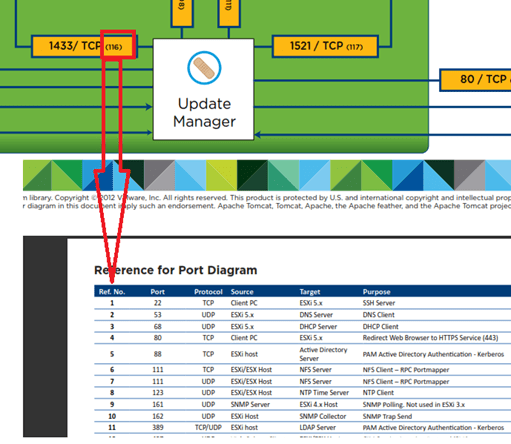
Part of a PIC of the Port Diagram

Free Training for VMware Products
This comprehensive list of training links came my way the other day and it was too good I just had to share it.
It’s the work of the former Omaha VMUG leader turned VMware TAM Jodi S (Twitter @rytalws)
|
Foundational Topics |
URL |
|
DataCenter |
|
|
VMware DataCenter Virtualization Fundamentals |
http://mylearn.vmware.com/mgrreg/courses.cfm?ui=www_edu&a=one&id_subject=47866 |
|
Introduction to Virtualization and VMware Hypervisor |
|
|
VMware vSphere Strategy: The Foundation of Your DataCenter |
|
|
An overview of vCloud Suite |
https://www.youtube.com/watch?v=kKlFRCNVCbU&list=PL9MeVsU0uG67FCDj0U_V-4WIQ2vbgQbJB |
|
ESXI Foundation |
|
|
Featured VMware Documentation Sets |
|
|
vSphere Hypervisor – Installation & Configuration |
|
|
vSphere Hypervisor -vSphere Client Installation |
|
|
vSphere Hypervisor – Configuring VM Hardware |
|
|
VMware vSphere: What’s New Fundamentals [V5.5] |
http://mylearn.vmware.com/mgrreg/courses.cfm?ui=www_edu&a=one&id_subject=51301 |
|
VMware vSphere 5.5 What’s New! |
|
|
VMware vSphere: VM Management – Web Client Overview |
|
|
VMware vSphere: VM Management – Cloning/Templates |
|
|
VMware vSphere: VM Management – Migration vMotion |
|
|
VMware vSphere: VM Management – HA |
|
|
VMware vSphere: VM Management – DRS |
|
|
VMware vSphere: VM Management – Storage Profiles |
|
|
Local Management Tools Overview |
http://vmwarelearning.com/9ti/local-management-tools-overview/ |
|
How to Install and Configure VMware ESXI 5.5 |
|
|
VMware vSphere: Installation – ESXI 5 |
https://www.youtube.com/watch?v=r-VsThbQyXw&list=PLGey3gSYvwCBkH01wSlg8wd4Aye9f58HT |
|
vSphere 5.5 Installation, Administration and Training course |
|
|
Build your own VMware vSphere ESXi 5.5 Datacenter, starting with one PC |
|
|
HOL-SDC-1304 – vSphere Performance Optimization |
|
|
HOL-SDC-1310 – vSphere and vSOM 101 |
|
|
HOL-SDC-1319 – Tech Preview: VMware NSX for Multi-Hypervisor Environments |
|
|
Networking |
|
|
VMware Virtual Networking Concepts |
https://www.vmware.com/files/pdf/virtual_networking_concepts.pdf |
|
vSphere Networking |
|
|
vSphere Distributed Switch |
https://www.youtube.com/watch?v=8fxdz2aoVOw&list=PLGey3gSYvwCBkH01wSlg8wd4Aye9f58HT |
|
VMware Network Virtualization Fundamentals |
http://mylearn.vmware.com/mgrreg/courses.cfm?ui=www_edu&a=one&id_subject=52533 |
|
Network I/O Control |
|
|
VMware vCloud Networking and Security |
|
|
VMware NSX Product Page |
|
|
VMware NSX Blog |
|
|
HOL-SDC-1302 – vSphere Distributed Switch A to Z |
|
|
HOL-SDC-1303 – VMware NSX Network Virtualization Platform |
|
|
HOL-SDC-1319 – Tech Preview: VMware NSX for Multi-Hypervisor Environments |
|
|
Storage |
|
|
Introduction to Storage |
|
|
VMware vSphere: Storage – Thick & Thin Provisioning |
|
|
VMware Storage Virtualization |
|
|
Enable vSphere HA and Storage DRS for VMware vSphere |
|
|
VMware Storage Profiles |
|
|
VMware Storage I/O Control |
|
|
VMWorld Session: STO1545-Architecting Storage DRS |
|
|
How to identify and Solve Storage I/O Latency Issues |
|
|
vSphere 5 Storage DRS IO Load Balancing |
|
|
VMware Storage Distributed Resource Scheduler |
|
|
HOL-SDC-1308-Virtual SAN (vSAN) and Virtual Storage Solutions |
|
|
Security |
|
|
Security of the VMware vSphere Hypervisor |
http://www.vmware.com/files/pdf/techpaper/vmw-wp-secrty-vsphr-hyprvsr-uslet-101.pdf |
|
VMware Security Development Lifecycle |
|
|
VMware Security Response Center |
|
|
VMware Security Advisories |
|
|
VMware Hardening Guides |
|
|
Operations Management |
|
|
VMware vCenter Operations Manager Documentation |
|
|
VMware vCenter Operations – Introduction Video |
|
|
VMware vCenter Operations Manager Fundamentals [V5.6] |
http://mylearn.vmware.com/mgrreg/courses.cfm?ui=www_edu&a=one&id_subject=42954 |
|
VMware vCenter Operations Training Videos |
|
|
HOL-SDC-1301-Applied Cloud Operations |
|
|
HOL-SDC-1304 – vSphere Performance Optimization |
|
|
HOL-SDC-1301-Applied Cloud Operations |
|
|
Certification – |
|
|
Certification – VMware Cloud Fundamentals |
|
|
Certification – VMware DataCenter Virtualization – VCP5-DCV – Blueprint |
http://mylearn.vmware.com/mgrReg/plan.cfm?plan=45082&ui=www_cert |
|
VMware VCP-DCV 5.1 Exam Preparation |
http://mylearn.vmware.com/mgrreg/courses.cfm?ui=www_edu&a=one&id_subject=46281 |
It’s my easy button for you this week. You all probably already have something but I didn’t…
In addition, here is a 5.5 Feature URL listing which provides information on each 5.5 feature.. Enjoy!
vSAN 1.0 Released Home lab update here I come!
In case you missed the vSAN announcement and demo on www.vmware.com/now Here is a quick review…
- General Availability of Virtual SAN 1.0 the week of March 10th
- vSphere 5.5 Update 1 will support VSAN GA
- Support for 32 hosts in a Virtual SAN cluster
-
Support for 3200 VMs in a Virtual SAN cluster
- Note, due to HA restrictions only 2048 VMs can be HA protected
- Full support for VMware Horizon / View
- Elastic and Linear Scalability for both capacity and performance
- VSAN is not a virtual storage appliance (VSA). Performance is much better than any VSA!
- 2 Million IOPS validated in a 32 host Virtual SAN cluster
- ~ 4.5PB in a 32 host cluster
- 13 different VSAN Ready Node configurations between Cisco IBM Fujitsu and Dell available at GA, with more coming soon
Elaboration and analysis: http://www.theregister.co.uk/2014/03/06/vsan_emerges_at_a_whopping_32_nodes_and_two_meeelion_iops/
VSAN Hands-on Labs (already available): https://blogs.vmware.com/hol/2014/03/click-go-take-vsan-hands-labs.html
Cormac as always does a great review as well — http://cormachogan.com/2014/03/06/virtual-san-vsan-announcement-review/
vSAN will be the next direction for my home lab as I plan to move away from in my opinion a buggy FreeNAS product.
High speed networking is required for the replication network and my back plane will be something like this — http://www.bussink.ch/?p=1183
I’ll post up more as it progresses.
Enjoy!
Patches? Patches? We don’t need no stinkin’ Patches
Recently I reviewed some of the patching techniqus around ESXi and vCenter Server.
The question I wanted to know more about was – How are products (vCenter and ESX(i) patched (4.0 and above)?
What I found was “it depends” J but I remember them this way…
Note – Before I apply ANY patch or update I always check the HCL, check with my hardware vendor, and read the release notes as most patches contain prerequisites.
vCenter Server is simple, I remember it this way “Patches? Patches? We don’t need no stinkin’ Patches…”
ESXi — Can be a bit more complicated… It’s more like this — “I’d like the pie heated and I don’t want the ice cream on top, I want it on the side, and I’d like strawberry instead of vanilla if you have it, if not then no ice cream just whipped cream but only if it’s real; if it’s out of the can then nothing.”
Here is a bit more depth –
vCenter Server (VC) Windows Edition –
VC 4.x, 5.0 and 5.1 – There are no patches vCenter Server only full updates packages which contain all the content. AKA – Patches are included in the each releases.
VC 5.5 – No patches for VC just updates but there are patches for tcServer and JRE. These patches will be released on an as needed basis.
It’s pretty simple, if you want to patch your vCenter Server then just install an Update, but do your
homework first.
ESXi —
First off Patches are not exactly cumulative and depending on how you update ESXi the Build numbers and sub-components can be off.
Trying to simplify this… it’s not a cut and dry method but here is what I found…
In most cases (not all) it seems to come down to two ways of updating your host. Ask yourself this:
1. Do you want ESXi to report the more accurate Build Number and have all the underlying sub-components (Virt Hardware, Tools, etc) up to date?
2. OR is it more important to just have a specific Patch installed?
If Yes to “more accurate Build Number” then this is suggested…
Update ESXi to the latest Update, then apply the latest Patch.
This should ensure the sub-components contained within are updated uniformly and the build number should report properly.
Accurate Build Number Example – You are at ESXi 4.1U1, update it to ESXi 4.1U3 first, then Apply Patch 9
The result should yield an ESXi server and sub–components fully up to date
If Yes to “more important to just have a specific Patch” Simple answer is just apply that patch
However depending on your current level of ESXi the patch may not contain all the updated sub-components.
It will contain the Patches and Security updates documented in its KB or release notes.
Specific Patch Example – You are at ESXi 4.1U1, Just Apply Patch 9
The result should yield an ESXi Server with Patch 9 and the sub-components may not be updated, it depends on the patch
This may also change the build number to reflect an unexpected result, meaning it may not look like the build number for ESXi 4.1U1 or Patch 9, it may be somewhere in between.
Last Monkey Wrench in this mix… Express Patches with ESXi
This is the exception to the statements above and add a couple of new rules…
Express Patches typically fix only a very specific function, and they are typically are NOT cumulative.
Monkey Wrench Example – You are at ESXi 4.1U1 let’s say Express Patch 3 (EP) is the latest patch level.
To fully update ESXi and Sub-components you should update to ESXi 4.1U3 first, apply the Patches and only EP’s just below EP3, then apply EP3
If you only want the EP then just apply EP3
Hopefully this makes sense and after reading this thread I’ll bet you never look at ESXi patching the same way J
One last item here is a great url around build numbers…
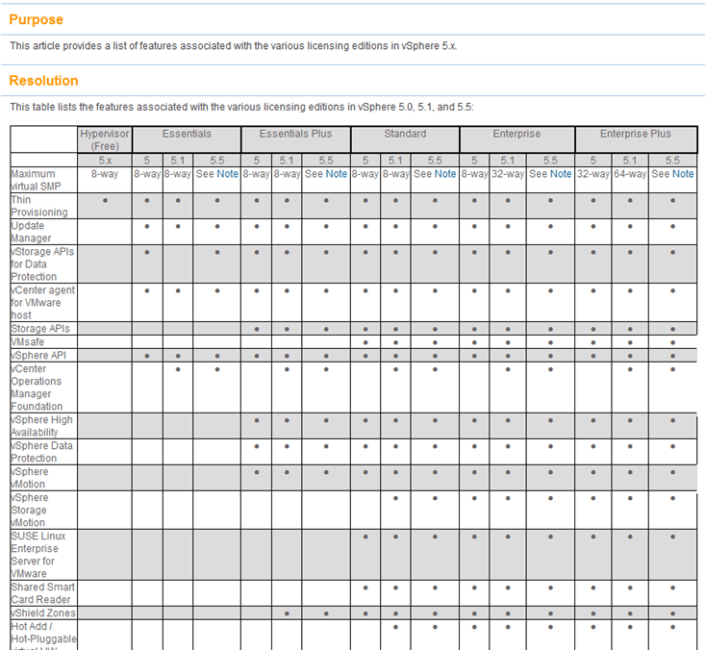
vSphere 5.x licensing Matrix
Ever want to compare a full list of the vSphere features to the associated licensing level?
Well now you can… Check out >> http://kb.vmware.com/selfservice/microsites/search.do?language=en_US&cmd=displayKC&externalId=2001113
Here is a quick snapshot of the matrix. Enjoy!

vSphere 5.x licensing Matrix
Ever want to compare a full list of the vSphere features to the associated licensing level?
Well now you can… Check out >> http://kb.vmware.com/selfservice/microsites/search.do?language=en_US&cmd=displayKC&externalId=2001113
Here is a quick snapshot of the matrix. Enjoy!
Top Blogger Voting for 2014 is now open
For many years now Eric Siebert has held voting for the top Virtualization Bloggers. This is no easy task, and this year he has over 300 blogs listed.
If you found any of my blog posts useful, then please, do take a few minutes out of your busy schedule and vote. Every vote really does count, and the higher you rate a blog the more weight it gets in the final tally. Ratings do make a difference, and feedback is great. As any blogger will tell you, frequently writing quality content takes a lot of time.
Please, take a few minutes out of your day and vote. I’ll be voting for bloggers myself, including MIchael Webster and Jason Boche.
Voting is now open, and will continue through 3/17/2014 >> http://vsphere-land.com/news/voting-now-open-for-the-2014-top-vmware-virtualization-blogs.html
Enjoy!
Whitepaper – Security of the VMware vSphere Hypervisor
Folks release recently is the Security of the VMware vSphere Hypervisor.
http://www.vmware.com/files/pdf/techpaper/vmw-wp-secrty-vsphr-hyprvsr-uslet-101.pdf
Enjoy!
VMware Hands On Lab — HOL-SDC-1305
I decided to take the HOL-SDC-1305 lab but only module four tonight. Why only module four? Well, it’s the one all about vCenter Server Heartbeat.
If you have not taken a VMware lab I would highly recommend it as you’ll gain the proper topic knowledge and you’ll get to do some great hands on lab work at the same time.
HOL-SDC-1305 (Module 4) didn’t disappoint me, it was straight to the point, went through the key areas, and was a great overview of the product.
I wanted to see more about requirements, design, and any constraints. However these items were outside the scope of this lab so I can’t really hold it against it.
I attached a quick screen shot of the lab for your enjoyment!

Note – Everyone has access to the VMware Hands on Labs, and it’s FREE to all.
Start here >> https://communities.vmware.com/community/vmtn/resources/how
HOL Labs Main Link >> http://labs.hol.vmware.com/
Enjoy!
 vmexplorer