Other
vmworld 2010 – The Schedule
Here is my schedule for vmworld 2010… This year I plan to hit the self-paced labs in the morning, followed up by super-sessions, performance, and cloud computing throughout the week. Hopefully I’ll have time for lunch and the vendor area!
| EA7850 — Design, Deploy, and Optimize Microsoft SQL 2008 |
| SS1055 — Partner Track Super Session |
| TA8102 — Tuning Linux for Virtual Machines |
| EA8210 — Zimbra and The Future for Mission Critical Apps in the Virtualized Enterprise |
| ALT3005 — VMware vCenter™ Orchestrator – Orchestrating the Cloud |
| ALT2004 — Building the VMworld Lab Cloud Infrastructure |
| EA7829 — Panel Discussion: Virtualization’s Impact on the Delivery of Healthcare IT Services |
| TA9420 — vSphere 4.1 Overview |
| SP9820 — Getting the Most Out of Your Storage Infrastructure with Client and Server Virtualization |
| TA6720 — Troubleshooting using ESXTOP for Advanced Users |
| TA8133 — Best Practices to Increase Availability and Throughput for VMware |
| SS1011 — How Cisco, EMC and VMware Are Changing the IT Landscape with Vblock Converged Infrastructure |
| TA8623 — Storage Super-Heavyweight Challenge |
| SP9721 — How to Use Virtual I/O to Provision and Manage Networks and Storage Resources in a Private Cloud |
| TA6944 — PowerCLI Is For Administrators! |
| TA8051 — Infrastructure Technologies to Long Distance VMotion – What Is “VM Teleportation”? |
| TA8101 — Virtual Storage and VMware vSphere: Best Practices and Design Considerations |
| TA7994 — vStorage Update for vSphere 4.1 |
VMware vExpert 2010
The other day I was selected as a VMware vExpert for 2010. John Troyer (of VMWARE) is building a great community of vExperts with like minded individuals that are proponents of virtualization evangelism. On another note I nominated my entire Phoenix VMUG Team (Luke, Rob, Duke, and Charles) for the award and they all were excepted ! Congrats Guys, you have earned it.
For those of you that do not know, the VMware vExpert program was created in 2009 to show appreciation for those individuals who have significantly contributed to the community of VMware users over the past year. For more information on the program visit the vExpert site
HP c7000 Mid-Plane Replacement
If you’re reading this blog, I’m hoping you never have to do this procedure. However the other day we had a c7000 Mid-plane go out.
We first noticed some odd issues with Ethernet NICs randomly disconnecting. Then, our chassis started to fail entire Ethernet pass through modules, it came back online and then a few weeks later just one Ethernet port stayed in a failed state. Working with HP and our local VAR we tried all the troubleshooting steps and found it was the mid-plane had failed.
This blog post is merely my notes and some of my findings during the replacement of the mid-plane. I worked with an HP certified technician and he had a punch list from HP to complete this repair. I recommend a certified technician do the repair as you never know what you’re going to run into and we did run into a few gotchas that stumped us all.
Quick Disclaimer – This is not a guide for repairing this device but merely my notes…
First thing – The Plan:
- 7:00 Migrate VM’s to BC2 (BC = blade chassis) and shut down ESX hosts on BC1
- 8:00 Shutdown remaining blades in BC1
- 8:20 Start Repair on BC1
- 8:40 Test repair on BC1
- 8:50 bring up Blades on BC1
- 9:00 TEST applications
- 9:10 Migrate VM’s from BC2 to BC1
- 10:00 Finish
The Plan with Notes:
7:00 Migrate VM’s to BC2 (BC = blade chassis) and shut down ESX hosts in BC1
- No issues, vMotion worked without issues & shutdown 6 ESX hosts via vCenter Server
8:00 Shutdown remaining blades in BC1
- No issues, shut down blade servers
8:20 Start Repair on BC1
Power down the c7000 chassis, remove all the cards, power supplies and blades
This is a pic where we removed the rear cards. One thing we were able to do was remove the Ethernet & Fibre Pass through cards without having to disconnect the cables.
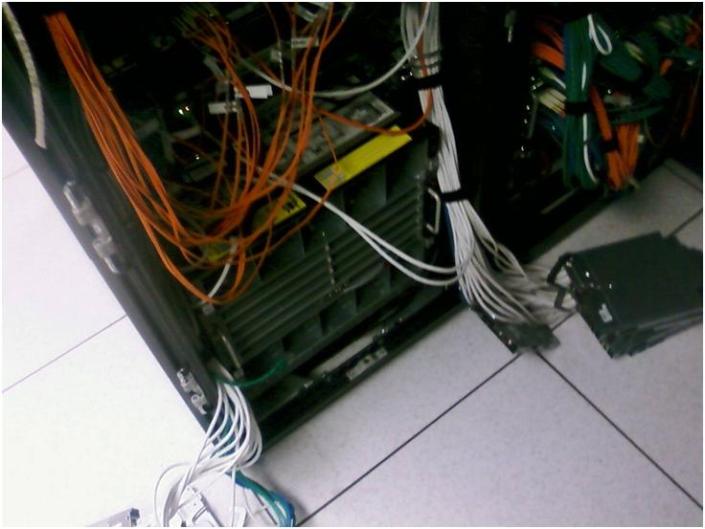
Second shot of the removal
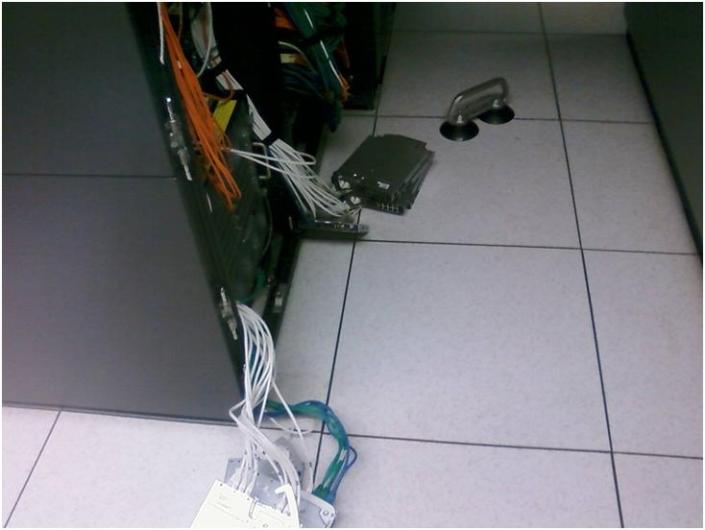
Remove the blades and Power supplies
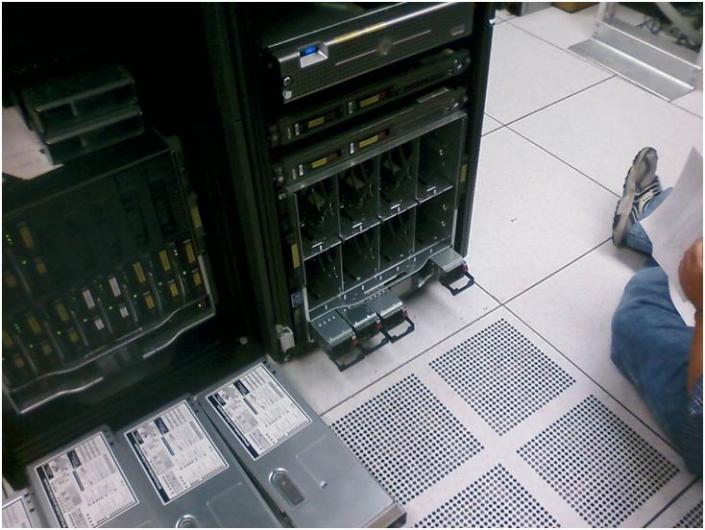
To remove the mid-plane there were four bolts holding in it in place. We removed them and then pull it till it stops. The retaining clips needed depressed to allow the unit to be removed and we pressed them in and it removed with ease. Note: The manual fails to mention this.
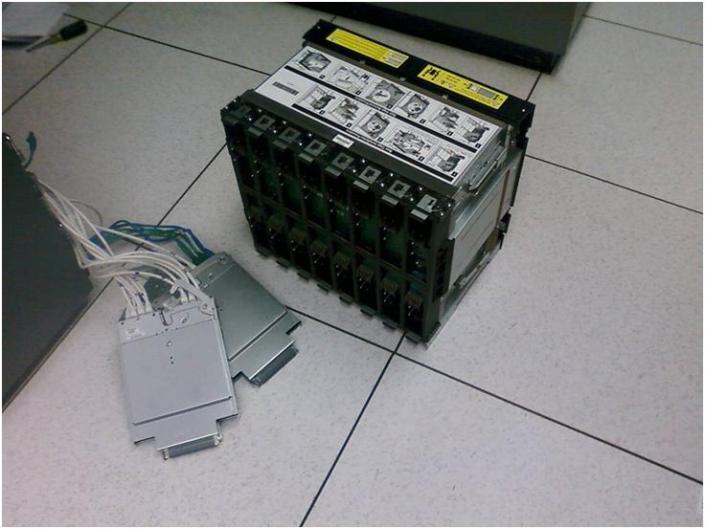
Here is a shot of the retaining clips. They help to hold the mid-plane in. At first we could not figure out why the mid-place would not come out. This held us up a bit as the instructions failed to mention depressing them to allow the mid-plane removal.
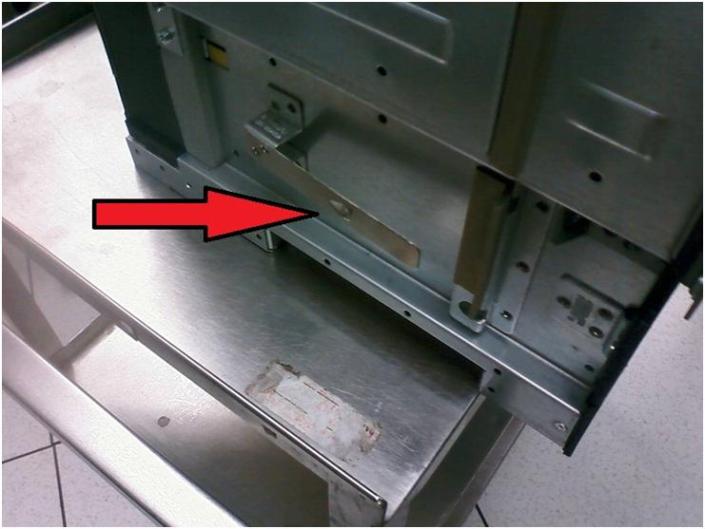
Inside the blade chassis – Rear
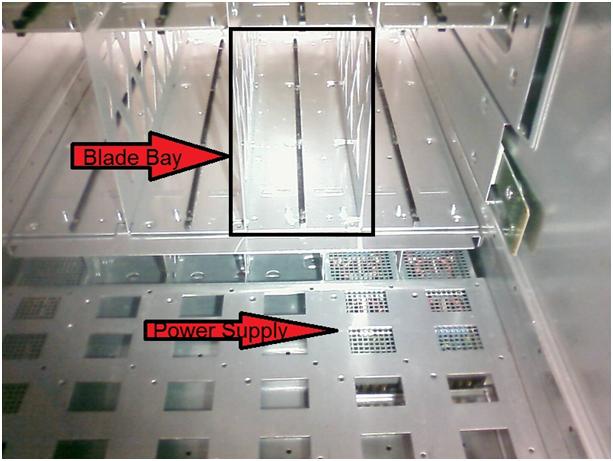
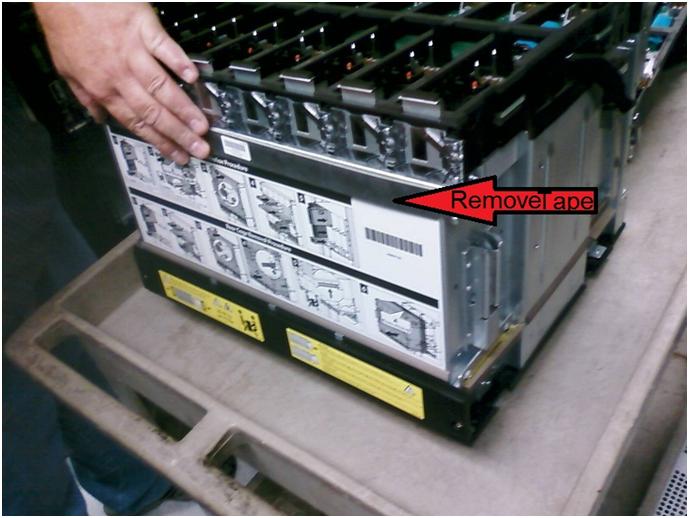
After removing the mid-plane chassis there are several bolts that hold in this together. One item you have to do is remove the foam tape in the screen shot below.
This will allow you to separate the mid-plane board from the chassis. This was another gotcha that the instructions failed to mention this step.
Our package came with replacement tape, yours may vary.
After replacing the mid-plane board we reassemble the chassis in this order..
- Reinserted the Mid-Plane chassis
- ilo Control Modules
- Power Supplies
- Powered on device, wait
- Inserted pass though modules, wait
- Inserted Blades and powered them on
9:00 Ensure the Blades on BC1 are reporting in
-
No issues, everything is now working!
9:15 TEST applications
-
No issues, all blades and apps came right up
9:30 Migrate VM’s from BC2 to BC1
- No Issues, all VM’s migrated perfectly
10:00 Finish
Gotchas / Notes
2 Items slowed us down
- The retaining clips on the lower right and left hand sides were not noted in the documentation. We had lots of cables on the left and right side so it made it hard to clearly see where they were.
- The tape holding on the mid-plane board wasn’t documented. It took us a bit to figure out that a simple piece of foam tape could hold together, but it did.
Next time I mount a c7000 chassis I’ll remember to mount it about 4U from the base of a rack. The issue we were having was the cabling and PDU power cords were getting in the way of the mid-plane and this made it harder to remove.
Other than these minor issues, the repair went smooth, and it was fun to see the “guts” of a c7000.
06.08.2010 VMUG Event
The big Phoenix VMUG meeting is tomorrow… I hope you all can make it… some of the buzz will be about the FREE VMware CookBook and the workshop around Building your home lab around Workstation 7.
For all you night owls… I posted my Workshop lab a day early…. Go here to see it…
http://communities.vmware.com/docs/DOC-12763
Enjoy!
Matt..
Network – Edit Hosts file on ESX
Here are the simple commands to edit a hosts file on an ESX server…
Log on as root
Enter vi /etc/hosts
Press ESC, then i to insert
Edit Text
Press ESX, the :wq press enter to save
Here are some common commands with vi
“you have to enter command mode first using ESC “
i = insert at this charachter
x = delete a charachter
dd = delete a line
yy = copy
p = paste a copied line
a = append to the next charachter
A = append to the end of aline
I = insert at the beginning of a line
:w = write
:q = quit
:w! = force a write (read only files)
:q! = force a quit no changes
Nasuni does a nice write up on the Phoenix VMUG
Hey if you get a chance check out the blog below, Andres did a really nice write up about the Phoenix VMUG and their product..
https://www.nasuni.com/news/nasuni-blog/hello-vmug-phoenix/
I had a chance to watch the Nasuni presentation and they offer are really cool vm appliance that allows for “virtually” unlimited storage for a flat rate price…
When I heard the flat rate price it floored me how cost effective it was…
I currently have a need for some off site storage and we’ll be looking at Nasuni very soon…
WebSite – MXTool Box
I found this neat web tool today… it was a pretty quick way to do a Who-is and then do simple tests like SMTP, DNS, etc..
One feature I liked the Black list checker… real easy way to see if your domain or the domain your trying to send email to has been black listed.
Exchange – Free downloadable Exchange starter kit
VMware offers a free downloadable Exchange starter kit.
What you’ll get are 3 files (2PDF’s and one Video):
Exchange_on_VMware_WP_202007.pdf
forresterresearchwhitepaper.pdf
University of Plymouth – Video.mov
Here this link to register..
http://www.vmware.com/resources/wp/ms_exchange_kit_register.html
I found this information useful if your needing to do an “executive overview”.
If you need in-depth information and how-to’s for business critical apps then start here..
http://www.vmware.com/solutions/business-critical-apps/exchange/
Book – VMware vSphere 4.0 Quickstart Guide
I bought this book today… based on some blog posts I found (see below).
I must say it is one of the best.. It is a pocket reference so be aware the print is a bit small…
Download the Power-CLI Scripts from the book here…
http://www.yellow-bricks.com/wp-content/uploads/quickstartguide.zip
Here are some notes about the book.. From this URL…
http://www.boche.net/blog/index.php/2009/11/23/vsphere-4-0-quick-start-guide-released-on-amazon/
What a great way to kick off the new week – The highly anticipated book, vSphere 4.0 Quick Start Guide: Shortcuts down the path of Virtualization, has arrived at Amazon.com! I look at this new release as the 2nd edition or vSphere edition of RapidApp’s Quick Start Guide to ESX 3.0 which is still available and was a huge success.
The vSphere 4.0 Quick Start Guide was written by a lineup of new authors who are well known rock stars in the virtualization community: Bernie Baker, Thomas Bryant, Duncan Epping, Dave Mischenko, Stewart Radnidge, and Alan Renouf. I obtained a preview copy of this book at VMworld 2009 in San Francisco and I can tell you that this it is absolutely amazing. Nowhere else will you find as much information in such a small and convenient footprint. Its small size allows you to put it in your pocket and take it virtually anywhere: On the plane, on the bus, into a meeting, or into the datacenter. As with the first edition, there are several blank pages in this book which allow you space to write down notes, command line information, configuration maximum changes, information about your environment, helpful URLs, etc. The authors did a great job on this book and considering the cumulative years of experience and combined expertise packed into this book, you can’t beat the price. I don’t think a better value exists. My copy has been traveling with me daily in my laptop bag. I give it two thumbs up.
TalkShoe – Call – VMware Communities Roundtable
I found this really cool little community today thanks to a fellow VMUG User (Vlad N)
They have some really cool stuff..
TalkShoe – Call – VMware Communities Roundtable: “VMware Communities Roundtable”
- ← Previous
- 1
- …
- 7
- 8
- 9
- Next →
 vmexplorer