Test Lab – Day 2 CLI with the Xsigo!
Yesterday I did about 90% of the hardware install. Today, Day 2, our Xsigo SE will be here to assist with the installation and configuration of the Xsigo to the ESX Hosts..
Today’s Goals..
- Install 2nd Xsigo VP780
- Install vmware ESXi 4.1 on 4 servers with Xsigo Drivers
- Configure both Xsigo vp780’s
Install 2nd Xsigo VP780…
Day 2 started out with a gift from Mr. FedEx, it was the parts we needed to install the 2nd Xsigo. Only yesterday afternoon we discovered we were missing some power cords and mounting brackets. A couple quick calls to Xsigo and viola parts are on their way. Props to Xsigo for a VERY quick response to this issue!
Based on the lessons learned from Day 1 we mounted the 2nd Xsigo VP780 and it went much smoother. Notice the WE part of installing the VP780, these things are heavy & large and you’ll need some help or a giant with huge hands to install them into a rack. See their install manual for more information.
When we powered them up I was amazed by the amount of air they moved through the device >> Very NICE!
Keep in mind at this point all the test lab hardware including the Xsigo fiber modules (2 x 10gig Fiber modules per device), and networking is mounted and interconnected…

Install vmware ESXi 4.1 on 4 servers with Xsigo Drivers…
You’ll need the Xsigo Drivers installed for ESXi to recognize the infiniband cards and for proper communication.
There are two installation options…
- Install ESXi 4.1 and add the Xsigo Drivers after the install.
- Download the drivers and re-master the ESXi ISO yourself (This is a good option if your building / rebuilding lots of servers)
We chose to re-master the ESXi ISO with the Xsigo drivers.
Here is the link to master the ISO
I won’t bore you with the details of installing ESXi, however the only gotcha I ran into was the Dell R5400 SATA RAID controller.
I setup a SATA RAID group, during the ESXi install it recognized the RAID volume, and ESXi installed to it without issue.
However after the reboot of the host it would not boot to this volume.
I didn’t have time to troubleshoot, for now we just broke the RAID group, reinstalled, and it worked perfectly.
ESXi Management NICS’s..
Our test lab network will be isolated from production network traffic. However, one of our servers will need to be in the production environment. We setup one physical NIC (pNIC) on to our production environment. This will allow us to temporarily transfer VM’s from production to test, we’ll then disconnect this pNIC and setup ESXi to use the Xsigo NIC for management.
(More to come on this on Day 3)
Configure both Xsigo vp780’s…
Configuring the vp780 was very simple. We attached a laptop to the Xsigo and in about 20 commands our Xsigo was up and running..
These are the basic commands we used to setup our pair of Xsigo’s (A and B), the commands below reflect B only.
The commands would be the same for the A Xsigo simply change the appropriate parameters…
NOTE: I don’t recommend you execute these commands in your environment, keep in mind these are for my reference ONLY… I also recommend you contact your Xsigo representative for assistance.
Here are the commands we executed..
Getting into the Xsigo VP780…
We used a standard Xsigo provided rollover cable plugged into Serial1. (Serial2 is for Tech / Debug – Don’t use)
We connected to the console via Putty or Absolute Telnet (COM Settings are 115200,8,1,None,None)
Tip: All default passwords are in the CLI Config Guide by Xsigo
Setup the Xsigo via the Wizard…
Once the connected we used the XgOS config Wizard and entered in the following..
|
Welcome to XgOS Copyright (c) 2007-2010 Xsigo Systems, Inc. All rights reserved.
Enter “help” for information on available commands.
Would you like to use the XgOS Configuration Wizard? [Y/n] Hostname: xsigo-b Domain: YOURDOMAIN.COM Is this Director to be designated as the IB subnet manager (leave as Y unless using an external, non-Xsigo subnet manager) ? [Y/n] Do you want this Director to send diagnostic data to Xsigo periodically? [Y/n] Please input the ‘root’ password: **** Please confirm the ‘root’ password: **** Please input the ‘admin’ password: ***** Please confirm the ‘admin’ password: ***** Please input the ‘recovery-password’: **** Please confirm the ‘recovery-password’: **** IP Address [static/DHCP]: 555.555.555.555 IP Address [static/DHCP]: Enter NTP Server 1: 555.555.555.555 Enter NTP Server 2: Enter Timezone [<Tab><Tab> for the list of Timezones]: America_Phoenix Welcome to XgOS Copyright (c) 2007-2010 Xsigo Systems, Inc. All rights reserved.
Enter “help” for information on available commands. admin@xsigo-b[xsigo] |
Now it’s time to setup the Xsigo…
Place the Xsigo into Trunk Mode..
Port 10 and Port 11 are the 10gig Fibre Modules; this command places them in Trunk Mode
set ethernet-port 10/1 -mode=trunk << Port 10 will be used for our IP Network (Vlans for Guests, vmotion, hosts, etc)
set ethernet-port 11/1 -mode=trunk << Port 11 will be used for our NFS
Rear of VP780

Ensure Trunk Mode is activated..
Use the command ‘show ethernet-port ‘
|
admin@xsigo-b[xsigo] show ethernet-port
name type state descr mode flags lag access-vlan vnics vlans ——————————————————————————- 10/1 nwEthernet10GbPort up/up trunk -s— 1 0 none 11/1 nwEthernet10GbPort up/up trunk -s— 1 0 none 2 records displayed |
Setup Phone Home for Support…
set system phone-home -customer-name=”YOUR COMPANY NAME HERE”
set system phone-home -contact-email-address=YOURNAME@YOURDOMAIN.COM
set system phone-home -contact-phone-numbers=”555-555-5555″
set system phone-home proxy [YOUR PROXY IP HERE] [PROXY PORT if needed, default is 3128]
Note: For this command the syntax is [PROXY IP Address] one space [PROXY PORT], don’t use ‘:’ to as the separator.
Once completed then check confirm your information…
Enter the command ‘show system phone-home’
|
admin@xsigo-b[xsigo] show system phone-home ——————————————————————————- enabled true freq weekly next Fri Jan 14 12:44:52 MST 2011 notify no strip yes alarm yes name COMPANYNAME email EMAIL@EMAIL.com phone 5555555555 copy p-host 555.555.555.555:3128 p-user ——————————————————————————- 1 record displayed admin@xsigo-b[xsigo] |
Check on the Phone Home Log….
admin@xsigo-b[xsigo] showlog phonehome.log
Wed Jan 5 17:30:33 MST 2011: Phone home successful to http://phone-home.xsigo.com:6522
Wed Jan 5 18:04:14 MST 2011: Phone home successful to http://phone-home.xsigo.com:6522
Wed Jan 5 18:04:38 MST 2011: Phone home successful to http://phone-home.xsigo.com:6522
[Press CRTL-C to Exit]
admin@xsigo-b[xsigo]
Tip: your log might be empty until it has something to send
Ensure your Physical servers are attached…
As expected all 4 servers are attached to this Xsigo.. (If they don’t show up here it could be an interconnect or ESXi issue)
Enter the command ‘show physical-server’ to view your connected servers.
|
admin@xsigo-b[xsigo] show physical-server ——————————————————————————- name localhost <<< This is the ESXi Hostname guid 2c903000b4df5 descr port xsigo-001397001:ServerPort2 << This is the Xsigo Port the Server is connected to os VMware/ESXi-4.1.0:xg-3.5.0-1-246491/x86_64 << This is the version of ESX & Xsigo Driver version 2.7.0/3.0.0 server-profile << Notice this is blank, We configured it next ——————————————————————————- name localhost guid 2c903000b4ea5 descr port xsigo-001397001:ServerPort3 os VMware/ESXi-4.1.0:xg-3.5.0-1-246491/x86_64 version 2.7.0/3.0.0 server-profile ——————————————————————————- name localhost guid 2c903000b4ea9 descr port xsigo-001397001:ServerPort4 os VMware/ESXi-4.1.0:xg-3.5.0-1-246491/x86_64 version 2.7.0/3.0.0 server-profile ——————————————————————————- name localhost guid 2c903000b5095 descr port xsigo-001397001:ServerPort1 os VMware/ESXi-4.1.0:xg-3.5.0-1-246491/x86_64 version 2.7.0/3.0.0 server-profile ——————————————————————————- 4 records displayed |
Create Server Profiles…
Creating a server profile enables you to assign devices to your specific host.
In our case we used the ESX Hostname as the Xsigo Server Profile name.
This will help us to keep the profiles well organized.
Keep in mind YOURSERVERNAME# equals your ESX Hostname and it will become your Xsigo Server Profile Name…
Long way to create a Server Profile…
add server-profile [server profile name]
View the new server profile…
|
admin@xsigo-b[xsigo] show server-profile name state descr connection def-gw vnics vhbas ——————————————————————————- YOURSERVER1 up/unassigned 0 0 1 record displayed |
Assign the server profile to a port on the Xsigo…
set server-profile YOURSERVER1 connect localhost@xsigo-001397001:ServerPort1
Short way to create a Server Profile…
add server-profile YOURSERVER2 localhost@xsigo-001397001:ServerPort2
add server-profile YOURSERVER1 localhost@xsigo-001397001:ServerPort3
add server-profile YOURSERVER1 localhost@xsigo-001397001:ServerPort4
Then use show server-profile to confirm your entries…
|
admin@xsigo-b[xsigo] show server-profile name state descr connection def-gw vnics vhbas ——————————————————————————- Yourserver3 up/up localhost@xsigo-001397001:ServerPort3 0 0 Yourserver4 up/up localhost@xsigo-001397001:ServerPort4 0 0 Yourserver1 up/up localhost@xsigo-001397001:ServerPort1 0 0 Yourserver2 up/up localhost@xsigo-001397001:ServerPort2 0 0 4 records displayed admin@xsigo-b[xsigo] |
Set Up and attach the virtual NICS to your server profile…
In this step we created our Xsigo vNICS, attached them to the appropriate server profiles, and the 10gig Modules.
When complete each of our ESXi servers will have 4 Xsigo vNICS.
(2 vNICs for IP Network, 2 vNICs for Storage network)
Decoding the command…
The command ‘add vnic xnb.yourservername1 10/1 -mode=trunk’ breaks down to…
add vnic << Add vNIC Command
xnb << The vNIC Name (xnb = Xsigo, IP Network, B Xsigo Device, Xsb = Xsigo, Storage Network, B Xsigo Device)
yourservername1 << Which profile to attach to
10/1 << Which Module on the Xsigo to attach to
-mode=trunk << What transport mode
These are the command we entered..
|
IP Network vNICS admin@xsigo-b[xsigo] add vnic xnb.yourservername1 10/1 -mode=trunk admin@xsigo-b[xsigo] add vnic xnb.yourservername2 10/1 -mode=trunk admin@xsigo-b[xsigo] add vnic xnb.Yourservername3 10/1 -mode=trunk admin@xsigo-b[xsigo] add vnic xnb.Yourservername4 10/1 -mode=trunk
Storage vNICS admin@xsigo-b[xsigo] add vnic xsb.Yourservername1 11/1 -mode=trunk admin@xsigo-b[xsigo] add vnic xsb.Yourservername2 11/1 -mode=trunk admin@xsigo-b[xsigo] add vnic xsb.Yourservername3 11/1 -mode=trunk admin@xsigo-b[xsigo] add vnic xsb.Yourservername4 11/1 -mode=trunk |
Results from ESXi…

Other Information…
Set System back to factory Defaults…
If needed, you can set the System back to factory Defaults by the following command.
When complete you will need to access the system via Serial Cable.
Here are the steps:
set system factory-default
confirm << type in Confirm, my Putty will exited and the system will shutdown
NOTE: This command will erase the configuration from the Xsigo. Do it with caution
Tip: Note this will cause the system to shutdown, this means someone will have to manually power it back on.
Upgrade the XgOS via USB…
Download the GOS 2.8.5 to a USB Stick..
We inserted the stick into the USB Port on the VP780, then executed this command
system upgrade file://usb/xsigo-2.8.5.xpf
Other Handy commands…
show system status
show system
show system version
show system warnings
show serial
show system info
history
CLI Fun…
One thing I like about the CLI for Xsigo is TAB at the end of the command (most modern CLI’s have this and it sure is handy)
If I type in set system phone-home[Press TAB] it displays possible completions and qualifiers and then it displays the last command I typed in.
admin@ xsigo-b[xsigo] set system phone-home [Press TAB]
Possible completions:
disable Disable phone home
enable Enable phone home
noproxy Don’t use HTTP Proxy
proxy HTTP Proxy config
snooze Hit the snooze button
[Optional qualifiers]
-contact-email-address Email address for Xsigo technical support to contact when a problem is discovered. (or ‘none’)
-contact-phone-numbers Telephone number for Xsigo technical support to contact when a problem is discovered. (comma separated, or ‘none’)
-copy-url URL to send audit copy to
-customer-name Customer name (or ‘none’)
-frequency Phone home frequency (relative to when it is set)
-notify Will Xsigo notify you when problems are detected?
-send-alarms Send major alarms to Xsigo?
-strip-private Strip private information from phone-home data
Repeat ‘?’ for detailed help.
admin@xsigo-b[xsigo] set system phone-home
Day 2 Summary..
The pair of Xsigo’s were very easy to configure and install. I enjoyed working with Xsigo CLI, it is very well thought out, and I plan do to write additional blog about it alone.
Besides for the very few and sometime self-inflicted gotchas things went smooth.
It was nice to have a Xsigo SE on site to assist with the initial install and I’m looking forward to tomorrow when we spin up some VM’s and then test!
Still to do…
- Copy vCenter Server & other VM’s from Production to this test environment
- Test, Test, Test and more testing..
Test Lab – End of Day 1
Day one was pretty simple it mostly comprised of hardware installation.
Below are my notes from todays adventure!
Work completed…
- Network team mounted and configured the EX4200 switches with appropriate vlans (NFS, VM Service Console, vMotion, and others)
- Severs were mounted and remounted to make room (see Installation gotchas below)
- One Xsigo was mounted, and due to some missing brackets the other will have to be mounted tomorrow
- Ethernet CAT and Infiniband cables were all cabled and routed
- Physical Servers for VMware ESXi 4.1 were installed
Installation Gotchas…
Installing & Mounting the Xsigo VP780 proved harder then I expected, this in no way is a slam against Xsigo, and it is totally my fault for not fully reading the manual.
I suggest you run through the Quick Install Manual prior to installing the VP780. There are a LOT of brackets and about 5-8 bolt packages. All are necessary for their intended purpose.
My mistake was I just looked at the VP780 which is 4U in size and planned out 8U for both.
However the mounting / support bracket requires 1U of space… This brings the total to 5U per Xsigo or 10U for both.

This miscalculation caused a bit of a delay and I had to remount some servers to make up this space.
Lesson learned, read the manual before installing.
Xsigo Stuff..
From a DC cooling and cabling perspective the Xsigo is designed very well. In the front there are 4 massive primary fans and 4 smaller fans for the Power Supplies.
This design puts the intake in the front pulling cool air though the Xsigo and out the rear. All the cabling is done in the rear and cable management is a breeze as I can directly cable the rear of my servers to the rear of theXsigo.
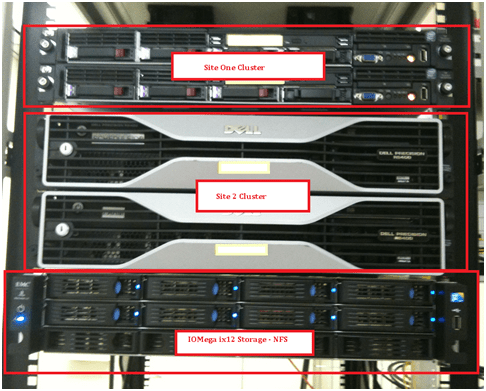
Front View

Rear View
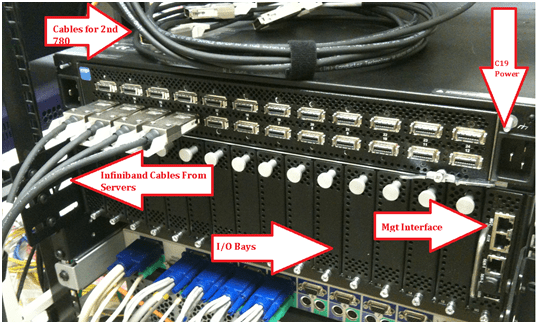
Physical Server Front..
Physical Server Rear (Look Mom No Cables!!) – It’s Pretty Sweet that 2 Cables can do so much

Still to do…
- Install Vmware on site 1 and 2 cluster with Xsigo Drivers
- Install 2nd Xsigo into rack
- Copy vCenter Server & other VM’s from Production to this test environment
- Test, Test, Test and more testing..
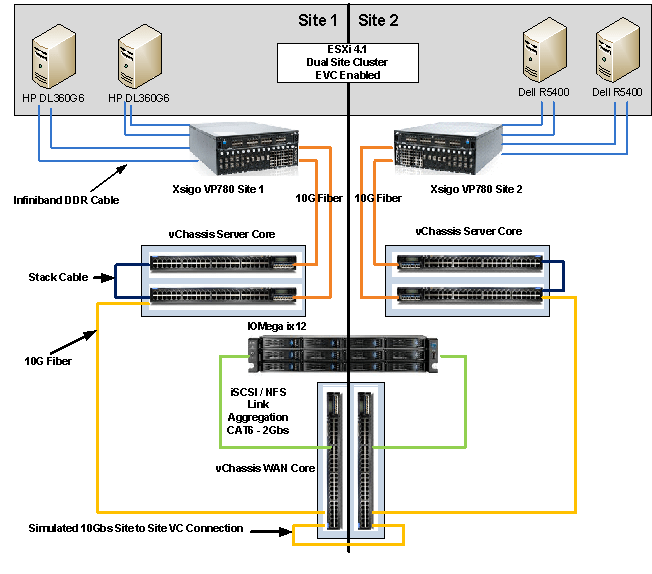
Test Lab – The Plan and Layout with Xsigo, juniper, IOMega, vmware, and HP/Dell servers)
This week I have the pleasure of setting up a pretty cool test lab with Xsigo, juniper, IOMega, vmware, and HP/Dell servers.
I’ll be posting up some more information as the days go on…
The idea and approval for the lab came up pretty quickly and we are still defining all the goals we’d like to accomplish.
I’m sure with time the list will grow, however here are the initial goals we laid out.
Goals…
-
Network Goals
- Deploy the vChissis solution by Juniper (Server Core and WAN Core)
- Deploy OSPF Routing (particularly between sites)
- Multicast Testing
- Layer 2 test for vm’s
- throughput Monitoring
-
VMware Goals
- Test EVC from Old Dell QuadCores Servers to new HP Nehalem
- Test Long Distance vMotion & long distance cluster failures from Site1 to Site 2
- Play around with ESXi 4.1
-
Xsigo Goals
- Test Redundant Controller failover with vmware
- Throughput between sites, servers, and storage
Caveats…
- We don’t have a dual storage devices to test SAN replication, however the IOMega will be “spanned” across the metro core
- Even though this is a “Site to Site” design, this is a lab and all equipment is in the same site
- The Simulated 10Gbs Site to Site vChassis Connection is merely a 10Gbs fibre cable (We are working on simulating latency)
- Xsigo recommends 2 controllers per site and DOES NOT recommend this setup for a production enviroment, however this is a test lab — not production.
The Hardware..
2 x Xsigo VP780’s with Dual 10Gbs Modules, All Server hardware will be Dual Connected
2 x HP DL360 G6, Single Quad Core Nehalem , 24GB RAM, Infinband DDR HBA, gNic’s for Mgt (Really not needed but nice to have)
2 x Dell Precision Workstation R5400, Dual QuadCore, 16GB RAM, Infiniband DDR HBA, gNic’s for Mgt (Really not needed but nice to have)
6 x Juniper EX4200’s (using Virtual Chassis and Interconnect Stacking Cables)
Using BGInfo to help determine VM Guest partition alignment (Starting offset and allocation unit size)
We use BGInfo quite a bit to help us with basic VM guest information (IP Address, name, HD Space, etc)
Today I was thinking about the partition alignment (Starting offset and allocation unit size) on my Windows guests and wondered about their alignment.
There are programs made for this, some are quite good, but it wouldn’t be more convenient to have it come up with BGinfo?
I thought it would be especially handy because we have multiple templates some are aligned differently, and I could use this as a double check to those programs which correct this issue.
By adding the Starting Offset and volume block size(aka allocation unit size) to our BGinfo.bat file we can now see how are VM guest partitions are aligned!
From this screenshot we see 3 Volumes..
C: has a 32K Offset / 4K Allocation | D: 64K offset / 32K Allocation | E: 64K offset / 4K Allocation
The only volume that is optimal is our D: volume, the rest need some work…

Want to know more about alignment?
Go here >> http://www.vmware.com/pdf/esx3_partition_align.pdf and here >> http://www.vmware.com/pdf/Perf_Best_Practices_vSphere4.0.pdf
Here’s how to setup BGInfo…
- Download BGInfo from sysinsterals
- Create your *.bgi file (this file contains all the fields you want displayed, see below for the offset)
- Create a simple batch file to launch your *.bgi file on logon
- @echo off
- cd\
- CALL “C:\Files\bginfo.exe” “C:\Files\YOUR.bgi” /timer:0 /nolicprompt
-
Place all the files in a simple folder like c:\Files
-
Files Needed
- Bginfo.exe
- YOUR.bgi
- Startbgi.bat
-
- In Windows 2003 – Copy Startbgi.bat into “c:\Documents and Settings\All Users\Start Menu\Programs\Startup”
Every time you logon to the server, bginfo will launch and update your background with useful information..
Once you have created your basic *bgi file, then it’s time to add the WMI Query for Starting Offset and volume block size(aka allocation unit size)
- In BGInfo click on Custom, then New, Enter a name under Identifier, Choose WMI Query, then click on Browse
- Under WMI Class Choose Win32_DiskPatition and under Class Property choose StartingOffset
- Save it up and add it to your *.bgi file
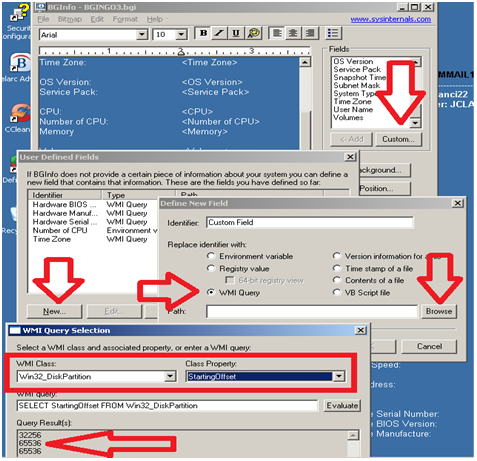
Follow the same steps as above only this time…
Under WMI Class Choose Win32_Volume and under Class Property choose BlockSize (aka allocation unit size)

I hope this works for you as well as it did for me!
Enjoy!
Matt..
Veeam’s Gift to VCPs, vExperts, and VCIs
Thanks Veeam!!
From their website…
Today Veeam issued a press release about their vHoliday Gift. In the release, they say that their vHoliday gift is to offer NFR (not for resale) licenses of their most popular products to VMware Certified Professionals (VCP), vExperts, and VMware Certified Instructors (VCI).
These individuals can receive Veeam Backup & Replication™ v5 with vPower™ for non-production use in their home labs. Any vExpert, VCP or VCI can receive a free two-CPU socket software license for evaluation, demonstration and training purposes. The offer also includes the Veeam ONE™ Solution for VMware management with Veeam Monitor™, Veeam Reporter™ and Veeam Business View™.
If you are a VCP, vExpert, or VCI, you can find out how to register for your license keys in the Veeam Holiday Gift PR.
Working with the IOMega ix12-300r
I installed an IOMega ix12-300r for our ESX test lab and I must say it’s just as feature rich as my personal ix4 and ix2.
I enjoy working with this device for its simplicity and feature depth. It’s very easy to deploy and it’s a snap to integrate with ESX.
Here are some of the things I like about ix12 and a high level overview to enable it with esx.
Note: Keep in mind most of the
features below are available on the ix2 and ix4 line but not all..
See http://iomega.com/nas/us-nas-comp.html for more information about the ix line and their features…
The Drives…
Our ix12 (the ix## is the amount of possible drives in the unit, ie ix2 = 2 drives, ix4 = 4drives) is populated with 8 x 1TB drives.
By default the 8TB unit will come with 4 x 2TB drives, I opted to buy a 4TB unit and expand it by 4TB, giving us the 8 x 1TB drives.
The drives are Seagate Barracuda Green SATA 3Gb/s 1TB Hard Drive – ST31000520AS – SATA II (Rev 2.6 Drives) 5.9K RPM, they should perform nicely for our environment…
(Buts like most techies, I wish they were faster)
More information here about the drives and SATA 2.6 vs 3.x
http://www.serialata.org/documents/SATA-6-Gbs-The-Path-from-3gbs-to-6gbs.pdf
Storage Pools…
A storage pool is not a new concept but in a device this cost effective it’s unheard of.
Basically, I’m dividing up my 8 drives like this..
Storage Pool 0 (SP0) 4 Drives for basic file shares (CIFS)
Storage Pool 1 (SP1_NFS) 2 drives for ESX NFS Shares only
Storage Pool 2 (SP2_iSCSI) 2 drives dedicated for ESX iSCSI only
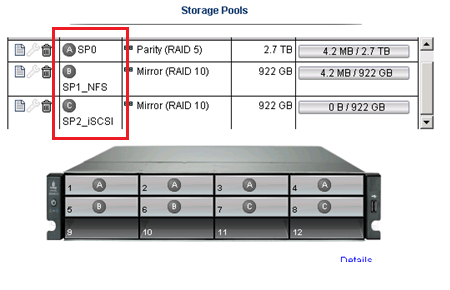
I could have placed all 8 drives into one Storage pool but…
One of our requirements was to have SP0 isolated from SP1 and SP2 for separation reasons…
NO Down time for RAID Expansion… Sweet…
Another great feature is NO down time to expand your RAID5 Set..
Simply edit the Storage pool, Choose your new drive, and click apply.

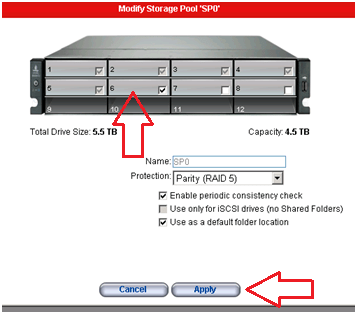
The Raid set will rebuild and you’re all done!
Note: the downside to this… If you decide to remove a drive from a RAID set, you’ll have to rebuild the entire set.
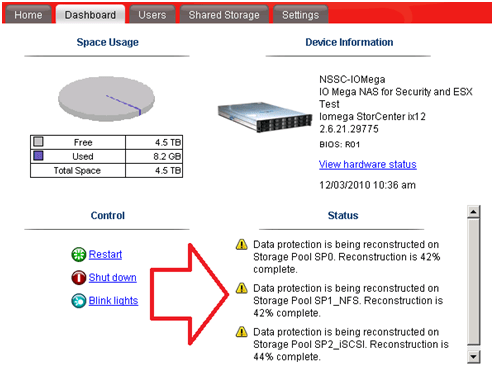
TIP: To check the status of your RAID reconstruction check on the Dashboard under status or the home page at the bottom.
Mine reconstructed the 3 Storage Pools or all 12 drives at the same time in about 4.5 hours…
Teaming your NIC’s!
The ix12 comes with 4 x 1gb NICS, these can be bonded together, stay separate, or a mix of both.
You can setup your bonded NICs as Adaptive Load Balancing, Link Aggregation (LG), or Failover modes.
In our case we bonded NIC 3 and 4 with LG for ESX NFS/iSCSI Traffic and set NIC 1 up for our CIFS traffic.
For the most part setting up the networking is simple and easy to do.
Simply enter your IP’s, choose to bond or not and click apply.

Note: Don’t uncheck DHCP from unused adapters, if you do you’ll get an invalid IP address error when you click apply.
Also, making changes to the network area, usually requires a reboot of the device.. Tip: Setup your Network First..
Adding the NFS Folder to your ESX server
Note: These steps assume you completed the Iomega installation (Enabled iSCSI, NFS, Files shares,etc), networking, and your ESX Environment…
From the ix12 web interface simply add a folder on the correct Storage pool.
In our case I choose the folder name of ESX_NFS and the SP1_NFS storage pool
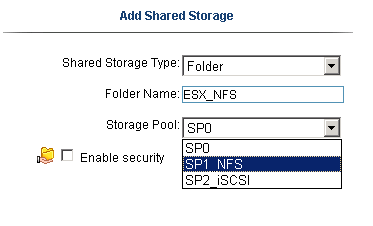
Tip: ALL Folders are broadcasted on all networks and protocols… I haven’t found a way to isolate folders to specific networks or protocols.
If needed make sure your security is enabled… I plan to talk with IOMega about this…
In vCenter Server, Add NAS storage and point it to the ix12.
Note: use /nfs/[folder name] for the folder name…
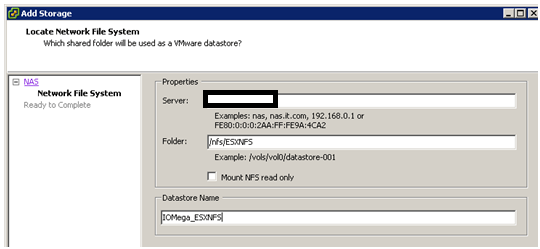
Once it’s connected it will show up as a NFS Data store!

Adding iSCSI to your ESX Server..
Note: This assumes you setup your esx environment to support iSCSI with the ix12…
Add your shared storage as an iSCSI Drive, set your iSCSI Drive name, and Select the correct Storage Pool.
Next is to set the Size of the iSCSI device, in this case we have 922GB free, but can only allocate 921.5GB

After clicking on apply, you should see the information screen…

In vCenter Server ensure you can see the iSCSI drive..

Add the iSCSI disk…
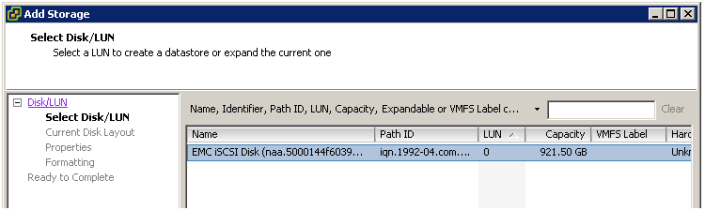
Give this disk a name…

Choose the right block size…

Finally there she is… one 920GB iSCSI disk…

Summary…
From a price vs. performance stand point the IOMega line of NAS devices (ix2, ix4, and our ix12) simply ROCK.
It will be hard to find such a feature rich product that will cost you so little.
This post has merely scratched the features of these devices. It is really hard to believe that 10+ years ago Iomega was known only for ZIP and Jazz Drives…
There new logo is IOMega Kicks NAS, and from what I’ve seen they do!
Follow up posts…
Over the next couple of months I hope to performance test my VM’s against the ix12
I’d like to figure out their protocol multi tendency issue (CIFS, NFS, iSCSI broadcasting over all NICS)
I’ll post of the results as they come in..
VM ESX and ESXi 4.1 Comparison
I’m reposting this for my reference, but I thought you might like it too..
I recommend you go to the link below for the most updated information…
See this URL –
VMware ESX and ESXi 4.1 Comparison
Purpose
This article provides a detailed comparison of VMware ESX and ESXi 4.1. The article is separated into capabilities or features and compared at that level.
Resolution
|
Capability |
VMware ESX |
VMware ESXi |
|
Service Console |
Service Console is a standard Linux environment through which a user has privileged access to the VMware ESX kernel. This Linux-based privileged access allows you to manage your environment by installing agents and drivers and executing scripts and other Linux-environment code. |
VMware ESXi is designed to make the server a computing appliance. Accordingly, VMware ESXi behaves more like firmware than traditional software. VMware has created APIs through which monitoring and management tasks – traditionally done through Service Console agents – can be performed. VMware has provided remote scripting environments such as vCLI and PowerCLI to allow the remote execution of scripts and commands. Tech Support Mode (TSM) provides a command-line interface that can be used by the administrator to troubleshoot and correct abnormal conditions on VMware ESXi hosts. |
|
CLI-Based Configuration |
VMware ESX Service Console has a host CLI through which VMware ESX can be configured. VMware ESX can also be configured using vSphere CLI (vCLI) or vSphere PowerCLI. |
The vSphere CLI (vCLI) is a remote scripting environment that interacts with VMware ESXi hosts to enable host configuration through scripts or specific commands. It replicates nearly all the equivalent COS commands for configuring ESX. VMware vSphere PowerCLI is a robust command-line tool for automathing all aspect of vSphere management, including host, network, storage, virtual machine, guest operating system, and more. Notes:
|
|
Scriptable Installation |
VMware ESX supports scriptable installations through utilities like KickStart. |
VMware ESXi supports scriptable installations using a mechanism similar to Kickstart, and includes the ability to run pre- and post-installation scripts. VMware ESXi also provides support for post installation configuration using PowerCLI- and vCLI-based configuration scripts. |
|
Boot from SAN |
VMware ESX supports boot from SAN. Booting from SAN requires one dedicated LUN per server. |
VMware ESXi may be booted from SAN. This is supported for Fibre Channel SAN, as well as iSCSI and FCoE for certain storage adapters that have been qualified for this capability. Please check the Hardware Compatibility List for supported storage adapters. |
|
Serial Cable Connectivity |
VMware ESX supports interaction through direct-attached serial cable to the VMware ESX host. |
VMware ESXi does not support interaction through direct-attached serial cable to the VMware ESXi host at this time. |
|
SNMP |
VMware ESX supports SNMP. |
VMware ESXi supports SNMP when licensed with vSphere Essentials, vSphere Essential Plus, vSphere Standard, vSphere Advanced, vSphere Enterprise, or vSphere Enterprise Plus. The free vSphere Hypervisor edition does not support SNMP. |
|
Active Directory Integration |
VMware ESX provides native support for Active Directory integration. |
VMware ESXi provides native support for Active Directory integration. |
|
HW Instrumentation |
Service Console agents provide a range of HW instrumentation on VMware ESX. |
VMware ESXi provides HW instrumentation through CIM Providers. Standards-based CIM Providers are distributed with all versions of VMware ESXi. VMware partners include their own proprietary CIM Providers in customized versions of VMware ESXi. These customized versions are available either from VMware’s web site or the partner’s web site, depending on the partner. Remote console applications like Dell DRAC, HP iLO, IBM RSA, and FSC iRMC S2are supported with ESXi. |
|
Software Patches and Updates |
VMware ESX software patches and upgrades behave like traditional Linux based patches and upgrades. The installation of asoftware patch or upgrade may require multiple system boots as the patch or upgrade may have dependencies on previous patches or upgrades. |
VMware ESXi patches and updates behave like firmware patches and updates. Any given patch or update is all-inclusive of previous patches and updates. That is, installing patch version “n” includes all updates included in patch versions n-1, n-2, and so forth. Furthermore, third party components such as OEM CIM providers can be updated independently of the base ESXi component, and vice versa. |
|
vSphere Web Access |
vSphere Web Access is only experimentally supported in VMware ESX. |
VMware ESXi does not support web access at this time. |
|
Licensing |
For licensing information, see the VMware Sphere Editions Comparison. |
For licensing information, see the VMware Sphere Editions Comparison. |
|
Diagnostics and Troubleshooting |
VMware ESX Service Console can be used to issue command that can help diagnose and repair support issues with the server. |
VMware ESXi has several ways to enable support of the product:
|
|
Jumbo Frames |
VMware ESX 4.1 fully supports Jumbo Frames.
|
VMware ESXi 4.1 fully supports Jumbo Frames.
|
Additional Information
- For a comparison of ESX and ESXi 4.0, see VMware ESX and ESXi 4.0 Comparison (1015000).
- For a comparison of ESX and ESXi 3.5, see VMware ESX and ESXi 3.5 Comparison (1006543).
- For a list of new features in vSphere 4.1, see What’s New in VMware vSphere 4.1.
- For a comparison of the different ESX 4.1 editions, see Compare vSphere Editions for Mid-size and Enterprise Businesses.
How to keep up to date on VMware technical information
TIP –
How to keep up to date on VMWARE related blog posts and information?
Simple…
Setup an RSS feed to – Vmware’s Planet V12n
http://www.vmware.com/vmtn/planet/v12n/rss.xml
You’ll have more information then you can handle…
Intel Experimental 48-core Processor
What a server this “could be” << Notice could be is in quotes, I understand this isn’t for us yet…
Imagine your entire Data Center on a just few of these? Who cares if they charge us 10K for one CPU?
With 48 Cores to a socket you would have very dense VM’s per host…
Please give this CPU to the masses…
Read here…
http://www.pcworld.com/article/193745/intel_to_ship_samples_of_experimental_48core_processor.html
http://www.dvhardware.net/article39544.html
http://download.intel.com/pressroom/pdf/rockcreek/SCC_Announcement_JustinRattner.pdf
VMware View 4.5 on NetApp Solution Guide
Repost from http://blogs.netapp.com/virtualstorageguy/ but its worth it!
I’m pleased to announce that NetApp is giving away published copies of our NetApp and VMware View 4.5 Solution Guide! This offer is open to the first 1,000 eligible individuals who have a shipping address in the US or Canada. The View on NetApp book has been extremely popular and now is your chance to scoop one for free! This is the same soft-cover book currently available on Lulu.com for $15.99 plus shipping (USD).
If you are a NetApp customer or partner, run VMware on FAS, vSeries, or IBM N-Series arrays this book is the ‘how-to’ guide for implementing VMware View on NetApp. Below is the book’s description from Lulu.
This book highlights the NetApp best practices in a VMware View 4.5 environment. It focuses on design, architecture, deployment and management of NetApp technologies that allow customers to design and implement space efficient AND high performing AND cost effective virtual desktop solutions without negative trade-offs.
The book runs 82 pages and the authors of book are Chris Gebhardt & Abhinav Joshi, both recognized by VMware as vExperts for 2010!
You can register for your free copy of VMware View 4.5 Solutions Guide here.
 vmexplorer